Lot Number Modification
You can use the Lot No. Modification to rename an existing lot, to post a lot split or lot merge.
A Lot No. Modification can be created from the Yaveon 365 Lot No. Information, Inventory Summary or directly via menu search.
Use the action +New to create a new Lot No. Modification. The number is inserted accordingly to the setup in the Yaveon 365 Lot Management Setup. The posting date is filled with the working date. Depending on the setup in Yaveon 365 Lot Management Setup it is mandatory to enter a Reason Code for the planned change.
Call the action Get lines.
Fill in the fields as desired to display the inventory that should be modified in the lines Lot No. Modification. When calling the Lot No. Modification for example from the Inventory Summary the lines are prefilled and must not be calculated.
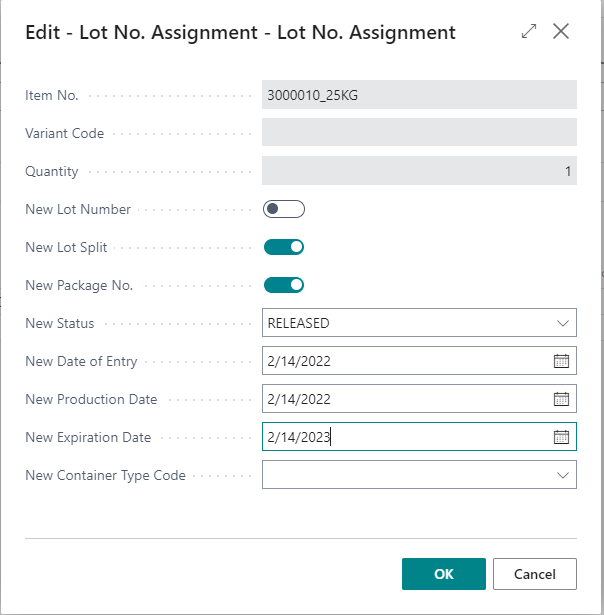
Call the action Lot No. Assignment in the line, to assign a new lot number, a lot split number or a new package number. You can also enter new lot information in the fields New Status, New Date of Entry and so on. If you want to do a lot merge please enter an existing lot number in the field new lot number of the line.
- Enter the quantity you want to post in the field Qty. to Handle. Then post the lot split, merge or creation of a new lot using the action Post.
The new lot (split) number is determined as follows:
When the new lot number is entered in the line, it is noted internally and an entry is created in the table PB365 LM Lot Split Number (5517651). The line is given the Type = Last number.
If the line or the document is deleted, an entry with the Type = Free number is created.
If another line or a new document is created, a free number is assigned if available. Otherwise, a new number is determined on the basis of the last number.
Note
If no changes were entered in a line, this line must be deleted before posting. Otherwise, an error message will be displayed when posting. This concerns e.g. lines that refer to the original lot that is not to be changed in the context of a lot merge.
Note
Features that are linked on one of the original lots are generally deleted when you make a posting. If features are to be assigned to the new or merged lot, this must then be done manually or via an inspection order (inventory testing).
Exception: For a Lot No. Modification with several lines that refer to the same source lot (same Item No., Variant Code and Lot No.) and that are converted into the same new target lot number that does not yet exist in the system, the features of the source lot are transferred to the new lot. If the target lot number already exists or if different source lots are merged, the features are deleted as before.
Note
Package No. Information records are not created by assigning numbers from the package no. number series. The record must be created by the user before posting.
Note
If a lot is given a new status marked as QP Release Register relevant, an entry is automatically created in the QP Release Register.