Replace Document Field
The CD Field Configuration allows you to replace fields that are already printed on a Corporate Design document with a different field — without any custom development. The replacement works by adding a new setup line at the same Section and Position as the existing field. The new setup line overrides what is printed at that position.
There are two forms of replacement:
- Same-table field swap — a field from the document table is replaced by a different field from the same table. Only one new setup line is needed.
- Related-table value replacement — a code field is replaced by a descriptive value from a linked table (for example, showing the Shipment Method Description instead of the Shipment Method Code). Two setup lines at the same Position are needed: the first references the code field and establishes the table relation; the second references the description field from the linked table and provides the value that is actually printed.
The following examples demonstrate both forms.
Example 1: Replace Shipment Date with Planned Delivery Date in Order Confirmation Line
This example shows how to replace the Shipment Date column in the line section of the order confirmation with the Planned Delivery Date. Both fields belong to the Sales Line table, so only one setup line is needed.
Open the CD Field Configuration and filter on CD Report ID 5517504 (order confirmation) and on Section Line. Locate the existing setup line for the Shipment Date at the position you want to replace, or add a new line at the same position. Fill in the fields as follows:
- CD Report ID 5517504 — limits this setup line to the order confirmation report.
- CD Layout ID 2000 — applies the replacement only to the custom layout with this ID. Leave empty to apply to all layouts.
- Source Type Table — the data is read directly from a database table.
- Source No. 37 — table 37 is the Sales Line table, which contains the line-level data of a sales order.
- Type Field — a standard table field is printed.
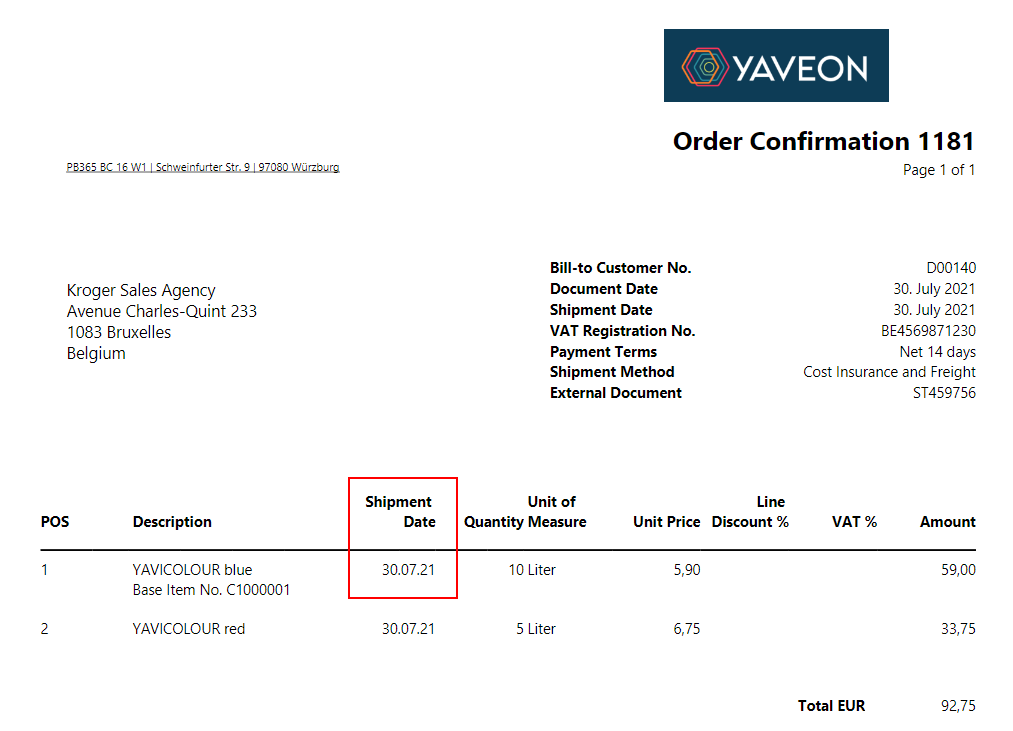
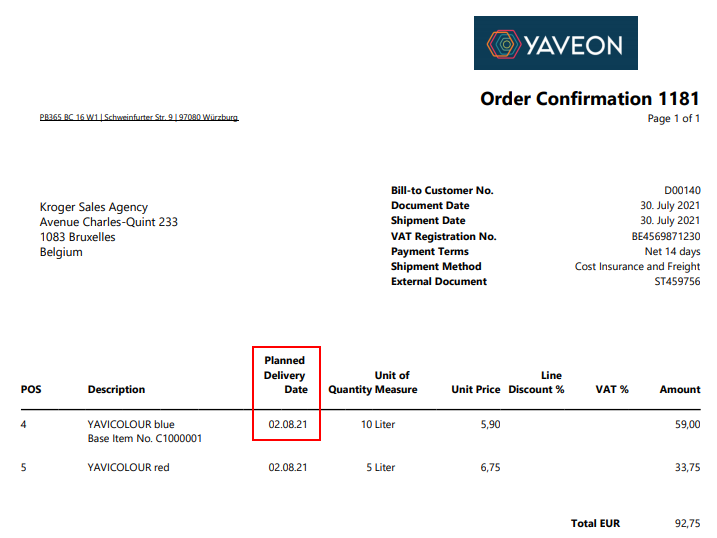
- Field No. 5794 — field 5794 in the Sales Line table is the Planned Delivery Date field. This replaces the previous field 10 (Shipment Date) at this position.
- Section Line — the field is placed in the line section.
- Position 6 — must match the position of the existing Shipment Date column in the line section layout.
- Output Type 7 — defines the total number of columns in the line section. Must match the Output Type used on all other setup lines for this section and report.
- Use as Caption Yes — the label of this setup line is used as the column header.
- Label Planned Delivery Date — the new column header text printed above the date values.
- Label Font Style Bold — the column header is printed in bold.
The following is the before/after comparison:
Before:

After:

Example 2: Replace Shipment Method Code with Shipment Method Description in Order Confirmation Header
By default, the order confirmation prints the Shipment Method Code (for example, EXW) in the header. This example replaces it with the human-readable Description from the Shipment Method table (for example, Ex Works).
This is a related-table value replacement and requires two setup lines at the same Position. Open the CD Field Configuration, filter on CD Report ID 5517504 (order confirmation) and Section Header, then add the two lines described below.
Setup line 1: Shipment Method Code (establishes the table relation)
- CD Report ID 5517504 — limits this setup line to the order confirmation report.
- Source Type Table — the data is read directly from a database table.
- Source No. 36 — table 36 is the Sales Header table, which contains the document-level fields of a sales order.
- Type Field — a standard table field is printed.
- Field No. 27 — field 27 in the Sales Header table is the Shipment Method Code field. When this field is selected, the system automatically fills in the Source Table Relation Type (Table) and the Source Table Relation (10 — Shipment Method), because field 27 has a defined table relation to table 10.
- Section Header
- Position 5 — defines where in the header this field appears. Both setup lines must use the same position.
- Label Shipment Method — the label printed next to the value.
- Label Font Style Bold
Setup line 2: Shipment Method Description (replaces the code with the description)
- CD Report ID 5517504
- Source Type Table
- Source No. 10 — table 10 is the Shipment Method table, linked from setup line 1 via the table relation on field 27.
- Type Field
- Field No. 2 — field 2 in the Shipment Method table is the Description field.
- Section Header
- Position 5 — same position as setup line 1. The system uses the matching position and table relation to resolve the description from the linked record and print it instead of the code.
After saving both setup lines, the header of the order confirmation prints Ex Works instead of EXW at position 5.