Overview over the mobile pages and their parameters
The following mobile dialogs are included in the app Yaveon 365 Warehouse Management. The behavior of the mobile dialog can be influenced via the respective parameters:
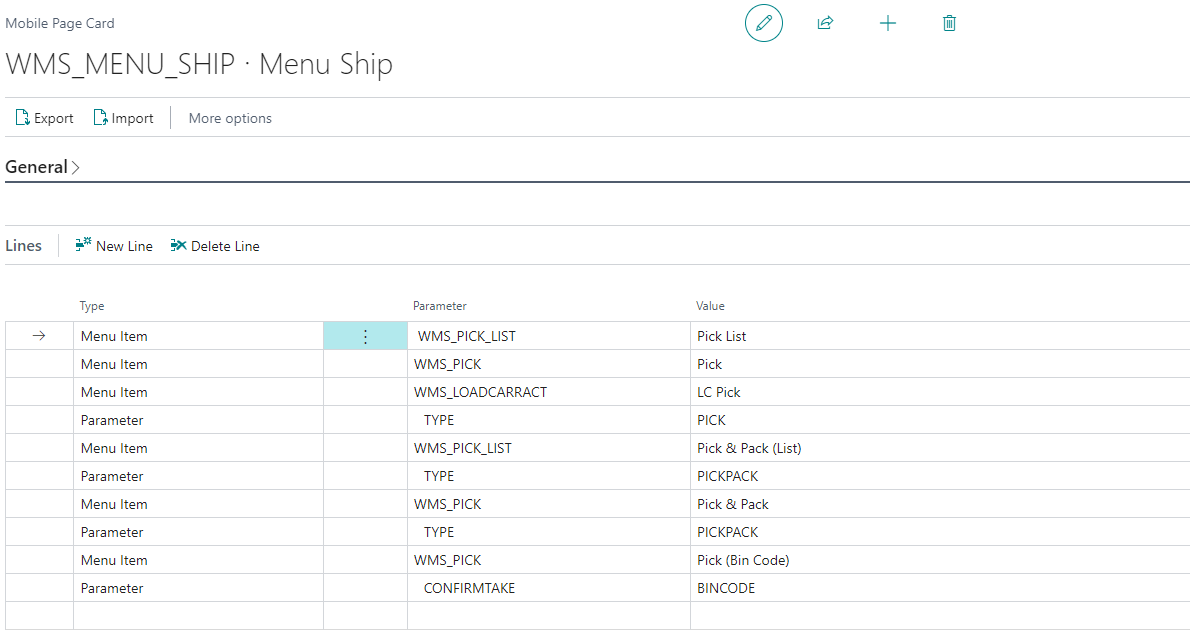
| Codeunit ID | Mobile Page Code | Parameter | Value | Description |
|---|---|---|---|---|
| 5518358 | WMS_BINCONTENT | With the scan of the bin label, the existing inventory is displayed | ||
| 5518368 | WMS_MOVEMENT | Mobile dialog for processing warehouse movements | ||
| CONFIRMTAKE | BINCODE | After entering the bin code, the dialog jumps directly to the entry of the quantity (i.e. entry/identification of Item lot barcode is omitted) | ||
| 5518371 | WMS_MVMT_LIST | List of warehouse movements available for the location and warehouse employee | ||
| 5518355 | WMS_PICK | Pick dialog | ||
| TYPE | PICKPACK | Pick & Pack (assignment of picking positions to shipping units) | ||
| CONFIRMTAKE | BINCODE | After entering the bin code, the dialog jumps directly to the entry of the quantity (i.e. entry/identification of Item lot barcode is omitted) | ||
| 5518354 | WMS_PICK_LIST | List of available picks for the location and warehouse employee | ||
| TYPE | PICKPACK | Pick & Pack (assignment of picking positions to shipping units) | ||
| 5518365 | WMS_PROD_PROV | Mobile dialog for processing provisioning | ||
| CONFIRMTAKE | BINCODE | In the dialog, after entering the bin code, the system jumps directly to entering the quantity (i.e. entry/identification of Item lot barcode is omitted) | ||
| 5518363 | WMS_PUTAWAY | Mobile dialog for processing Put-Aways | ||
| Type | POSITION NO. | Put-Away with selection of the position to be put away | ||
| 5518362 | WMS_PUTAWAY_List | List of Put-Aways available for the location and warehouse employee | ||
| 5518380 | WMS_ITEMTRACK | Mobile dialog to display item tracking info for a scanned item lot barcode | ||
| 5518375 | WMS_LC_ACTIVITY_LIST | List of load carrier activities available for the location | ||
| PILOTCODE | Pilotcode | The list can be filtered to only show load carrier activities for the pilot code | ||
| 5518353 | WMS_LC_ACTIV_PILOT | Overview of the mobile pilot codes and display of the load carrier activities per pilot code | ||
| 5518376 | WMS_LOADCARRACT | Mobile dialog for registering load carrier activities | ||
| TYPE | PUTAWAY | Only load carrier activities from the source document "Put-Away" can be processed | ||
| TYPE | PICK | Only load carrier activities from the source document "Pick" can be processed | ||
| TYPE | MOVEMENT | Only load carrier activities from the source document "Warehouse Movement" can be processed | ||
| TYPE | INTERNALPUTAWAY | Only load carrier activities that were created from an internal put-away can be processed | ||
| 5518372 | WMS_LOADCARR_CARD | Mobile dialog for displaying information about a scanned load carrier | ||
| 5518378 | WMS_BIN_MVMT | Mobile dialog for manual movements | ||
| TYPE | Load Carrier | Transfer of complete load carrier | ||
| TYPE | PARTIAL QUANTITY | Transfer of a partial quantity | ||
| 5518382 | WMS_PHYSINV | Mobile Dialog for physical inventory | ||
| 5518383 | WMS_PHYSINV_LIST | List of Yaveon 365 Phys. Inventory orders | ||
| 5518352 | WMS_PROD_PROV_LIST | List of available provisionings for the location and warehouse employee |