Inventory Summary
ProBatch 365 provides you with a clear list of all Item Ledger Entries, Warehouse Entries and Item Tracking Information.
The Inventory Summary is a combination of item lots, bin items and item tracking information. In addition to that the Inventory Summary shows the following important information, which is partially only available if additional apps are installed:
- Item No.
- Basic Item Number
- Lot No.
- Location Code, Bin Code, Zone Code
- Quantity (base), Base Unit Code
- Storage Quantity, Storage Unit Code
- Load carrier type, Load carrier No. (provided byProBatch 365 Warehouseapp)
- Status, Production Date (provided via the ProBatch 365 Lot Managementapp)
- Expiration Date
- and others
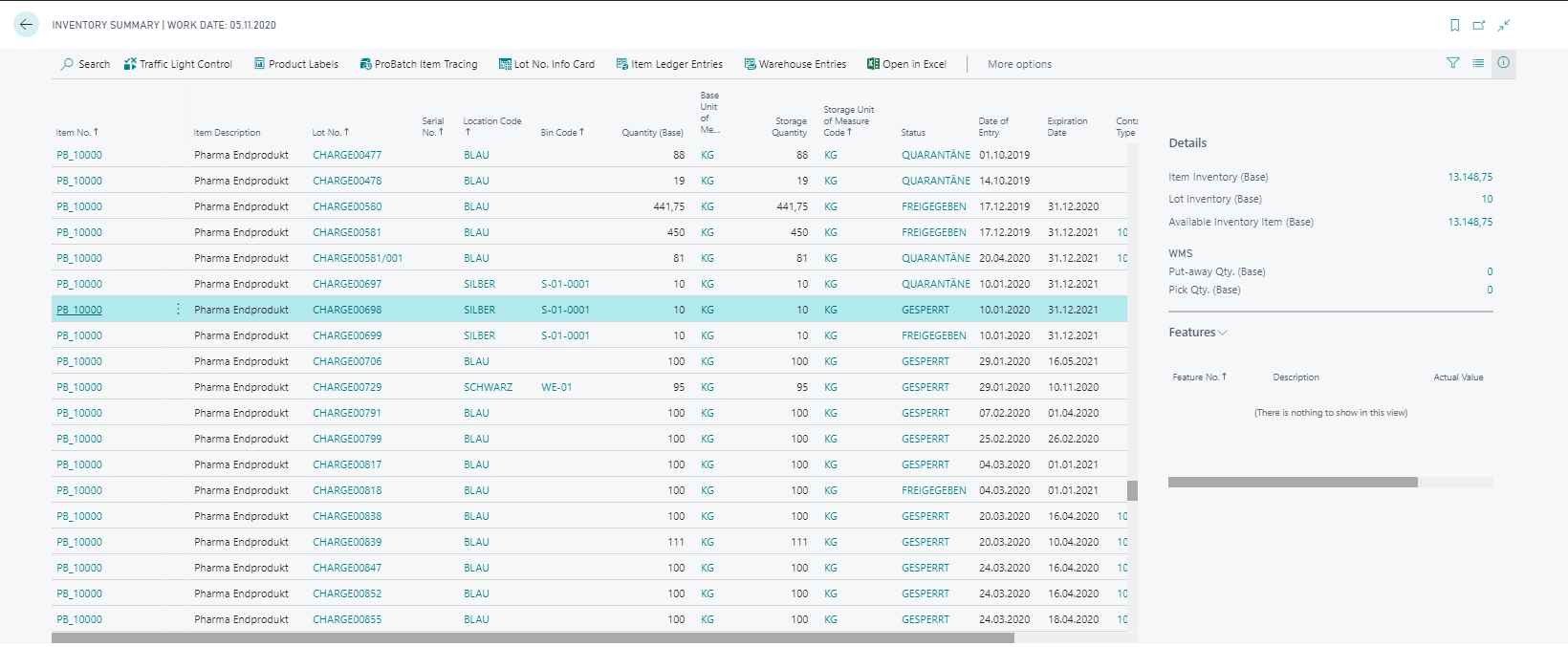
Moreover, the Info Box Features displays the features and their actual value assigned to the individual lots or serial numbers. This functionality requires installation of the ProBatch 365 Lot Management app.
Depending on which line your cursor is currently in, the Info box Details displays additional inventory information for the selected record.
Display of Item Tracking Data
Whether item tracking data are displayed in the Inventory Summary depends on the settings of the Item Tracking Code of the Item. The settings on the Item Tracking Card define in which company areas item tracking information will be handled. If Lot Warehouse Tracking or SN Warehouse Tracking is not activated, the item tracking information (Lot No., Serial No., Expiration Date, Status,...) will not be displayed in the Inventory Summary. Locations without logistic make an exception.