Reason Code for Item Tracking Modifications
Reason code for manual postings of Lot No. Modifications, Lot No. Information Modifications and Serial No. Information Modifications
The field Change Reason necessary on the page ProBatch 365 Lot Management Setup controls which lot modification types require a reason code.
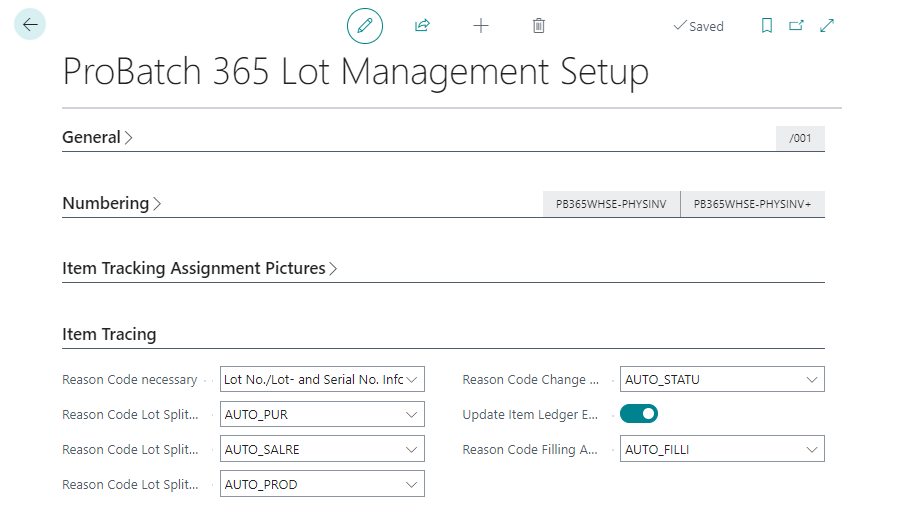
You can select:
- Lot No. Modification
- Lot /Serial No. Information Modification
- Lot No. Modification, Lot- and Serial No. Information Modification
Therefore you have the possibility to enter a reason code for the planned change that is to be posted in the header of the pages Lot No. Modifcation, Lot No. Information Modification and Serial No. Information Modification.
The reason code of a posted change is available on PB365 Item Tracing and makes the posted changes of an item tracking transparent.
Default values for automated item tracking modifications
Since changes to the lot or serial number can be made not only manually but also automatically, a predefined reason code is to be stored here as well. So automatically and manually created postings can be defined via reason code.
The following processes of automatical data changes can be setup to be posted with default reason code values:
- Lot split purchase receipt
- Lot split sales return shipment
- Lot split production
- Status change inspection order
- Reason Code Filling Assignment