Country-specific VAT ID, Account Assignment and tax-rate determination
The Necessity of a VAT Registration Number
Due to European Tax Law it is necessary to print the Value Added Tax Registration Number (VAT-ID) of the customer on certain Sales Documents. This is mandatory for Sales Invoices and Credit Memos within the European Union. The VAT Registration Numbers of your company and the customers company number have to be printed. This is necessary for deliveries between business customers from one european country to another.
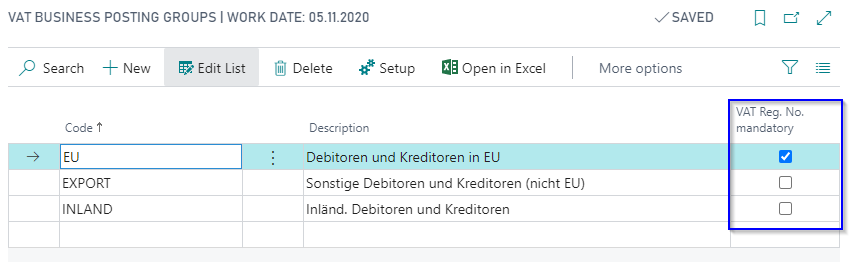
European Business customers have to be assigned a Posting Group with a mandatory VAT Registration Number. When Inserting the Customer No. in a Sales Document, the system checks on the basis of the VAT Business Posting Group whether the VAT Registration Number is mandatory. If this is true the field on the Customer Card has to be filled to create the Sales Document.
To activate the check for an existing VAT Registration Number, you have to mark the flag VAT Reg. No. mandatory for the affected VAT Business Posting Group.
Consideration of country-specific VAT-IDs
Companies might have country-specific VAT Registration Numbers for international trade. The numbers must be printed on purchase and sales invoices due to the actual flow of goods.
In addition, customers and vendors also have several country-specific VAT Registration Numbers, which must also be printed on the documents due to the flow of goods.
In addition, it is necessary to consider the different national tax rates, because for the country-specific VAT Registration Number it is necessary to perform a sales tax registration.
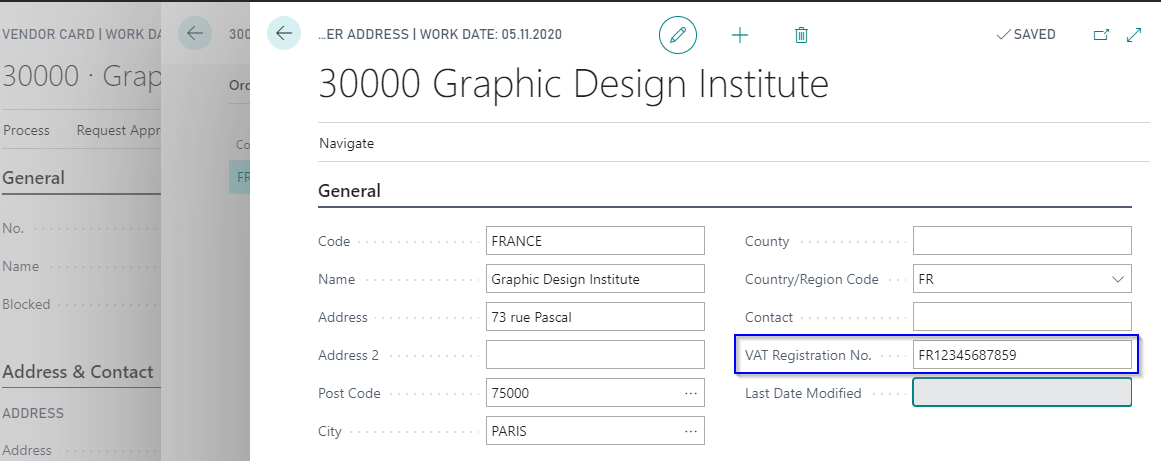
The ProBatch 365 Sales and Purchase App enhances the BC-Standard Account- and Tax-rate determination with the country code to reflect the actual flow of goods. For this the Order Address of the vendor has been enhanced by the VAT Registration No. Here you can enter the country-specific VAT Registration Number.
The field has been added on the Ship-to-Address of the customer as well.
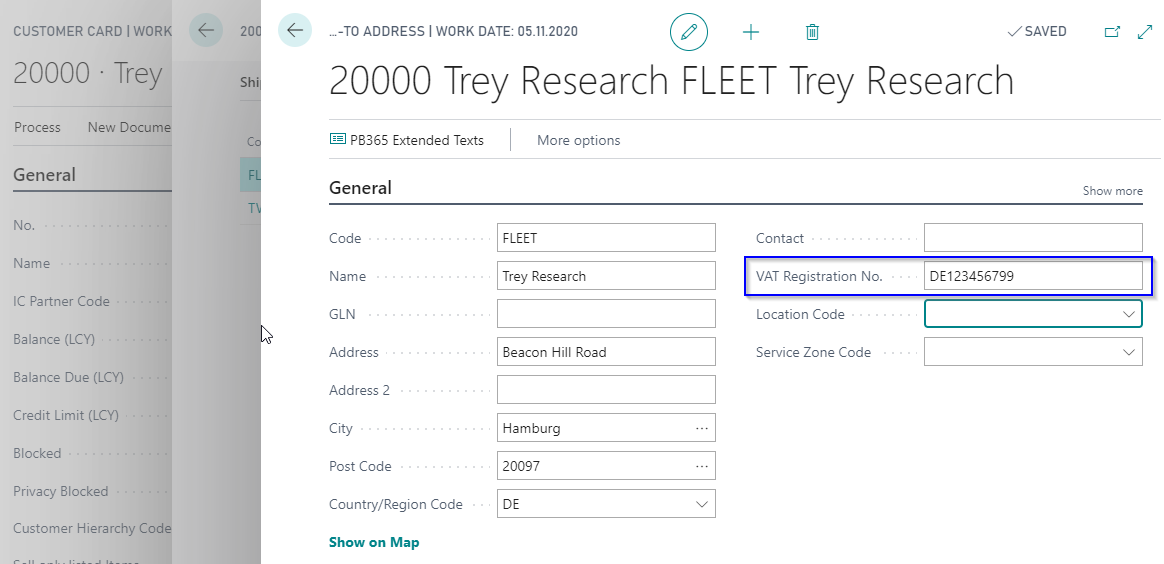
Through this addition you can manage the country-specific VAT Registration Numbers of your vendors and customers.
Note
The country specific VAT IDs are correctly added to all legally necessary documents. Since the Intrastat reporting is part of the country localizations of BC, the enhancement of the intrastat journal is only valid to be used in German localized databases. Please contact your Solution Center for national enhancement of Intrastat.
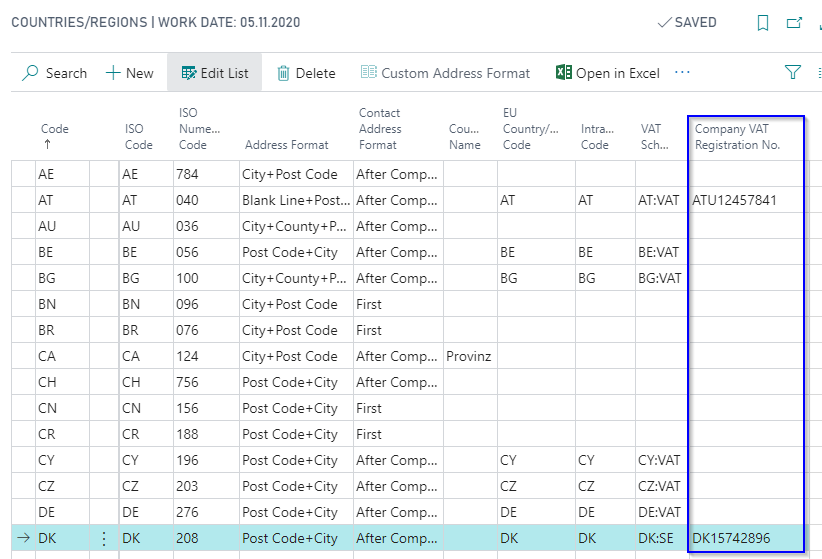
Furthermore, your company itself can own several country-specific VAT Registration numbers. To manage them the table Countries/Regions has been enhanced by the field Company VAT Registration No.
Note
To print the Company VAT Registration No on documents controlled by the Corporate Design functionality, the Replace VAT Reg. No. through Company VAT Reg. No. option must be enabled for the document, see Corporate Design - PB365 Sales and Purchase.
Check and verification of country-specific VAT IDs
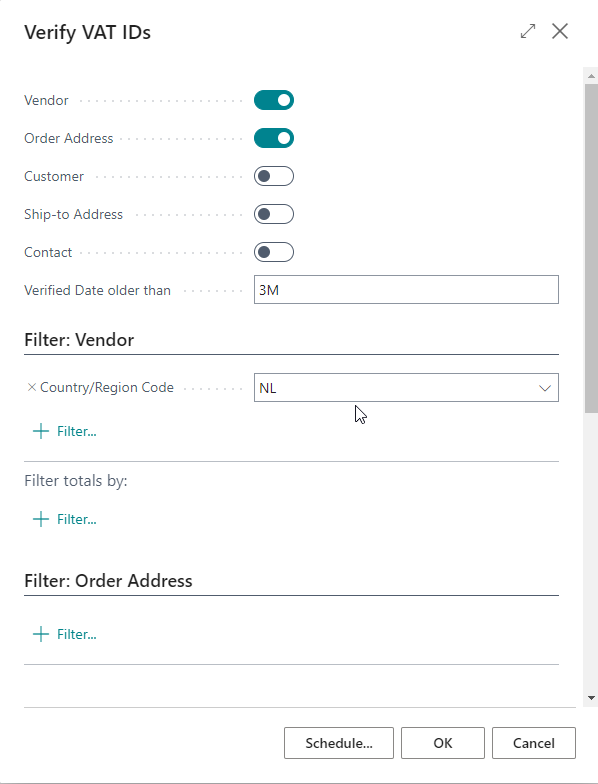
ProBatch 365 Sales and Purchase includes the function Verify VAT-IDs, which gives the user the possibility to check and verify VAT-IDs of multiple customes and vendors, including deviating VAT-IDs which are listed with their ship-to and order addresses, at the same time. The Business Central standard function Verify VAT Registraion No. is performed several times to check multiple VAT IDs. The results can be found in the VAT Registration Log.
The function offers multiple possibilities to filter the data records which are to be checked. Additionally, excluding counterparties, which have been checked within a defined time frame, is an option.
Note
This function is created as a report and designed in to be used in a Job Queue.
Account Assignment of Business Posting Group and VAT Business Posting Group
The Initial Account Assignment and determination of the tax is done due to the VAT Bus. Posting Groups and VAT Prod. Posting Group. Those depend on the customer or vendor and item.
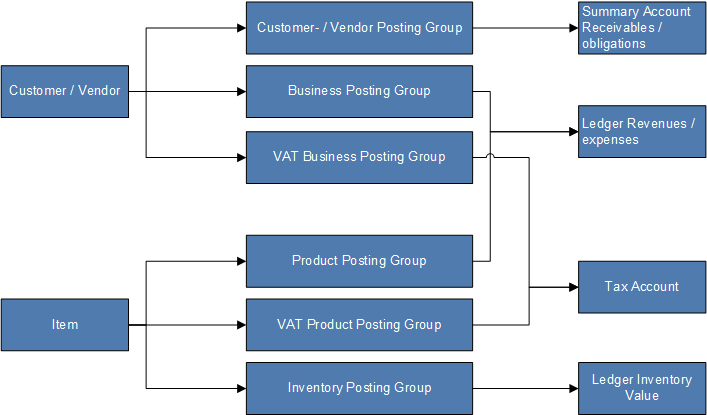
The ProBatch 365 Sales and Purchase App enhances the BC-Standard Account- and Tax-rate determination with the country code to reflect the actual flow of goods.
Crucial for the Account- and Tax-rate determination is the country where a shipment is delivered from and the country where it is finally delivered to. Additionally, the selected shipment method is relevant, for the determination.
To map delivery scenarios, which deviate from the BC-Standard, the Country Posting Grp. Setup can be used.
The function, which determines the Account Assignment and tax rate for Sales and Purchase Documents cycles through the Country Posting Grp. Setup. If it determines a combination of setup fields that fit the delivery scenario it will replace the Gen. Bus. Posting Group and the VAT Bus. Posting Group in the document. As a result, the Account Assignment and tax rate will be changed.
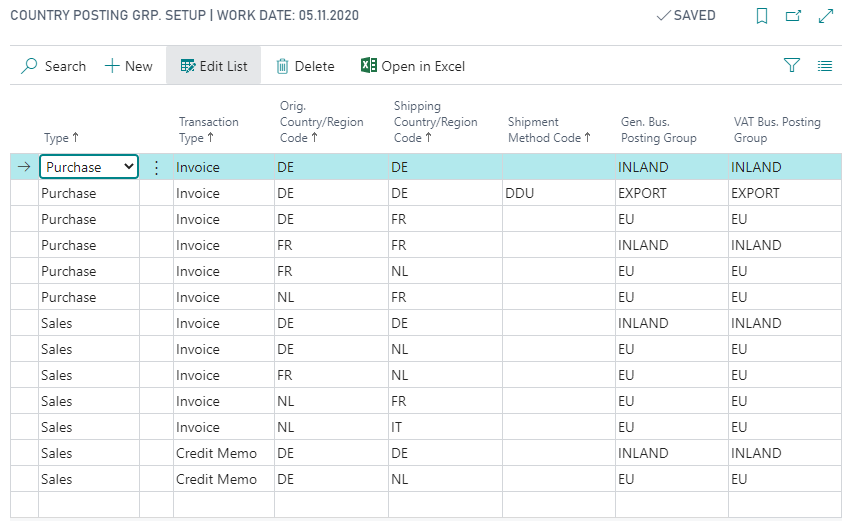
The function cycles through the Country Posting Grp. Setup in two steps:
- First, the function compares the parameters Type, Transaction Type, Country of Dispatch (=Orig. Country), Shipping Country and Shipping Method with the parameters in the document.
- If no result is found it cycles through the Country Posting Grp. Setup again, with the parameters Type, Transaction Type, Country of Dispatch (=Orig. Country), Shipping Country, with the parameter Shipping Method = empty.
If no result is found, the function is canceled and the Gen. Bus. Posting Group and the VAT Bus. Posting Group from the customer and vendor are used.
Note
The special features of business processes with Drop Shipment are not taken into account by the Country Posting Grp. Setup. Additionally company VAT-ID is also restricted to processes without Drop Shipment. Checking the VAT IDs and posting groups is always necessary and especially important for international drop shipment processes.
Note
The column Orig. Country was renamed to Country of Dispatch.
Special case: Miscellaneous Service
If a company provides a service for another company, e.g. third-party production, then there is no flow of goods. Thus, in these cases, the country-specific VAT ID and the country-specific tax rates may not be applied, as the Country Posting Grp. Setup currently does.
To reflect this case, the Miscellaneous Service field is included in the header of all purchase and sales documents. If this field is checked, the Country Posting Grp. Setup will not be used, i.e. the standard BC logic will be used to determine the Gen. Bus. Posting Group and VAT Bus. Posting Group. The determination of the VAT ID and Company VAT ID is also done using the BC standard.
The field can be activated in the document headers as long as no document line is created. Once a document line is created, it is no longer possible to change it. The setup is valid for the whole document. The field setup is transferred to subsequent documents, e.g. from the quotation to the order.
The field is initially deactivated. Exception is the creation of a purchase order from a Subcontracting Worksheet. For these purchase orders, the field is initially activated.
Example: Purchase Process
A German company buys goods of a German vendor from the vendors location in France and ships the goods to the Netherlands.
- Shipment of items from: France (Buy from Country / Region Code)
- Shipping to: Netherlands (Ship to Country / Region Code)
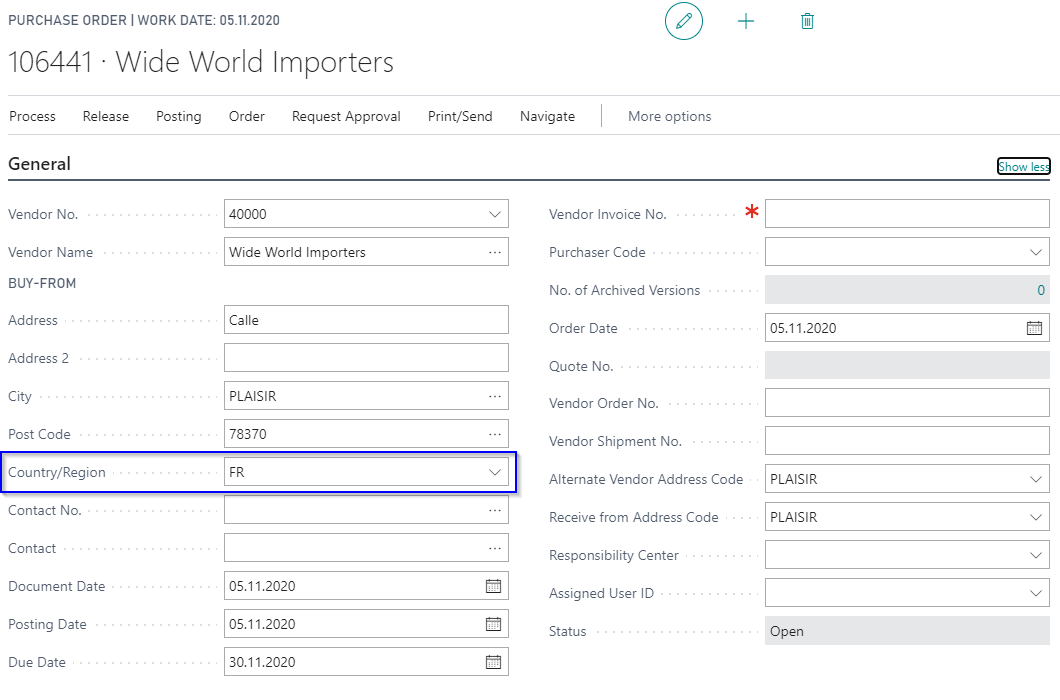
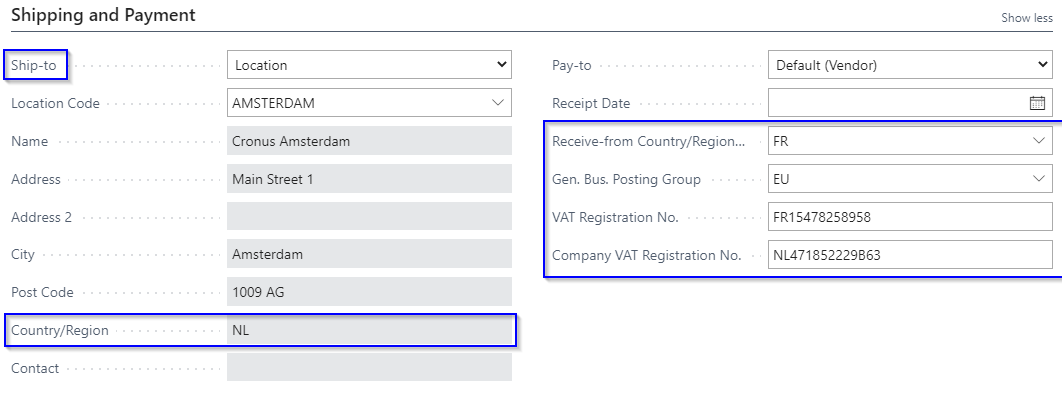
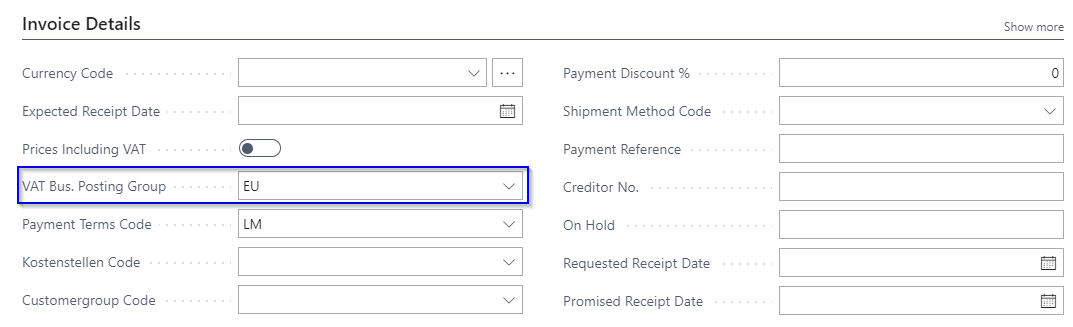
The field Receive-from Country-/Region Code is used for detecting the right posting group. It is inserted when selecting the vendor and modified with the country of the Order Address and Ship-to Address if necessary.
According to the origin and shipping countries the system determines the Gen. Bus. Posting Group and the VAT Bus. Posting Group out of the Country Posting Grp. Setup and inserts them into the document header.
The VAT Registration No. of the vendor Order Address (Buy from) is inserted into the document header and will be printed on the documents.
The Company VAT Registration No. is not copied from the Company Information, but from the Countries/Regions table, due to the Ship to Country/Region Code.
Example: Sales Process
A German company sells goods from a location in the Netherlands to a customer with shipping address in Italy.
- Ship from: Netherlands (Ship from Country / Region Code)
- Shipping to: Italy (Ship to Country / Region Code)
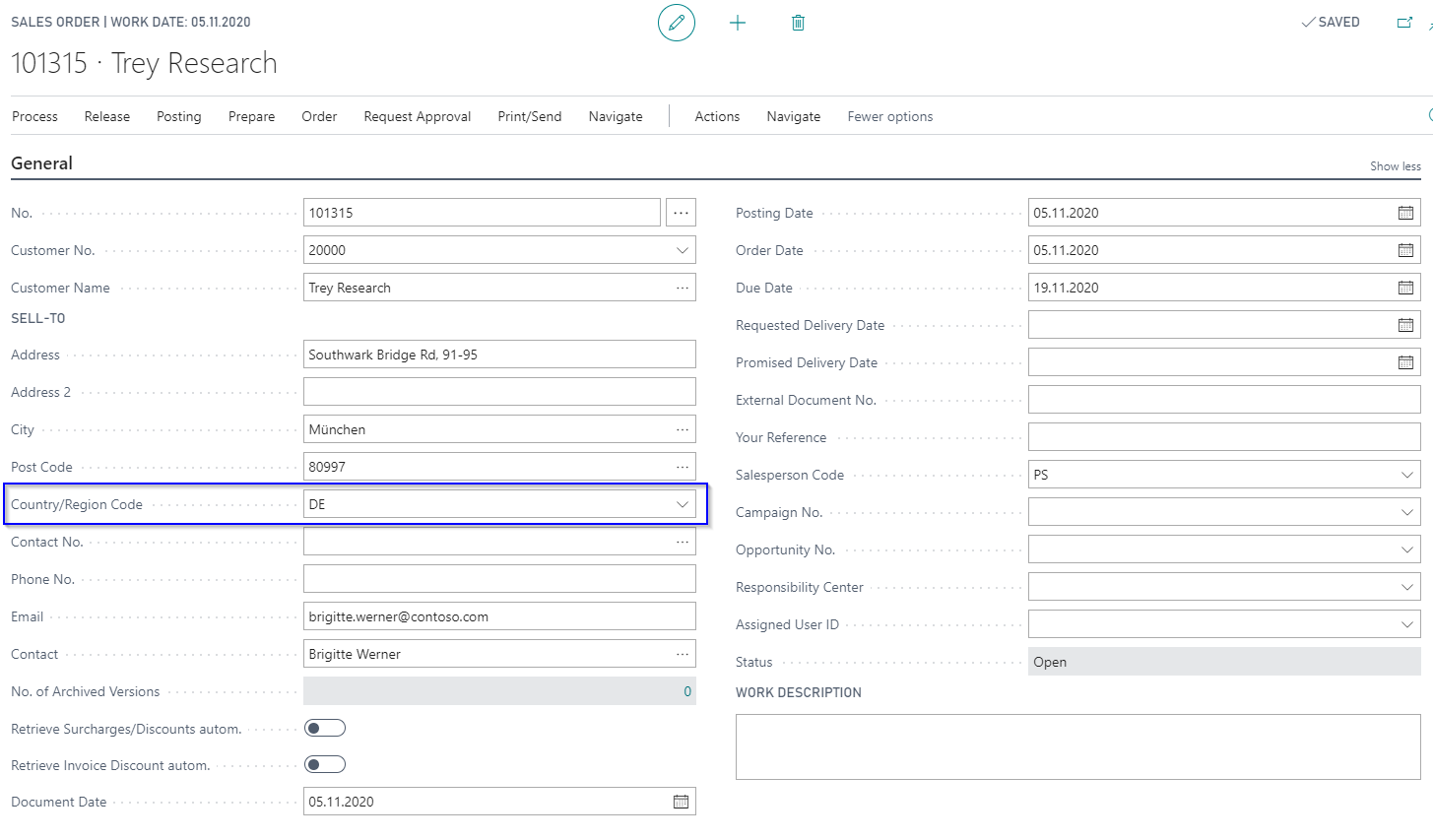
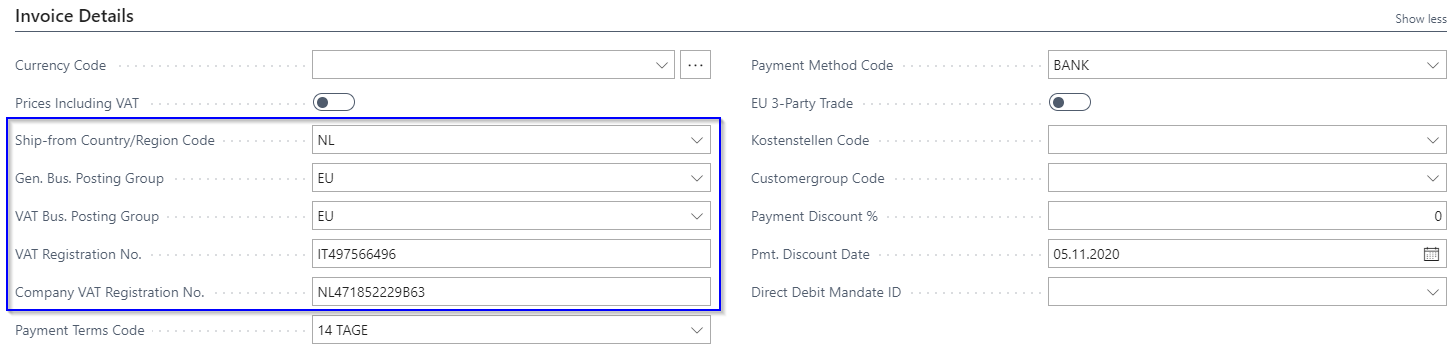
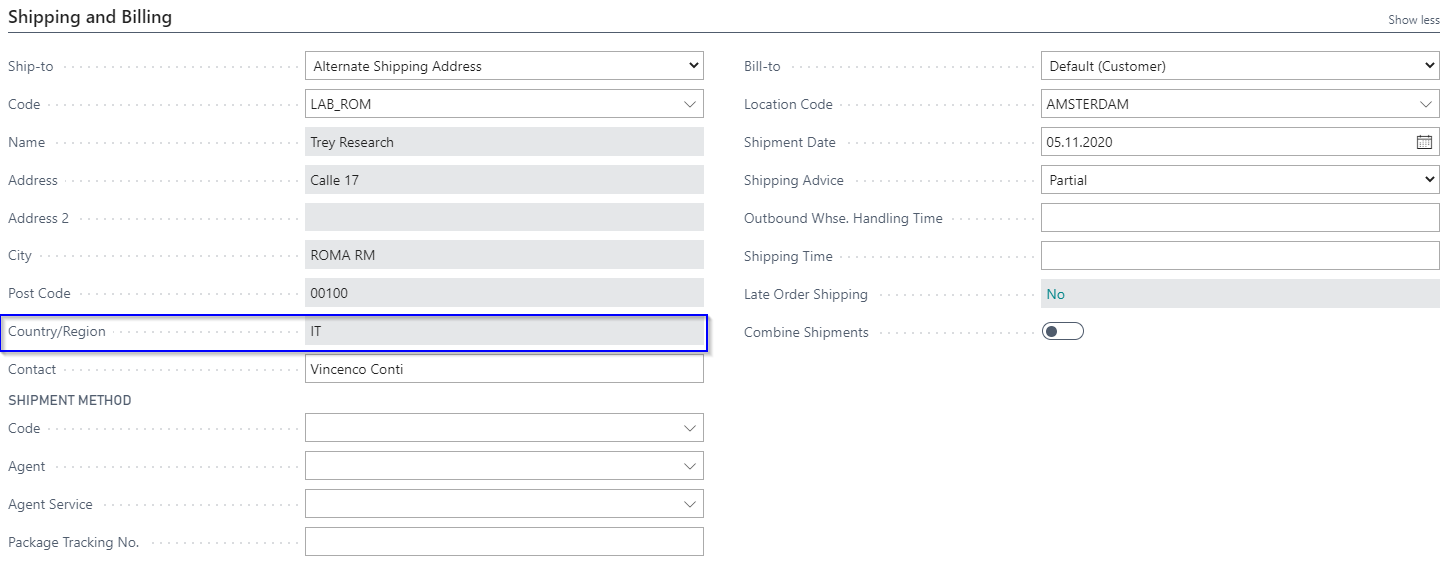
According to the origin and shipping countries the system determines the Gen. Bus. Posting Group and the VAT Bus. Posting Group out of the Country Posting Grp. Setup and inserts them into the document header.
The VAT Registration No. of the customers Ship-to Address is inserted into the document header and will be printed on the documents.
The Company VAT Registration No. is not copied from the Company Information, but from the Countries/Regions table, due to the Ship-form Country/Region Code of the Location.