Create HazMat Material Synonyms
A combination of Customer, Delivery Address, Region Code and Company Code can be defined for an individual product description with the HazMat Material Synonyms. The HazMat Material Synonyms are stored in epos as substance descriptions.
Note
By creating an HazMat Item Material Link a default synonym is automatically created in the background.
To create new HazMat Material Synonyms the following steps are necessary:
- Open HazMat Item Material Link.
- Select the action Synonyms and the HazMat Material Synonyms defined for the selected HazMat Item Material Link will be shown.
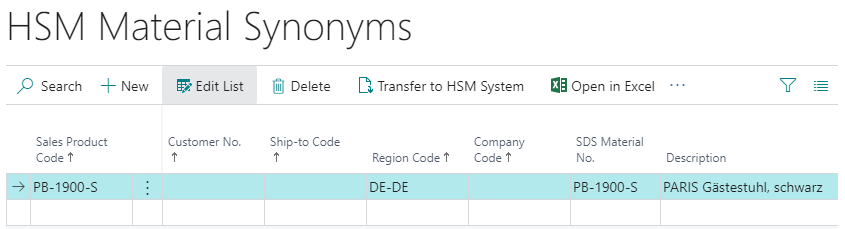
- Select the New action to create a new line. For epos, the fields Sales Product Code and Material No. from the Article Material Link are preassigned and cannot be changed. When using CHEMDOX, the Sales Product Code field is not displayed and instead an Alias ID is automatically assigned in the Alias field. The Region code is predefined with the value from the Default Region Code field in the Yaveon 365 HazMat Connect Setup table.
By creating a new HazMat Material Synonym, a HazMat Task is automatically created in the background for transmission to the Hazardous Substance Management System.