HazMat Transport and Accompanying Document
HazMat Transport
A HazMat Transport can be created manually or automatically.
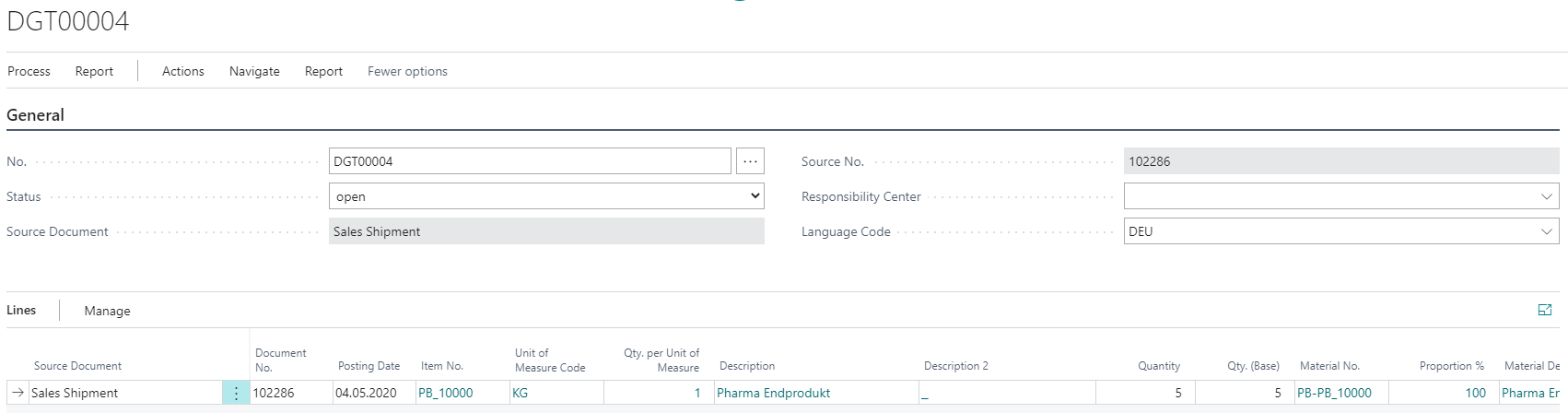
If the HazMat Transport was created for a single source document, the corresponding fields in the document header are filled. It is also possible to combine multiple documents in one HazMat Transport. Using the action Get Rows in the header of the HazMat Transport, you can select any HazMat Shipment Entries for transfer.
The Language Code controls the language of the HazMat Transport Document.
All dangerous goods transports can be stored in the HazMat Transport Archive. Only HazMat Transports with the Status Sent are archived by using the action Archive HazMat Transport. You also have the option of archiving a HazMat Transport with any status. For this purpose, call the action Archive on the HazMat Transport Card.
HazMat Accompanying Document
On the Accompanying Document, all origin documents contained in the HazMat Transport are displayed as individual blocks. All relevant positions are displayed there grouped by UN Numbers. A summary line is created for the block for an origin document. Below the explanations for the respective origin documents, the quantities and dangerous goods points are displayed totaled according to transport category and UN number. Finally, the most restrictive tunnel restriction code is printed out, as well as the footer text for the exemption limit if individual origin documents are below the 1000 points.