Create a HazMat Transport
In order to create the accompanying documents required for the shipment of dangerous goods, a HazMat Transport is necessary. A HazMat Transport can be based on a Sales Shipment, a Return Shipment, or a Transfer Shipment.
Important
Only delivered items that are marked as hazardous material via a HazMat Item Material Link can be transferred to a HazMat Transport. Also note that the HazMat Feature for the UN number needs to have a value. The relevant features are assigned in the HazMat Internal Feature Setup view.
As soon as an outgoing document containing at least one item with dangerous goods is posted, HazMat Shipment Entries are generated.
With the activation of the field Create HazMat Transport automatically in the Yaveon 365 HazMat Connect Setup, a HazMat Transport is generated per Document directly with the relevant lines of the document when you post a Sales Shipment, Return Shipment or Transfer Shipment. Otherwise, you can create a HazMat Shipment manually.
For HazMat Shipment Entries a HazMat Transport can be created:
- Open the HazMat Transports view.
- Use the action New to create a new HazMat Transport. The number can be assigned sequentially from a number series. You can also select the language for the accompanying documents in the HazMat Transport.
- With the action Get Lines any HazMat Shipment Entries can now be selected and transferred to the lines of the HazMat Shipment.
- For a better overview the Status of the HazMat Transport can now be changed to released.
- The HazMat Transport can now be printed via Report and the action Print HazMat Transport.
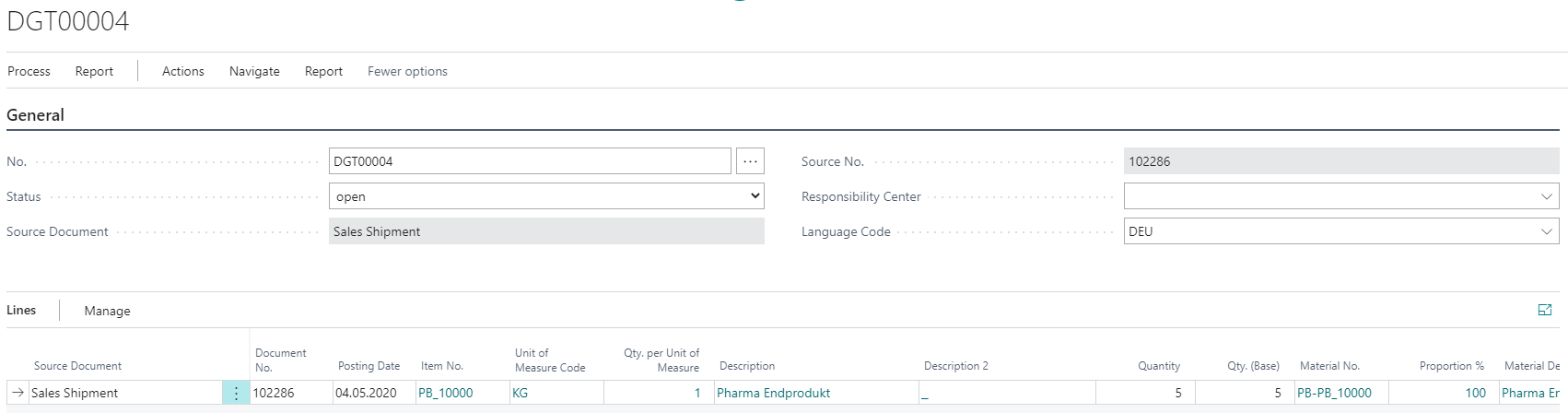
- After the goods have been shipped, the Status of the HazMat Shipment can be changed to sent.
- The action Archive transfers the current HazMat transports to the HazMat Transport Archive. Within the archive it is possible to reprint the transport documents.
Important
The Language Code field enables to translate the transport document into different languages. It is possible to print a footer text exemption limit on the transport document. For this purpose, text can be stored in the Yaveon 365 HazMat Connect Setup via the action Footer Text Exemption Limit. The texts are copied to the document when a HazMat Transport is generated and printed if 1000 ADR points are passed.
Tip
The report for archiving of sent HazMat Transports can also be executed via the Job Queue.