Container Types
A container type provides data to describe a container in more detail.
Note
Since the Returnable Container feature is permanently active from Yaveon 365 13.0 (Business Central 28.0), container types are no longer maintained in a separate table. They are records on the unified Package Types page in the Yaveon 365 Library app — see Package Types. When a Package Type is used in lot management it acts as a container type and the fields described below apply.
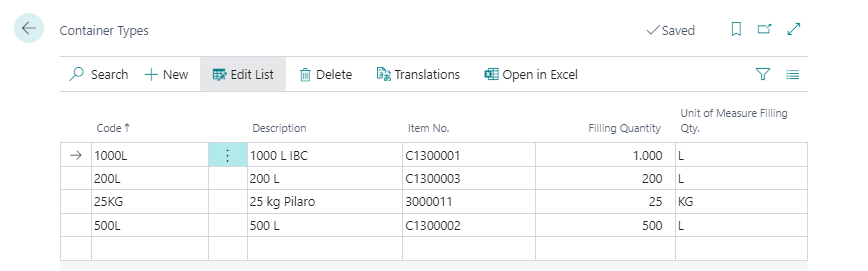
| Field | Description |
|---|---|
| Code | Enter any unique code |
| Description | Description of the container type |
| Item No. | Here you can enter the item number of the container if the container is on inventory. The app Yaveon 365 Manufacturing offers further functions for this. |
| Filling Quantity | Here you specify the possible filling quantity of the container. The app Yaveon 365 Manufacturing offers further functions for this. |
| Unit of Measure Filling Qty. | This field contains the filling quantity unit of measure. |
You can assign a translation to the container types via the Translations menu. This is not currently used in the system and is for information purposes only.
Container Types can be used within miscellaneous functions included into additional apps.
Container types as information for item tracking (Yaveon 365 Lot Management)
Container Type Usage field on the item card determines whether a container type can be assigned to an item tracking information. If the use of the container type is permitted, a container type can be assigned to the batch or container in the associated item tracking line for each receipt posting. This information is transferred to the item ledger entries and thus offers the possibility to view the inventory depending on the container type or to select lots or containers depending on the container type in the case of issues (e.g. sales orders).