Item Tracking Assignment Rules
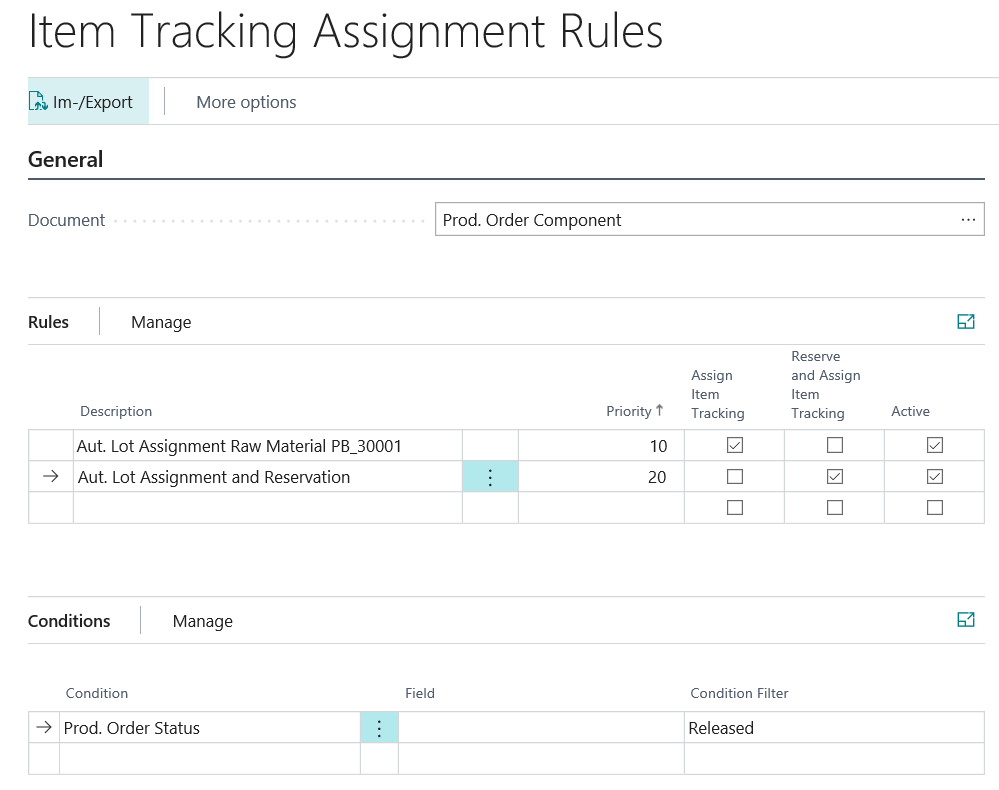
Item tracking assignment rules allow you to define rules that automatically assign item tracking to different document lines. When assigning existing item tracking, your setup of the picking method (FIFO or FEFO) in the item master data or on the item tracking code card is taken into account.
The following document lines have the option of setting up rules:
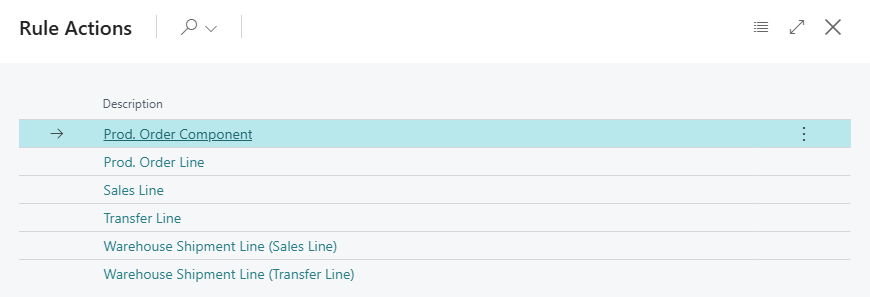
For each document you have different conditions to choose from, with which you can define for which selection either an automatic assignment of the item tracking or an automatic assignment of the item tracking including a reservation is to take place. It is possible to combine several conditions within a rule. In addition, the Priority field can be used to set the order in which your rules are checked. Rules are taken into account starting with the lowest priority, when the field Active is set.
| Document | Conditions |
|---|---|
| Prod. Order Component | Item, Prod. Order Status, Variant Code |
| Prod. Order Line | Item, Prod. Order Status, Variant Code |
| Sales Line | Item, Sell-to Customer, Variant Code |
| Transfer Line | Item, Variant Code, From Location, To Location |
| Warehouse Shipment Line (Sales Line) | Item, Sell-to Customer, Variant Code |
| Warehouse Shipment Line (Transfer Line) | Item, Variant Code, From Location |
Automatic Assignment in the Sales Order Depending on the Location Setup
For sales, two separate rule types apply at different points in time: The Sales Line rule assigns the item tracking directly in the sales order line (when entering the Quantity or when creating the line). The Warehouse Shipment Line (Sales Line) rule assigns the item tracking only when the warehouse shipment line is created.
Whether and where an automatic assignment takes place depends on the location setup:
| Location Setup | Sales Line rule | Warehouse Shipment Line (Sales Line) rule |
|---|---|---|
| Without logistics (neither Require Shipment nor Require Pick) | Automatic assignment in the sales line | – (no warehouse shipment line) |
| Only Require Pick (without Require Shipment) | Automatic assignment in the sales line | - |
| Only Require Shipment (without Require Pick) | Automatic assignment in the sales line | Automatic assignment when the warehouse shipment is created, provided the sales line does not have item tracking yet |
| Require Shipment and Require Pick | Automatic assignment in the sales line | – |
| Directed Put-away and Pick (directed warehouse) | Automatic assignment in the sales line | – |
Note
The Sales Line rule does not check the setup of the location. However, if Bin Mandatory is set at the location and Require Pick is not set, only the inventory in the Bin Code of the sales line is taken into account for the automatic assignment. If Require Shipment is set as well and a Shipment Bin Code is specified, the bin code of the sales line remains empty. In this case, item tracking is assigned neither by the Sales Line rule nor by the Warehouse Shipment Line (Sales Line) rule.
Note
An automatic assignment in the sales line only takes place if the line type = Item, the item has an Item Tracking Code, and it is not a Drop Shipment. For the variant with reservation (Reserve and Assign Item Tracking set), a Shipment Date must also be maintained in the sales line.
Automatic Assignment in the Transfer Order Depending on the Location Setup
For transfers, two separate rule types apply at different points in time: The Transfer Line rule assigns the item tracking directly in the transfer order line (when entering the Quantity or when creating the line). The Warehouse Shipment Line (Transfer Line) rule assigns the item tracking only when the warehouse shipment is created. The assigned lot numbers are automatically transferred to the receipt of the transfer as well.
With the conditions From Location and To Location, you can restrict a rule to specific transfer routes.
Whether and where an automatic assignment takes place depends on the setup of the transfer-from location:
| Setup of the Transfer-from Location | Transfer Line rule | Warehouse Shipment Line (Transfer Line) rule |
|---|---|---|
| Without logistics | Automatic assignment in the transfer line | – (no warehouse shipment line) |
| Only Require Shipment (without Require Pick) | Automatic assignment in the transfer line | Automatic assignment when the warehouse shipment is created |
| Require Shipment and Require Pick | Automatic assignment in the transfer line | no automatic assignment |
Note
If Bin Mandatory is set at the transfer-from location and Require Pick is not set, only the inventory in the Transfer-from Bin Code of the transfer line is taken into account for the automatic assignment.
Note
If the transfer line already has item tracking, e.g. from the Transfer Line rule, no further assignment takes place when the warehouse shipment is created. For the variant with reservation (Reserve and Assign Item Tracking), a Shipment Date must be maintained in the transfer line.
Important
Warehouse shipments from transfer orders are checked exclusively against the document Warehouse Shipment Line (Transfer Line). Rules of the document Warehouse Shipment Line (Sales Line) do not apply to transfers.
Setup Examples
Setup example for an automatic item tracking assignment with and without reservation:
- Priority=10: If a planned or firm planned production order is released or a released production order is created, item tracking is automatically assigned for a prod. order component with the No.=PB_30001. However, no reservation entry is created for the selected inventory because the Reserve and Assign Item Tracking field is not set.
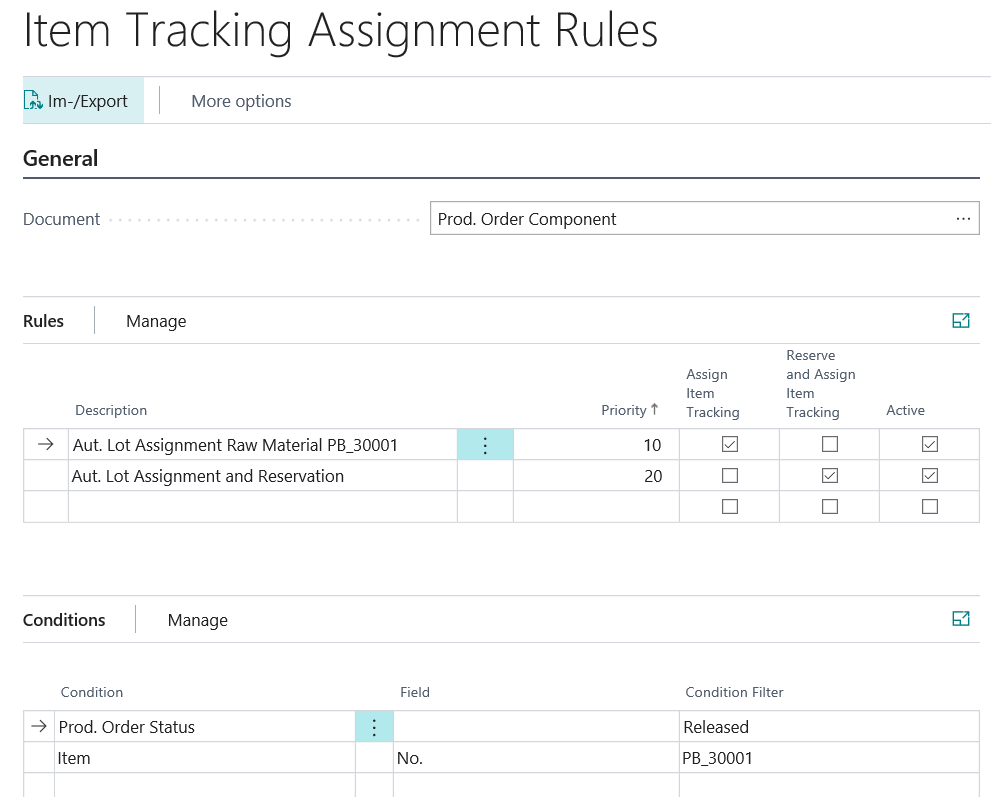
- Priority=20: If a planned or firm planned production order is released or a released production order is created, item tracking is automatically assigned for all prod. order component lines and a reservation entry is created for the selected inventory because the Reserve and Assign Item Tracking field is set. For the item No.=PB_30001, however, due to the previous rule with a lower priority, only the item tracking would be assigned, but no reservation entry would be created.