Yaveon 365 Lot Management Setup
The Yaveon 365 Lot Management Setup allows you to define settings for lot splits, number series for functions of the Lot Management application and item tracking assignment pictures.
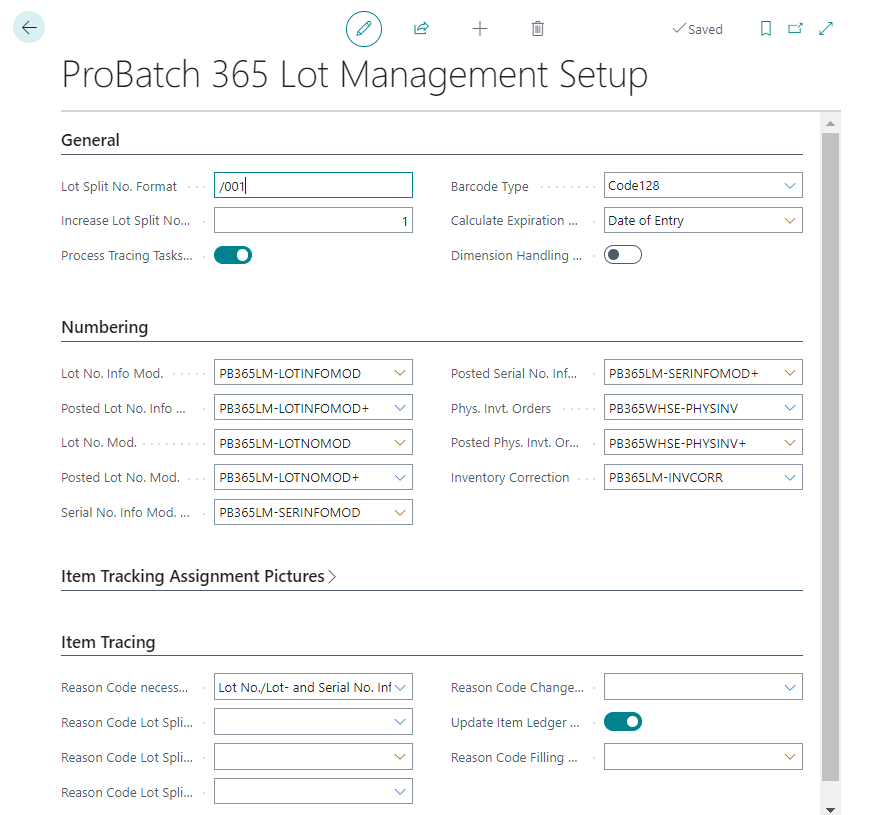
The InfoTab General allows you to define numbering logic for lot splits. For example, in the Lot Split No. Format field, the format for lot splits is set with the suffix "/001". The field Increase Lot Split Nos.by describes in which steps new lot splits are incremented.
Process Tracing Tasks before Item Tracing can be set to process open item tracking tasks when opening the Yaveon 365 Item Tracing. This guarantees that the view in the Yaveon 365 Item Tracing is always up-to-date. Alternatively, processing item tracing tasks can be automated by a Job Queue.
The Barcode Type defines the type of barcode for printing.
In the Calculate Expiration Date field, you can select whether the Production Date or Date of Entry is to be used as the basis for calculating the expiration date. The setting can be overridden on the Item Card.
Note
- If the field Calculate Expiration Date is set to Production date on the Item Card or in the Lot Management Setup, either the production date must be filled or an expiration date must be entered manually as well. If neither is filled, the Posting Date of the document is used for the calculation of the Expiration Date, ignoring the Lot Management Setup, as the Item Card setup is more specific.
The boolean field Dimension Handling on Lot Data Modification activates the availability of dimensions in Lot No. Modifications, Lot No. Information Modifications, as well as Inventory Corrections.
When item ledger entries of a lot have differences in dimensions, due to adjustments via Inventory Corrections, Physical Inventory Orders, or other journals where dimensions can be modified, the Lot No. Modifications and Lot No. Information Modifications can be opened, but the boolean Dimension Deviation is set to Yes. This indicates that the dimensions must be corrected manually via the Dimensions.
The number series for the following documents are stored in the InfoTab Numbering:
- Lot No. Info Mod. Nos.
- Posted Lot No. Info Mod. Nos.
- Lot No. Mod. Nos.
- Posted Lot No. Mod. Nos.
- Serial No. Info Mod. Nos.
- Posted Serial No. Info Mod. Nos.
- Phys. Invt. Orders
- Posted Phys. Invt. Orders
- Inventory Correction
The InfoTab Item Tracking Assignment Pictures allows you to enter a Unicode character in the Warning Symbol field. This is displayed to the user if no item tracking has been assigned to a document line for a lot/serial number-handled item. The OK Symbol field can be used to store a Unicode character, which is displayed in the document line if item tracking is assigned.
Note
A selection of Unicode characters can be found at the following URL: https://en.wikipedia.org/wiki/List_of_Unicode_characters
The InfoTab Item Tracking contains Reason Codes that are used for automatic postings. For more information, please see the chapter Reason Code for Item Tracking Modifications.
The field Reason Code Mandatory on Inv. Correction defines that inventory corrections may only be posted with a Reason Code. For more information, please see the chapter Inventory Correction.
If the flag Update Item Ledger Entries on Data Modification is set, item ledger entries of the type = transfer are created when the item tracking data is changed. These (negative / positive) entries contain the original and changed item tracking data. Thus, the last item ledger entry shows the current data.
Actions
Recreate LNSN ID Sequences
The action Recreate LNSN ID Sequences recreates the internal database number sequences used to assign unique IDs to Lot No. Information and Serial No. Information records. These sequences allow multiple users to post item tracking entries simultaneously without creating table locks — in line with the Business Central features Enable multiple users to post item and value/job/resource ledger entries at the same time.
Warning
This action deletes and recreates the existing sequences. Only use it if a sequence is corrupted or needs to be reset. Ensure that no posting activities are running when executing this action, as concurrent postings could otherwise lead to inconsistencies.
Show LNSN ID Sequences Info
The action Show LNSN ID Sequences Info displays the current last assigned ID values for both the Lot No. ID Sequence and the Serial No. ID Sequence. This is useful for troubleshooting or verifying that the sequences are initialized and advancing correctly.