Document Features
Document Features are the specific usage of master data features in a document. Document features are available for
- PO Line
- PO Components
- PO Routings
- Lot No. Information
Features for Lot No. Information are created normally with Lot-Inspections within the Quality Control.
Features for Production Orders are transferred from the used manufacturing specification and are used especially for the feature based Item Tracking Assignment (see Feature Based Item Tracking Assignment).
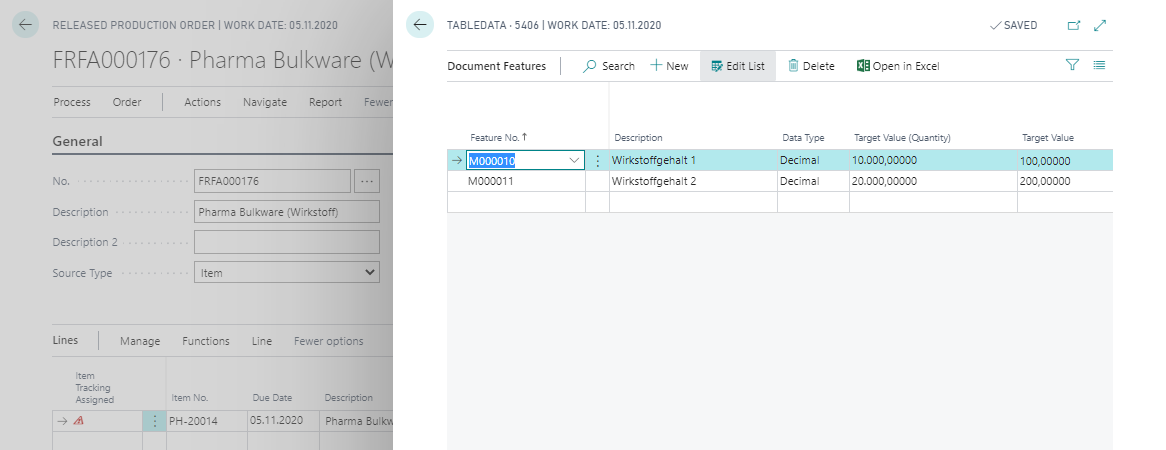
After finishing the production order the feature data are transferred to the Posted Document Features.
Feature Values with Data Type Picture
If the feature has the Data Type Picture, the Values (Picture) FactBox is shown for the document feature. It contains two pictures:
| Field | Meaning |
|---|---|
| Target Value (Picture) | Is transferred from the feature or master data feature and cannot be edited |
| Actual Value (Picture) | Can be entered at the document feature via Take, Import and Delete |
When the production order is finished, both pictures are transferred to the Posted Document Features – analogous to the other feature data – and frozen there.
Picture at the Document Feature
You can also store a picture for Document Features via the Picture FactBox. When the production order is finished, a picture stored at the document feature is transferred to the Posted Document Features – analogous to the other feature data – and frozen there.
Note
A picture changed later at the master data or feature record does not retroactively affect already posted document features.