Yaveon 365 Process Base Setup
General
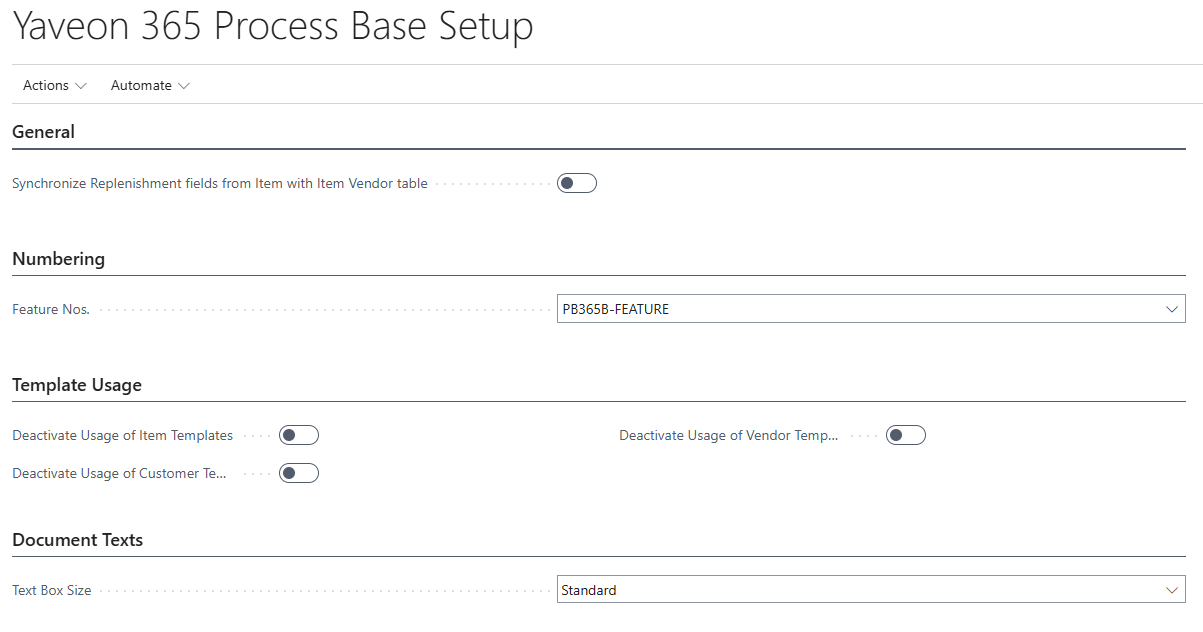
If the option Synchronize Replenishment fields from Item with Item Vendor table is set to YES, then the following fields are synchronized between the Item Card and the Item Vendor table, for the Vendor from the Item Card:
- Vendor No.
- Vendor Item No.
- Lead Time Calculation.
If the option is NO, then the fields are not synchronized.
Numbering
The Feature Numbers can be set in the field Feature No..
Template Usage
The use of Item, Vendor and Customer Templates can be deactivated through the options. If one of those options is active, then a template is not shown if a new dataset is created.
Document Texts
The size of the text box on the page in which the text modules are created and displayed can be adjusted. For this purpose, the field Text Box Size can be used. The available options are Standard and 1 to 5. The options correspond approximately to the number of lines specified below:
- Standard = 3 lines
- 1 = 5 lines
- 2 = 7 lines
- 3 = 9 lines
- 4 = 11 lines
- 5 = 13 lines
Note
This setup only applies to the Browser Client, not to the Mobile and Tablet Client.