Automatic Item Tracking Status Modification
By setting up Automatic Item Tracking Status Modifications, it is possible to automatically change the status of a lot. This setup allows you to use the item tracking status, for example, to determine the result of an inspection. You can also automate the execution of the usage decision, starting from a finished or canceled inspection order.
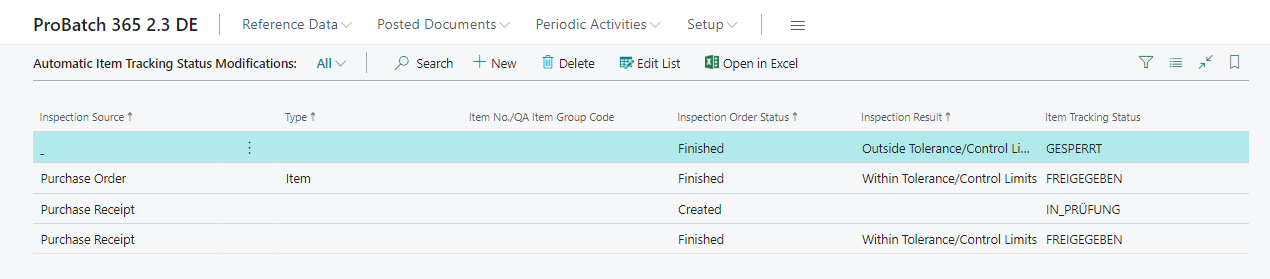
Using the Inspection Source field, you select the event for which you want to define an automatic status change. The following documents are available here:
- Purchase Order
- Purchase Receipt
- Purchase Return Order
- Sales Order
- Sales Shipment
- Sales Return Order
- Sales Return Receipt
- Production Order
- Prod. Order Routing Line
- Inventory Inspection
- Stability Test
- Transfer Order
- Manual
- System
If you want the automatic status change to apply to all items in the system, you can ignore the Type field and the associated Item No./QA Item Group Code field. If you only want to initiate an automatic status change for certain items or QA Item Groups, you can use both of these fields for differentiation.
Depending on the Inspection Order Status and the Inspection Result, you can define in the field Item Tracking Status which status the lot should receive.
On the basis of the picture you will find a short explanation of the setup:
| Inspection Order Status | Inspection Result | Item Tracking Status | Description |
|---|---|---|---|
| Created | --- | IN_QC | The lot gets an initial status based on the setup of the item, this status changes to IN_QC as soon as an inspection order is created automatically or, for a manually created inspection order, as soon as the Lot No. is entered. For more information, see the section Status change for manually created inspection orders |
| Finished | Outside Tolerance/Control Limits | BLOCKED | If the inspection result is outside the defined tolerance and control limits, the item tracking status of the lot is set to Blocked |
| Finished | Within Tolerance/Control Limits | RELEASED | If the inspection result is within the defined tolerance and control limits, the item tracking status of the lot is set to Released |
The setup of the Inspection Result field is passed through as follows.
within tolerance/control limits: The inspection result is within the tolerance and control limits.
outside control limit: The test result is between the tolerance and control limit
outside tolerance/control limit: The test result is below the lower tolerance limit or above the upper tolerance limit.
outside tolerance limit: The test result is below the lower tolerance limit or above the upper tolerance limit. This option corresponds to the third option, which is run through with higher priority. This option is no longer necessary and will be removed in a future version.
Status change for manually created inspection orders
For manually created inspection orders (Inspection Source Type = Manual), the setup for the Inspection Order Status Created is applied as soon as you enter a Lot No. in the inspection order header. The inspection order is saved with the lot number first, then the status of the lot changes without any further confirmation.
The following prerequisites must be met:
- The Inspection Object Type is Item.
- The Item Inspection Level is filled and is not Item (e.g. Lot).
- A matching setup exists with the Inspection Source Manual or blank and the Inspection Order Status Created or blank. If there is no matching setup, the status of the lot remains unchanged and no message is shown.
Tip
Enter the Item Inspection Level before the Lot No.. If the lot number is entered while the item inspection level is blank, no status change takes place – not even when you set the item inspection level afterwards.
Note
- Only an entry in the Lot No. field triggers the status change. Entering a Serial No. does not trigger a status change.
- If the lot number in the inspection order is cleared or changed to a different lot, the status of the original lot is not reset. If necessary, correct the status via a Lot No. Info Modification.
- Lots of the Type Inspection Lot do not receive an automatic status change.
- The status changes on later status transitions of the inspection order (e.g. release, finish) remain unchanged.
The status change is posted automatically as a Lot No. Info Modification. The current date is used as the posting date, and the value from the field Reason Code Change on Inspection in the Yaveon 365 Lot Management Setup is used as the reason code (see Reason Code for Item Tracking Modifications).
Important
Automatic status changes are performed as a system posting. The Lot No. Info Modification Rules and the rules for electronic signature are not checked. If the lot changes to a status marked as QP Release Register relevant, an entry is still created in the QP Release Register.