Yaveon 365 Quality Assurance Setup
To be able to work with Quality Assurance, it is important to configure some basic settings first. You can open the Quality Assurance Setup by searching for it in the search bar.
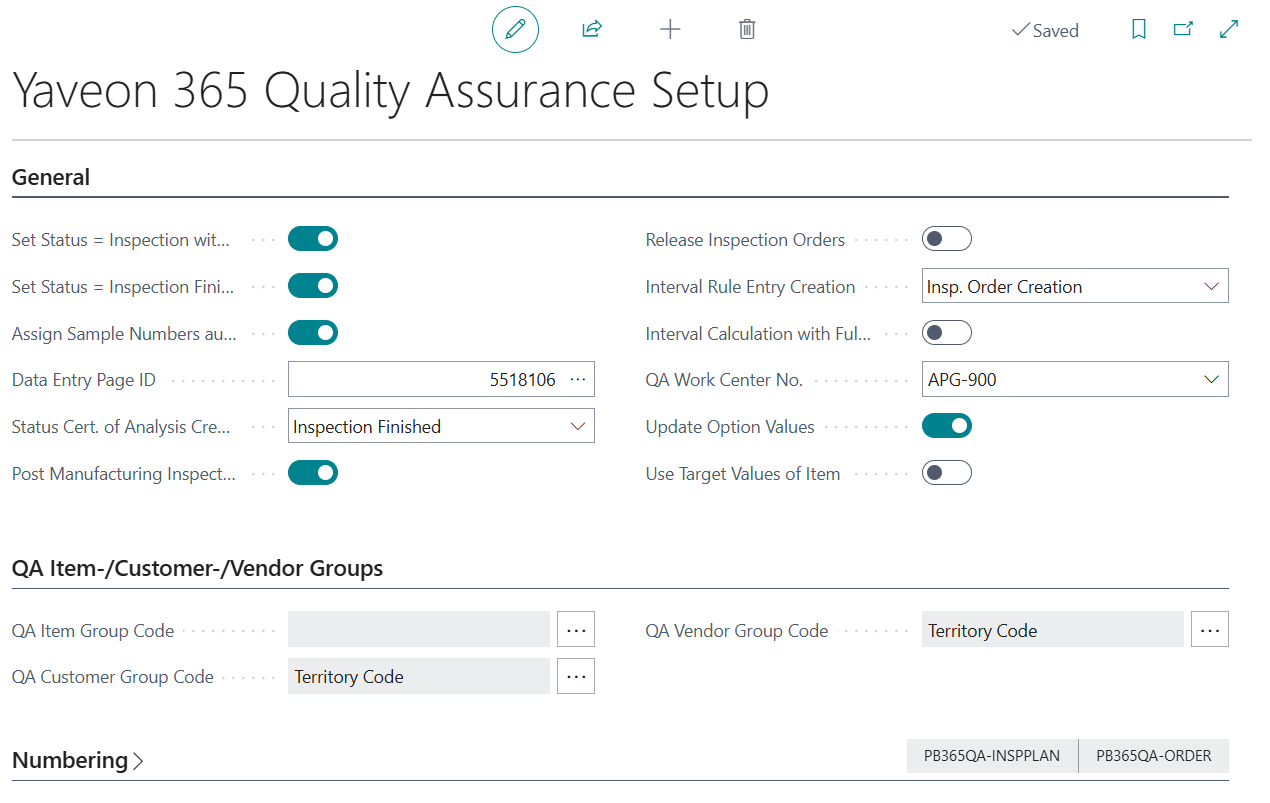
General
The General tab contains the central settings that control the behavior of inspection orders, data entry, certificates of analysis, interval rules, and production inspection costs.
| Field | Description |
|---|---|
| Set Status = Inspection with value recording | If enabled, the status of the inspection order is automatically set to Inspection as soon as an actual value is recorded in at least one inspection feature. If disabled, the status must be changed manually using the actions in the inspection order. |
| Set Status = Inspection Finished with completing value recording | If enabled, the status of the inspection order is automatically set to Inspection Finished once actual values have been recorded for all inspection features. If disabled, the status must be changed manually. |
| Assign Sample Numbers autom. | If enabled, sample numbers are automatically assigned when samples are created in an inspection order. |
| Data Entry Page ID | Determines which actual value entry page is used when recording actual values. Two entry pages are available: ID 5518106 and ID 5518107. The setting can be overridden per inspection group. If no page ID is defined here or in the inspection group, actual values can only be recorded directly in the inspection order. |
| Status Cert. of Analysis Creation | Defines the minimum inspection order status from which a Certificate of Analysis can be created. For example, if set to Inspection Finished, a certificate can only be created once all actual values have been entered. |
| Post Manufacturing Inspection Costs | If enabled, the costs of inspection orders linked to production orders are posted as capacity costs to the corresponding production order when the inspection order is finished. The field QA Work Center No. must also be filled. For more information, see Production Inspection Costs. |
| Release Inspection Orders | If enabled, inspection orders created via Function → Create Inspection Order in a document are automatically set to status Released. If disabled, the inspection order is created with status Created. |
| Interval Rule Entry Creation | Defines the point at which an interval rule entry is created. Select Insp. Order Finishing to create the entry when the inspection order is finished — at this point the inspection result is known, and the fields Next Step (out of Tolerance) and Next Step (out of Ctrl. Limits) in the interval rule can be used. Select Insp. Order Creation to create the entry when the inspection order is created — the result is not yet known at this point, so negative-outcome fields cannot be used. For more information, see Interval Rules. |
| Interval Calculation with Full Inspections | If enabled, the Interval 100% Inspection date is calculated based on the date of the last full inspection only. Reduced or skipped inspections are not taken into account. If disabled, the date of the last inspection is used regardless of inspection scope. For more information, see Interval Rules. |
| QA Work Center No. | Specifies the work center to which inspection costs are posted as capacity costs when Post Manufacturing Inspection Costs is enabled. For more information, see Production Inspection Costs. |
| Update Option Values | If enabled, option values can be added to or modified on inspection features that are already in use in inspection plans, inspection orders, or certificates of analysis, and these changes are propagated to all existing documents. If disabled, modification of option values is blocked for features already in use. For more information, see Inspection Features. |
| Use Target Values of Item | If enabled, the target value and tolerance/control limits defined at item feature level are automatically copied to the inspection plan line when an inspection feature is added. If disabled, or if no item feature exists, the values are taken from the inspection feature definition instead. For more information, see Inspection Plan. |
| Disable No. of Packages on Item Tracking | If enabled, the No. of Packages field is hidden on the Item Tracking Lines page and synchronization of tracking data to the QA tables is skipped during posting. This can improve posting performance and reduce table lock overhead when the package count is not used in the process. When the field is activated, a confirmation dialog is shown informing you that all open (unposted) item tracking lines across all document types will have their No. of Packages value reset to 1. When disabled again, the field and synchronization are restored; lines created while the field was disabled retain a value of 0 until the next edit or save. |
Important
When neither the Quality Assurance Setup nor the inspection group has a Data Entry Page ID defined, actual values can only be recorded directly in the inspection order.
Important
Before enabling Disable No. of Packages on Item Tracking, check the Samples Calculation Method in the Feature/Inspection Method Setup and in any active Inspection Plans and Inspection Orders. Methods using Per Package or SQRT(No. of Packages)+1 must be adjusted manually, as the package count will otherwise be treated as 1. A warning message is displayed if such a method is currently in use.
QA Item-/Customer-/Vendor Groups
On the QA Item-/Customer-/Vendor Groups tab, you can define which source field is used to populate the QA group tables for items, customers, and vendors. Use the AssistEdit button (...) in the respective field to select the table and field whose values should be used as the basis for the group. You can leave the fields empty, and therefore set up the values manually.
| Field | Description |
|---|---|
| QA Item Group Code | Defines the source field from which QA Item Group values are derived. If a field is selected, the QA Item Group table is initialized with the values from that field. For more information, see QA Item Groups. |
| QA Customer Group Code | Defines the source field from which QA Customer Group values are derived. For more information, see QA Customer Groups. |
| QA Vendor Group Code | Defines the source field from which QA Vendor Group values are derived. For more information, see QA Vendor Groups. |
Note
Once a field ID has been set and data already exists in the system (for example, inspection plans), this setting can no longer be changed. Data maintenance must then be carried out manually.
Numbering
In the Numbering tab you can assign number series to all QA documents and master data records. Number series must be set up in the Business Central No. Series page before they can be selected here.
| Field | Description |
|---|---|
| Inspection Equipment Nos. | Number series for Inspection Equipment. |
| Inspection Method Nos. | Number series for Inspection Methods. |
| Inspection Group Nos. | Number series for Inspection Groups. |
| Object Nos. | Number series for Objects. |
| Interval Rule Nos. | Number series for Interval Rules. |
| Inspection Plan Nos. | Number series for Inspection Plans. |
| Inspection Order Nos. | Number series for Inspection Orders. |
| Stability Test Nos. | Number series for Stability Tests. |
| Certificate of Analysis Nos. | Number series for Certificates of Analysis. |
| Sample Shipment Nos. | Number series for Sample Shipments. |
| Specification Nos. | Number series for Specifications. |