CD Layout Sections und Document elements
The Corporate Design Layouts consist of different Sections and contain different Document Elements.
The content of these Sections can be configured using the CD Field Configuration. There, fields and variables can be shown and hidden, which are printed within the Section. The arrangement and formatting of this data can also be controlled there.
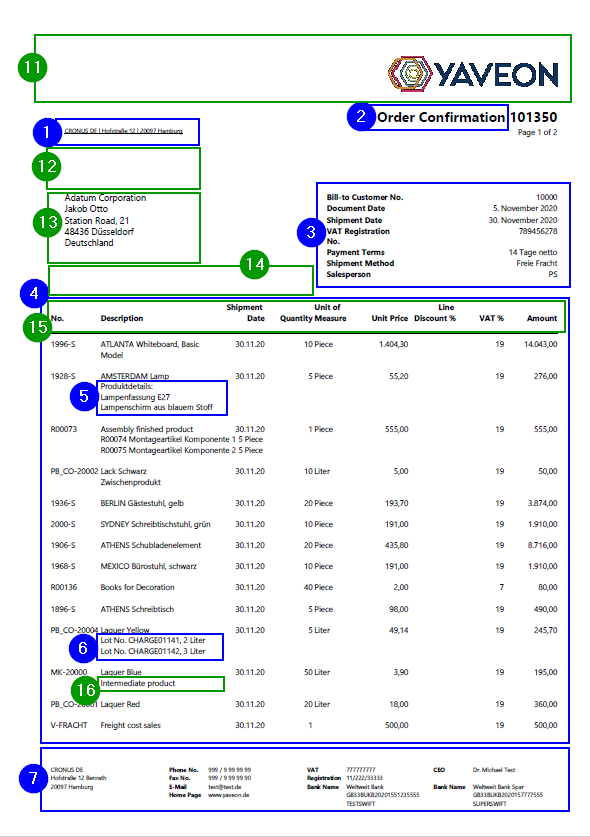
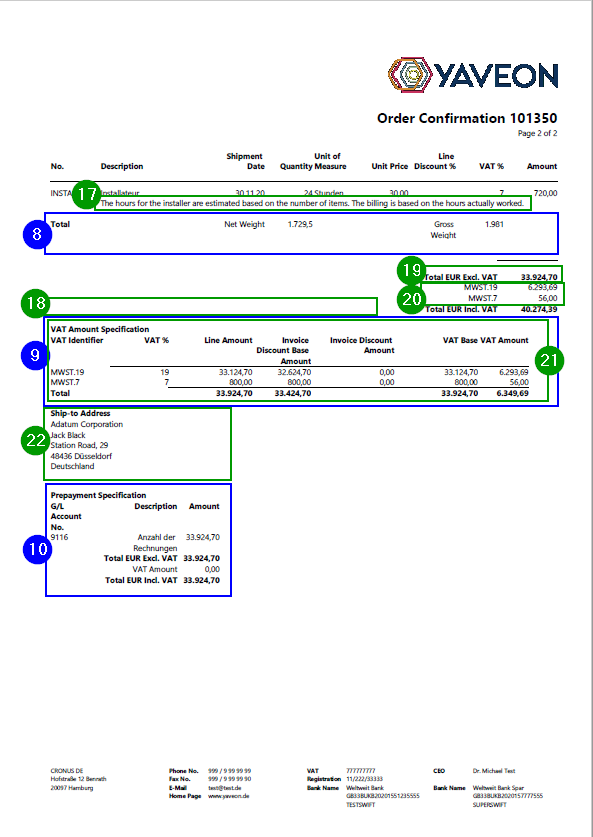
The following Sections exist on the standard documents, and are shown in an example document:
- Return Address
- Document Label
- Header
- Line
- Line Extension
- Tracking
- Footer
- RowTotals
- Specification - area 1
Specification - area 2
In addition to the Sections, there are other document elements which can be shown and hidden or displayed differently via setups. These elements can be controlled in the setup tables in the Report Print Details Section.
These document elements include, but are not limited to, the following:
Logo
- EPost Barcode Placeholder
- Recipient address
- PB365 Header Texts
- Label Line area
- Description 2
- PB365 Line Texts
- PB365 Footer Texts
- Document total
- VAT (shown as Sums for VAT Rates)
- Detailed VAT block
- Ship-to-Address (deviating from customer address)
Depending on the installed ProBatch Apps, the selection of printable elements is extended, e.g. by:
- Hazardous Material Information
- Additional Item Tracking Data
- Base Item Numbers
- Load Carrier Information
- Line and Invoice Discount Details
- Company VAT-IDs
- Signature Block and Inspection Method