Additional serial number data
A list of all existing serial numbers can be seen via PB365 Serial No. Information. All serial numbers are shown here - independent if they are on inventory or not.
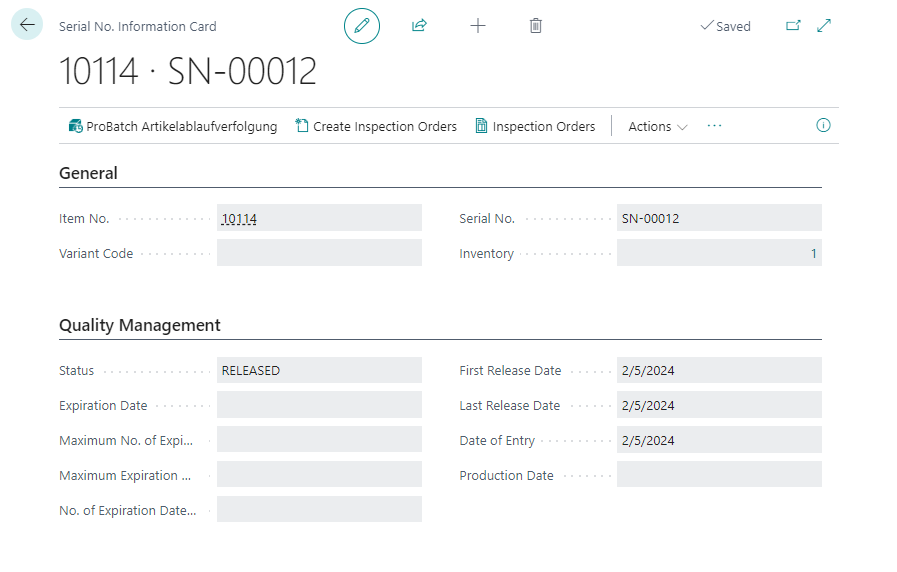
The following data has been added to manage the serial number:
| Field | Description |
|---|---|
| Status | latest status of the serial number. For new serial nubmers the defined initial status is used. |
| Date of Entry | Posting Date of the first entry. Can be used for calculating the production date. |
| Production Date | Production Date of the serial number. Enter the date manually when posting a pos. adjustment or purchase of a serial number. Can be used for calculating the production date. Must be filled manually, if the Calculation Method is done via the Production Date, otherwise an Error will occur. |
| Expiration Date | Is calculated at the time of first posting according to the setting on the Item or ProBatch 365 Lot Management Setup: - Date of Entry + Expiration Date Formula or - Production Date + Expiration Date Formula |
| Max. No. of Expiration Date Extensions | Transferred from item card. If there is no maximum information the expiration date can be extended any number of times |
| Max. Expiration Date | Calculated at the time of positive adjustment on the basis of the data of the item card. Max. Expiration Date = Posting Date + max. Expiration Date Calculation Formula |
| No. of Expiration Date Extensions | Counts up when the expiration date is extended. During posting, the system checks whether the number of expiration date extensions has reached the max. number of expiration date extensions. If this is the case, an error message appears and the expiration date cannot be extended |
| First Release Date | If the Release Status checkbox is selected in the Item Tracking Info Status table, this field is set when an item tracking switches to this status for the first time. |
| Last Release Date | Each time a change is made to the status and the new status is marked as release status, this field is updated (with the posting date). |
| ID | Each Item Tracking Information is marked with a unique ID. |
Serial number or serial number data can be changed manually via Serial No. Information Modification.