Batch-based Production
Manufacturing Specification
In the Manufacturing Specifications, the following fields are used for Batch-based Production:
| Field | Description |
|---|---|
| Batch-based Production | This field indicates that production of this item is to be carried out in batch sizes. |
| Batch Size (Base) | Here you can define the size of a batch that is relevant for production of this item. Production then takes place in these batch sizes. This means that the total production quantity is divided into several production runs per batch. The Value defined in the Manufacturing Specification is transferred when a Production Order is refreshed. The values can be overridden there if necessary. The batch size can also be empty in the Manufacturing Specification and specified in the Production Orders. |
Note
Partial manufacturing with and partial without batches is not possible.
Production Order
The following fields have been added to the production order header and Line:
| Field | Description |
|---|---|
| Batch-based Production | This field indicates that production of this item is to be carried out in batch sizes. It is taken from the Manufacturing Specification when the Production Orders are refreshed. When activating / deactivating this field, the Batch Size (Base) and Number of batches fields are filled or cleared. |
| Batch Size (Base) | Can be used to define the batch size that is relevant for production of this item. This value is taken from the Manufacturing Specification when the Production Orders are refreshed. When activating/deactivating the batch-based Production field, this field is filled or cleared. The field can be changed and the Number of Batches is recalculated. |
| No. of Batches | The Number of Batches of the Production Orders is displayed here. This value is calculated on the basis of the production and batch quantity (Total Quantity / batch size, rounded up to the nearest whole number) when the Production Orders are refreshed. When activating / deactivating the batch-based production field, this field is filled or cleared. The fields can be changed, which results in a recalculation of the Quantity. |
Changing these fields is possible as long as no postings have taken place on the Production Order and the lines have not yet been splitted into batches.
The production order is splitted into several Prod. Order Lines according to the number of batches. The Calculate Prod. Order batches function can be called up this purpose.
The following requirements must be met:
- If several lots are assigned to the production order line, an error is shown and calculation of batches is not possible
- No Picks must have been created or registered for the selected Prod. Order Line
- No postings (consumptions or outputs) may exist for the selected Prod. Order Line
The following is done when splitting the production order line into batches:
- Existing reservations for the production order line or components are reassigned.
- Item Tracking Information are transferred.
The Calculate Prod. Order Batches page contains the following fields:
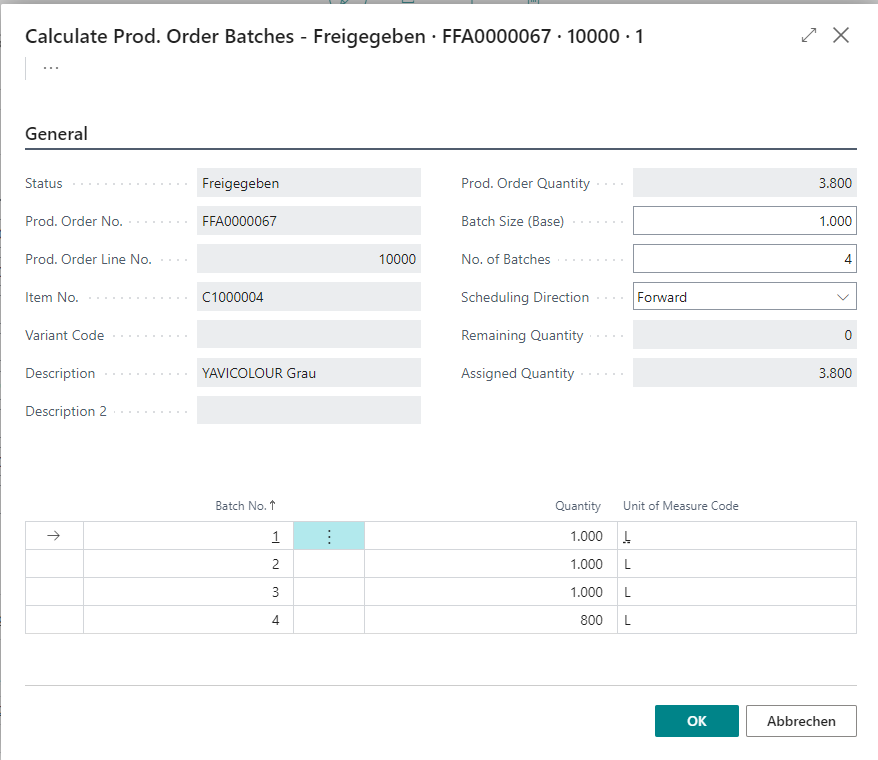
First, some Information from the Production Orders is displayed. The Batch Size (Base) and Number of Batches fields are used to calculate how many lines the production order line should be split into or which production quantity is assumed for the splitted lines. The Planning direction defines how the Times in the Prod. Order Lines are to be calculated.
It is possible that the calculation of the batch lines cannot be carried out because a due date can no longer be covered. This is the case, for example, if production takes longer due to the split of lines and the agreed delivery date to the customer can no longer be covered.
In this case, the calculation is stopped.
Set the Planning Direction to Backwards to be able to calculate the production lines correctly.
The lines in the Calculate Prod. Order Batches window are created based on the information provided. Any remaining/partial quantities are specified in a final batch. The suggested quantities can be changed manually. With Confirmation with OK the Prod. Order batch lines are created in the Production Orders.
In the Production Orders, the calculation of the batches is shown as follows:
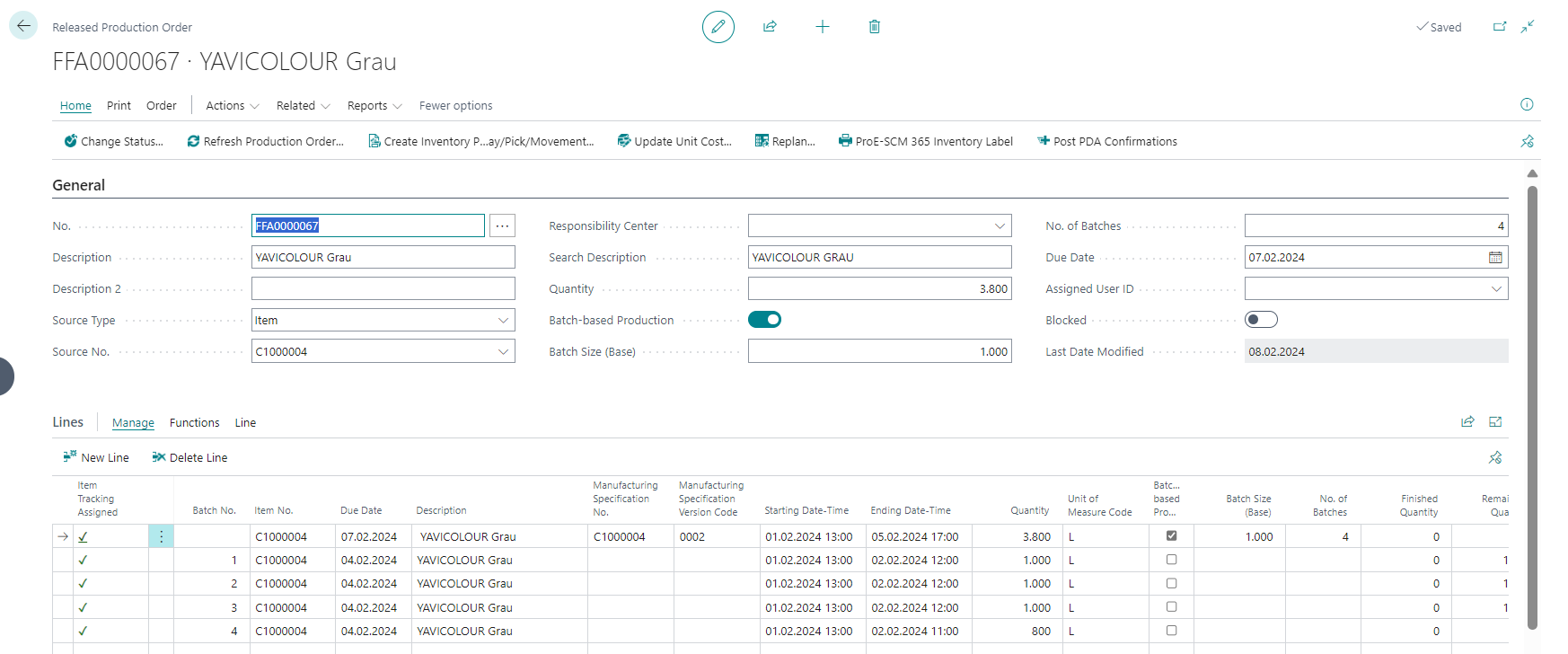
- field Batch No. lists the number of the batch.
- The Batch belongs to Line No. field is filled for the batch lines and contains the original Production Orders Line.
- The batch lines are created without Manufacturing Specifications. The BOM Component and Routing are copied into the batch lines and the components and operations are divided based on the new Quantity.
- Components and operation lines of the original line are deleted.
- The Starting/ Ending Date and Time of the operations are listed consecutively per Line. Depending on the selection in the request page, whether forward or backward calculation is required.
- The Components of the original Prod. Order Line are deleted and saved proportionally according to the respective batch quantity for the batch lines.
Calculate Production Order Batches based on a Manufacturing Specification
A batch-based Production Orders can be calculated with the following steps on the basis of a Manufacturing Specification:
- the Production Order is created with the item number and Quantity to be produced.
- the Production Orders can then be recalculated by calling the function.
- the fields batch-based Production, Batch Size (Base) and Number of batches are filled based on the default settings from the Manufacturing Specification used.
- in the Line Section, the production order lines are splitted up per batch by executing the Calculate Prod. Order Batches action. A Line with the partial quantity of the batch is created for each batch. The Batch No. is shown and the components are split up by quantity.
Creating Production Orders manually without batch-based Manufacturing Specifications
Without having to define batches in the Manufacturing Specification, a batch-based Production Orders can also be created manually. The following steps are necessary for this:
- the Production Order is created with the item number and Quantity to be produced.
- the Production Orders can then be recalculated by calling the function.
- the fields batch-based production, Batch Size (Base) and Number of Batches can now be activated or entered.
- in the Line Section, the production order lines are splitted up per batch by carrying out the Calculate Prod. Order Batches action. A Line with the partial quantity of the batch is created for each batch. The Batch No. is shown and the components are split up by quantity.
Automatically calculate Production Order batches
In the ProBatch 365 Manufacturing Setup, the Calc. Batches automatically field can be set. This automatically calls up the Calculate Prod. Order Batches function when the Production Order is refreshed based on the specified Batch size from the Manufacturing Specification and splits the Production Order lines.
Calculate batches for multi-level Production Orders (from ProBatch 8.13/9.7/10.1)
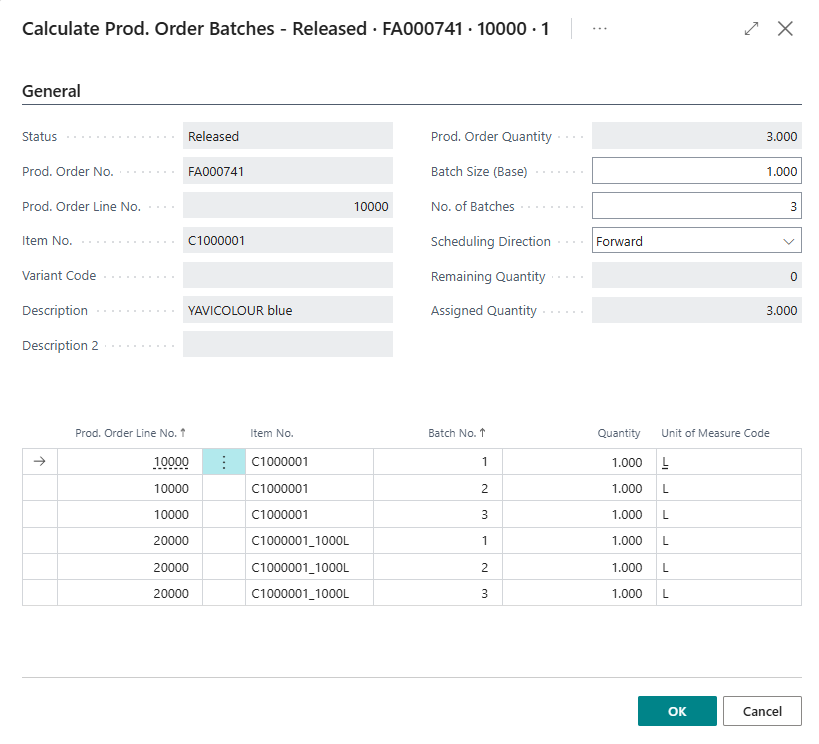
It is possible to split mulit-level production orders into batches. Those can be created, for example, due to fillings or make-to-order settings.
For this, the Batch based Production (Batch Size and No. of Batches) can be defined per production order line. Function Calculate Prod. Order Batches is processed for each marked line.
Print Production Orders
The printed Production Orders have been extended to include the batch number.
Output and consumption posting in the production journal
The batch number can be seen in the Lines of the Production Journal. It is also included in the item Ledger Entries of the Output.