Scale integration setup
In the scale integration setup you will find the following fields:
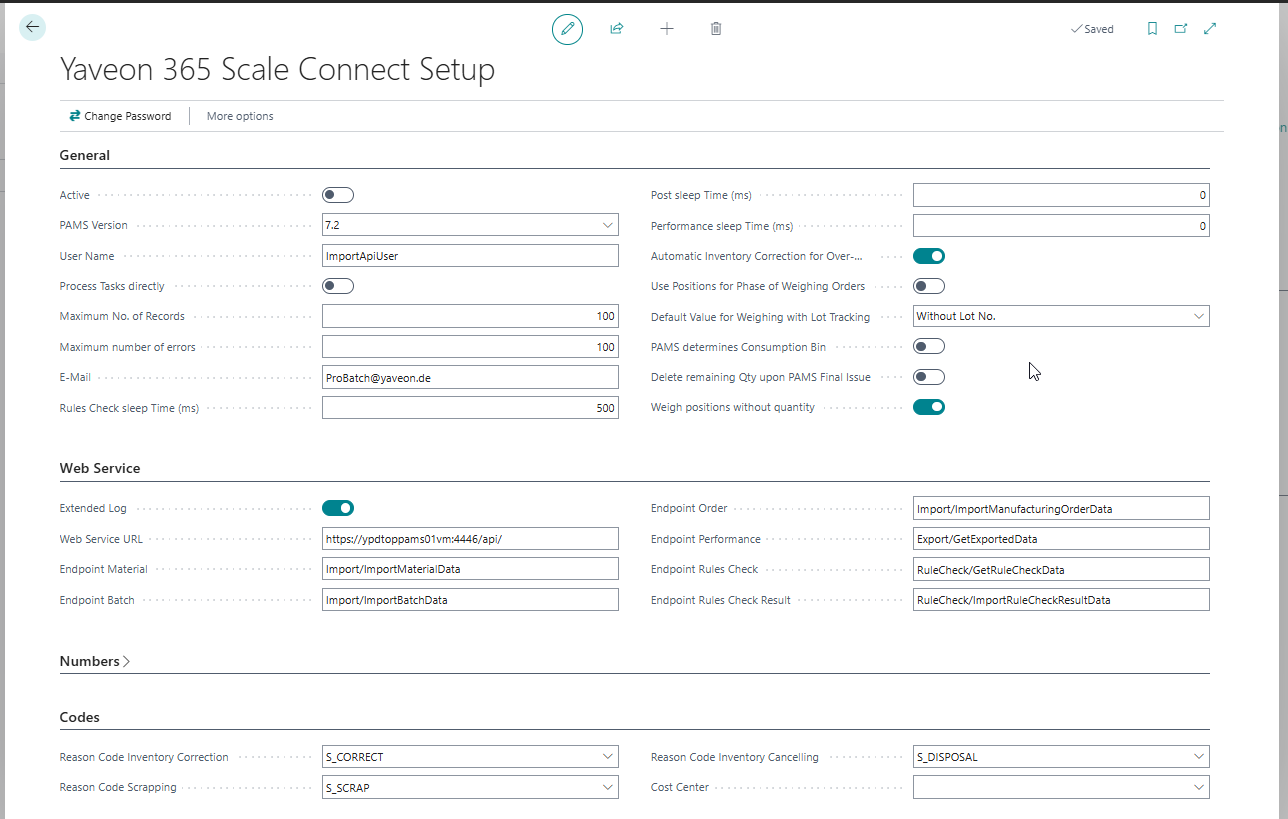
Infotab General
| Field | Description |
|---|---|
| Active | Indicates that automatic transfer between ProBatch and PAMS is enabled. In addition, the task queue items for automatic transfer of performances, postings and rule checking are also set to active. The flag cannot be enabled / disabled manually, but can be influenced by starting and stopping the job queues. To start, stop or restart the job queues, the Start/Stop PAMS job queues functionality must be used. |
| PAMS Version | Here you can see the PAMS version that is connected to your system. PAMS may already be available in a higher version, which however is not supported by ProBatch. Depending on the PAMS version selected, other fields or functions may be activated or deactivated. |
| User name | PAMS User |
| Maximum number of records | when transferring (e.g. material) from ProBatch to PAMS, a maximum of this number of records will be sent in one message. If more records are transferred, this will be done in several messages. |
| Maximum number of errors | Maximum number of incorrect attempts to send a message. If the maximum number is reached, the setup is automatically set to Active = NO and an e-mail is sent to the specified e-mail address. |
| When the maximum number of error transmissions is reached, the device is automatically set to Active = NO and an e-mail is sent to the specified e-mail address. | |
| Rule check sleep time (ms) | Specify the intervals at which the rule checks are to be retrieved. From PAMS version 7.3.2, the rule check is no longer queried via the task queue. From this version onwards, communication takes place via a bidirectional web service. The permanent sending of queries from ProBatch to PAMS via the task queue is no longer necessary. If the PAMS version is set to >= 7.3.2, the fields Rule check sleep time (ms), End point rule check and End point rule check result are deactivated. |
| Post sleep time (ms) | Specify here in which intervals the PAMS postings should be transmitted. |
| Performance Sleep Time (ms) | Specify here in which intervals the PAMS Performances should be transmitted. From PAMS version 7.4.1, PAMS Performances and PAMS Performance Bookings are no longer queried via the task queue. From this version onwards, communication takes place via a bidirectional web service. If the PAMS version is set to >= 7.4.1, the Performance sleep time (ms) and Endpoint performance fields are therefore deactivated. |
| Automatic inventory correction for more weighing | Here you can activate the automatic stock correction for overweighing. If more is consumed in the Prod. Order than has been posted in the inventory, an automatic quantity is posted and consumped for the PO |
| Production Consumption Weighing Source Type | Via this field (field must be inserted at first) the used value for the interface can be selected. So customer specific modifications can be done more easily. |
| Use Positions for Phase of Weighing Orders | If this flag is not activated, the creation of phases in the weighing order is based on the operations. If the positions (1-3) that influence the creation of phases are to be used in addition to the operations, the Use Positions for Phase of Weighing Orders flag must be activated. |
| Default value for weighing with lot tracking | The value selected here is used if weighing with Lot information is selected on the item card. It is used in manufacturing specifications and component lines for the Weighing Necessary field. It controls whether a Lot no. is part of the weighing order and whether this is obligatory or not. |
| PAMS determines Consumption Bin | If the flag is activated, the value from the scale overrides the bin location in the component line. |
| Delete remaining Qty upon PAMS final issue | If the field is active, the remaining quantity of a component is automatically set to 0 when the associated weighing position is marked as completed. |
| Weigh positions without quantity. | If the field is active, lines are included in the weighing order even without quantity. |
Infotab Web Service
| Field | Description |
|---|---|
| Extended Log | Reduced or Extended logging can be selected here for the tables PAMS Rule Check Log and PAMS WebService Log. With extended logging, every communication attempt is logged. If extended logging is switched off, a log entry is only created if data records are found for retrieval in PAMS and are to be processed. |
| Web Service URL | URL of the PAMS Web Service. Provided by PAMS. |
| Endpoint Material | Provided by PAMS. |
| Endpoint Batch | Provided by PAMS. |
| Endpoint Order | Provided by PAMS. |
| Endpoint Performance | Provided by PAMS. From PAMS version 7.4.1, PAMS Performances and PAMS Performance Bookings are no longer queried via the task queue. From this version onwards, communication takes place via a bidirectional web service. If the PAMS version is set to >= 7.4.1, the Performance sleep time (ms) and Endpoint performance fields are therefore deactivated. |
| Endpoint Rule Check | Provided by PAMS. From PAMS version 7.3.2, the rule check is no longer queried via the task queue. From this version onwards, communication takes place via a bidirectional web service. The permanent sending of queries from ProBatch to PAMS via the task queue is no longer necessary. If the PAMS version is set to >= 7.3.2, the fields Rule check sleep time (ms), End point rule check and End point rule check result are deactivated. |
| Endpoint Rule Check Result | Provided by PAMS. From PAMS version 7.3.2, the rule check is no longer queried via the task queue. From this version onwards, communication takes place via a bidirectional web service. The permanent sending of queries from ProBatch to PAMS via the task queue is no longer necessary. If the PAMS version is set to >= 7.3.2, the fields Rule check sleep time (ms), End point rule check and End point rule check result are deactivated. |
Infotab numbers
| Field | Description |
|---|---|
| Weighing order numbers | Here you must enter the number series that will be used when creating weighing orders. |
Infotab Codes
| Field | Description |
|---|---|
| Reason Code Inventory Correction | A Reason Code for automatic postings can be assigned here. These take place if excess or short quantities are reported back by the scale, which were not recorded in ProBatch beforehand. More information can be found in the chapter Automatic stock postings by the scale |
| Reason code scrapping | A reason code for automatic postings can be assigned here. These take place when a weighing item from PAMS (Cancelling or not posted Disposal) is processed in BC as a retirement posting. For more information, refer to the Automatic Inventory Postings by Scale |
| Reason Code Inventory Cancelling | Not used yet. A cause code for automatic postings can be assigned here. The cause code is given to the storage bin item of the issue postings for an item cancellation of a weighing order. For more information, refer to the chapter Automatic stock postings by scale |
| Cost center | This field is currently not used. |
Other actions
The Change password action can be used to replace the current password with a new one.