HazMat Tasks
A HazMat Task is used to exchange information between Business Central and the connected HazMat System. HazMat Tasks can be created using the following actions:
- Transmission and Request of HazMat Material Features
- Transmitting and requesting customer information
- Classify HazMat Material
- Retrieve SDS status
- Retrieve SDS
- Transmission of HazMat Recipes
Important
If direct processing is activated in the Yaveon 365 HazMat Connect Setup, Tasks are processed directly after creation. That means the HazMat Tasks are empty. You can view the processed tasks in the HazMat Task Log if the Log Web Service is set to Error or All in the Yaveon 365 HazMat Connect Setup.
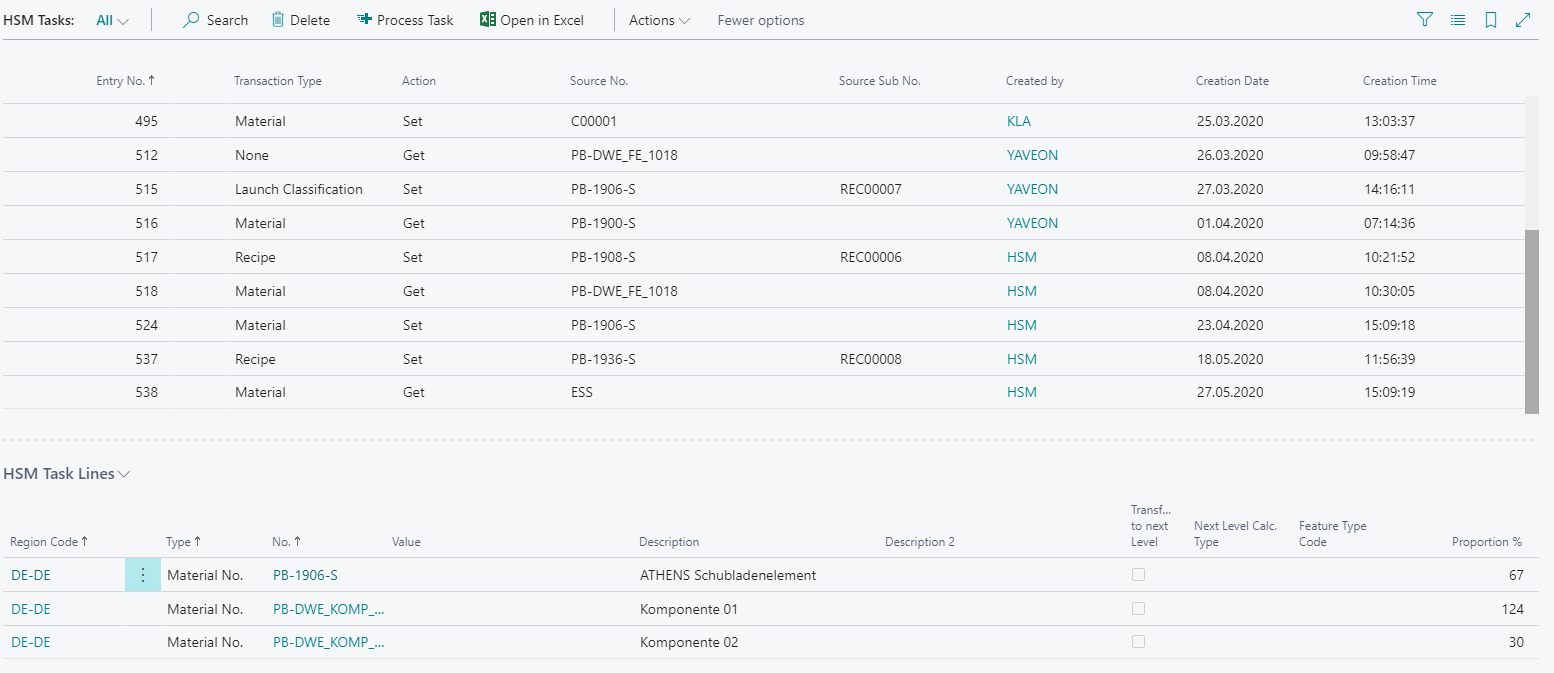
The Transaction Type can be used to trace the action that created the HazMat Task. The Source No. and the Source Sub No. indicate which HazMat Material or HazMat Recipe is processed with this task. The HazMat Task Lines give an overview of details about the task. For example, transferring a HazMat Recipe, these are the components of the recipe with their proportion.
With the action Process Task it is possible to transfer a HazMat Task manually.
Processed tasks are archived in the HazMat Task Log if this is enabled in the Yaveon 365 HazMat Connect Setup. Should an error have occurred during transmission, this can be seen there.