Automatic Lot Split
The module Yaveon 365 Lot Management allows you to set up automatic lot splits for your system. Since each lot has unique characteristics, it may be necessary to divide the lot as the features change for a subset. The alternative solution of creating a new lot number may be undesirable for a variety of reasons such as already printed lot labels.
If a lot split takes place, item tracking is clearly identified by adding a suffix to the lot number. The settings for the Lot Split No. Format and the Lot Split No. Increase is done in the Yaveon 365 Lot Management Setup.
Lot splitting is only possible for lot-managed articles. It is not possible to split the serial number because the serial number in combination with the lot number should be a one-time connection.
The automatic lot split can be set up for the following transactions:
- Sales Return Receipt (Sales Credit Note)
- Production (Output)
- Purchase Receipt
The setup of whether a lot split should take place on the page Item Tracking Info Status. The field Lot Split must be set for the corresponding transaction.
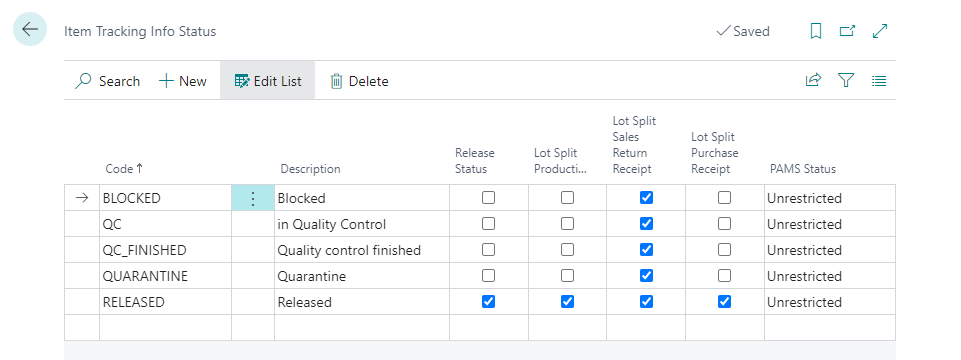
By setting the field, the system automatically creates a lot split for a warehouse receipt posting if the same batch number with the corresponding status is already in stock.
| Field | Description |
|---|---|
| Lot Split | If a lot with the same status is already in stock, a lot split is automatically generated when the actual production notification is posted. Note: When simplified posting of the output in the decanting order via the option "Create and post production order", no lot split is carried out. Note: An output can also be generated when posting a purchase receipt for a subcontracting order. Automatic lot split is not performed for such subcontracting receipt. |
| Lot Split Sales Return Delivery | If a lot number with the same status is already in stock, a lot split is automatically generated when the sales return delivery is posted (this applies to the document types Sales Complaint and Sales Credit Memo). |
| Lot Split Sales Delivery | If a lot number with the same status is already in stock, a lot split automatically takes place when posting the goods receipt. |
Note
Filled lots are linked via the ID and Base ID fields in the item tracking. The Base ID is emptied when a lot split is created due to a sales return order, as in this case new data is set and this contradicts the inheritance by the bulk item.