Item Tracking Info Status
The Item Tracking Info Status allows you to set up different settings for your status. For example, you can use the status to control your posting authorizations using posting rules.
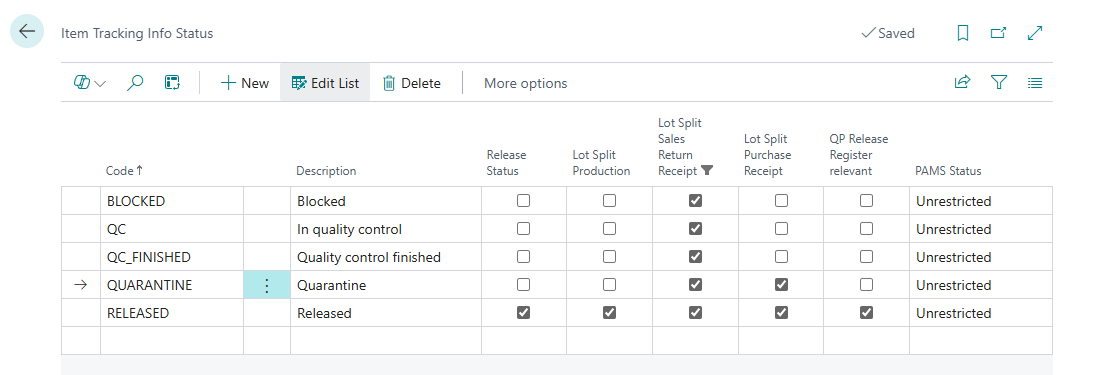
- You have to fill in the Code that identifies the record
- Enter a description of the item tracking info status that specifies the code in more detail
- Mark the line as Release Status, if this status should control the fields First Release Date and Last Release Date, which are saved when an item tracking information is posted. If an item tracking changes the first time to a status marked as Release Status, the field First Release Date is filled with the posting date. Posting a lot or serial number can also fill in the First release date field with the receipt date. The prerequisite for this is that the item tracking code has an initial status, which is set as Release Status. If the status is changed and the new status is marked as Release Status, the field Last Release Date will be updated with the posting date.
- In the Fields Lot Split you can specify whether a lot split should take place for this status. More information can be found in the chapter Automatic Lot Split |
- The field QP Release Register relevant specifies whether a change of a lot to this status automatically creates an entry in the QP Release Register. This field is independent of the field Release Status — for a QP-relevant release status, both fields are usually set together.
Initial Status and Initial Status Drop Shipments
When posting a lot or serial number it gets the defined Initial Status. The Initial Status depends on the Item Tracking Code on the Item Card. On the Item Tracking Card you can assign the Initial Status.
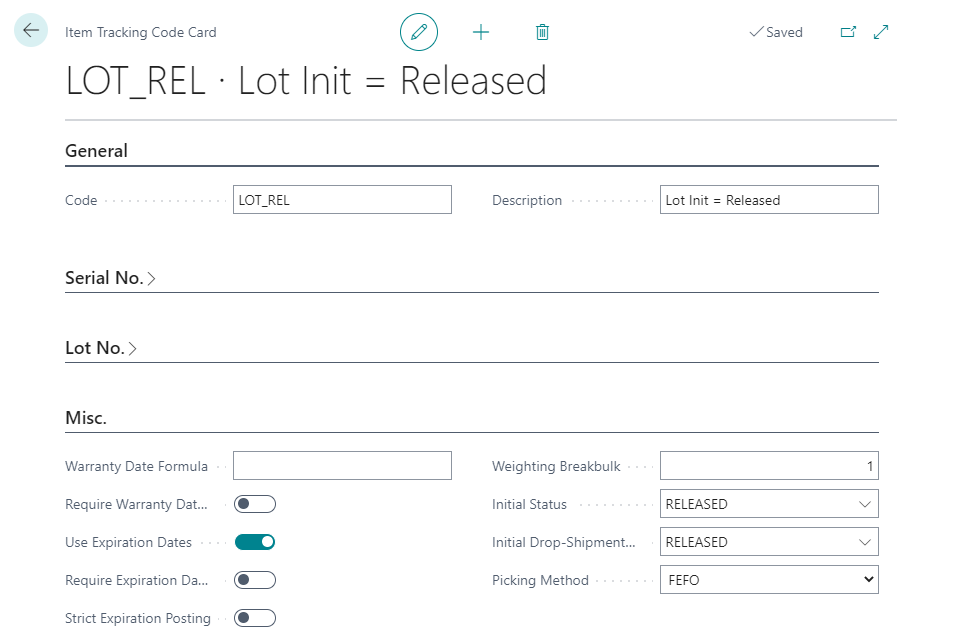
Because Items that are shipped via Drop Shipment will not arrive at the own warehouse you may not do a quality insurance for these items. Therefore you can set the Initial Drop-Shipment Status to „Released“ on the Item Tracking Code Card even if the Initial Status differs.
Important
A status marked as QP Release Register relevant should not be used as an initial status: since posting a lot or serial number does not create a status change in the sense of a Lot No. Information Modification or Lot No. Modification, no entry is created in the QP Release Register. See also the notes in chapter QP Release Register.