Position numbers in document lines
Corporate Design can be used to print position numbers on documents. These can be set up either report-specific or customer-specific. The following order confirmation shows an example of how the position numbers (POS) could look on a document:
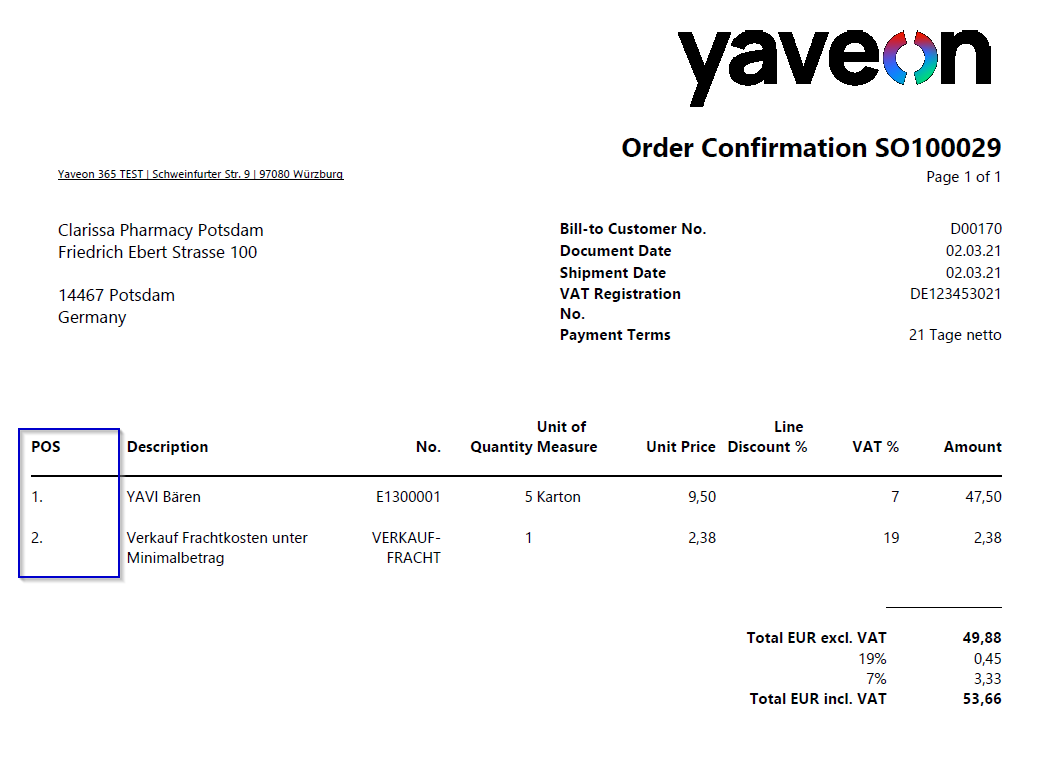
The position number is determined directly before printing the document via a FillFunction.
In the field Label for Position No. in the Yaveon 365 Process Base Corporate Design Documents Setup the format of the position number can be determined. %1 represents the position number itself, e.g. 1. As an example, if you append a colon to the end, %1: , then it will be appended to the number, e.g. 1: . The field is a link to the CD Labels table. There the format can be maintained in the Value column.
The position number is set up in the CD Field Configuration. The following fields must be filled here. The setup is exemplary for a sales order line.
- CD Report ID 5517504
- Source Type Table
- Source No. 37
- Source Sub Type -1
- Type Extra Field
- Field No. 5006
- Label Position No.
- Source Table Relation Table Type FillFunction
- Source Table Relation Table 5006
- Section Line
- Position 1
- Output Type 9
- Use as Caption Yes
- Label POS No.
- Label Font Style Bold
Note
To print position numbers only for a certain type of line, the Source Sub Type can be changed to 0, 1, 2.... For example, if you want to print position numbers only for the line type Item, then the Source Sub Type field must be changed to 2.