CD Labels
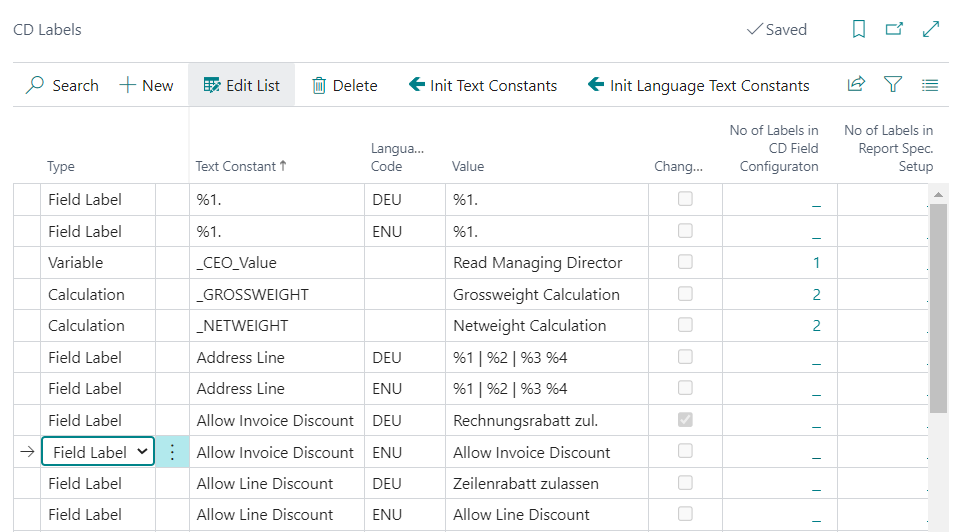
In the CD Labels table, labels and values can be maintained, which are needed for setups in other tables.
On the one hand, the table contains Document- and Field Labels, which are used as Document Labels, Field Names and Headings within the documents. These are created depending on a Language Code. Depending on which language code is maintained in the document, the corresponding identifiers are taken from this table. This makes it possible to set up documents in all possible languages by having the user maintain the labels and descriptions in this table. Changes to document and field labels are also easily made this way.
On the other hand, values can be set up, which can be used in the CD Field Configuration for calculations, as parameters or as conditions. It is also possible to create a variable that is printed directly. The value of this variable is maintained in the CD Rec. Extensions table. All these values are not dependent on the Language Code.
Column explanation
Type
The type of line can be defined in the column Type. The following options are available: Field Label, Document Label, Variable, Calculation, Parameter, Condition.
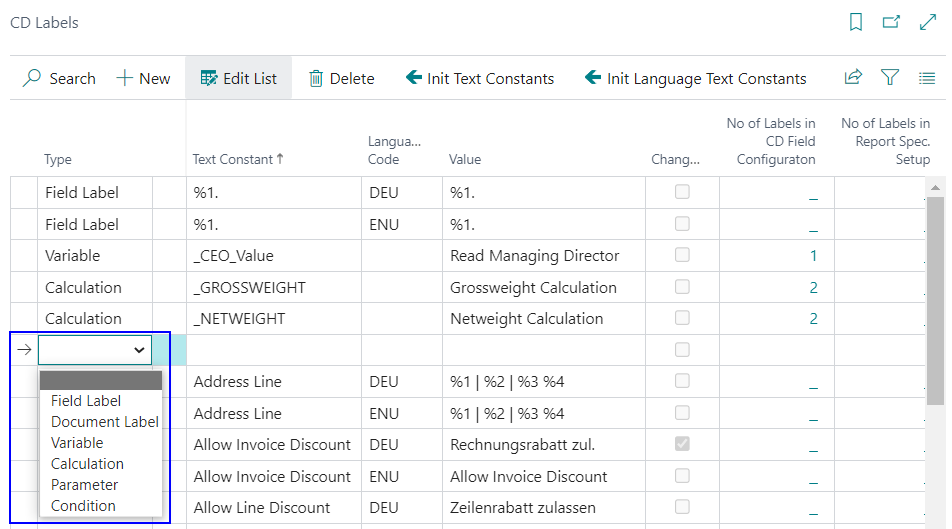
| Type | Description |
|---|---|
| Field Label | Used as field names, column headings, or field descriptions within document sections (e.g., Quantity, Unit Price, Shipment Date). Field Labels are language-dependent and are selected by the Language Code set on the document. They are referenced in the CD Field Configuration to label individual fields and columns. |
| Document Label | Used as the title or name of a document (e.g., Invoice, Order Confirmation, Sales - Shipment). Document Labels are language-dependent and typically contain placeholders such as %1 (document number), %2 (date) and %3 (page number). A Document Label can be assigned in the CD Report-Specific Setup, the CD Custom Specific Setup, or directly in the CD Field Configuration. It is printed in the Document Label section of the layout. See Where Document Labels can be assigned below. |
| Variable | A fixed value that can be printed directly on a document. Variables are not language-dependent. The value of a variable is maintained in the CD Rec. Extensions table. A variable is referenced by its Text Const name in the CD Field Configuration. |
| Calculation | Defines a named calculation that can be referenced in the CD Field Configuration to compute and print aggregated or derived values (e.g., total weight across all document lines). Calculations are not language-dependent. |
| Parameter | A parameter value used in the CD Field Configuration, for example to insert special characters or control formatting behaviour. Parameters are not language-dependent. |
| Condition | A condition identifier used in the CD Field Configuration to control whether a field is printed depending on the content of another field (e.g., checking whether a field contains a value or is empty). Conditions are not language-dependent. For details, see Conditions. |
Where Document Labels can be assigned
A Document Label can be assigned in three different places. Each location has a different priority. The system always uses the label from the highest-priority location that is set up:
| Priority | Location | Field | Description |
|---|---|---|---|
| 1 — highest | CD Field Configuration | Section = Document Label | A setup line with the Section set to Document Label directly defines which label is printed for a specific report. This also supports Yes/No conditions to switch the document label dynamically — for example, printing Prepayment Invoice instead of Invoice when the prepayment flag is set on the document. Several condition entries are possible; the first entry whose condition evaluates to true (or that has no condition) is used. |
| 2 | Corporate Design Custom Specific Setup | Report Label | Assigns a Document Label for a specific customer, vendor, or layout group. This overrides the report-specific label for the applicable business partner. |
| 3 — lowest | Corporate Design Report-Specific Setup | Report Label | Assigns the default Document Label for a report. This is the fallback used when neither a CD Field Configuration entry nor a customer-specific label is set up. The report-specific setup is pre-populated by the initialization function. |
Note
If no Document Label is found in any of the three locations, the system returns an error. A Document Label must always be set up at least in the CD Report-Specific Setup.
For setup examples and screenshots, see Customize Labels.
Text Constant
This is the label that is selected in the various setup tables and used in programming.
Language Code
For each Text Constant, a value can be created in any language. For this purpose, the corresponding Language Code can be selected in this field, for which the data in the Value column is then used.
Value
The values that are printed on the documents can be maintained in the Value column. Variable values, e.g. document numbers in the document label, are represented by "%1", "%2", etc.
Changed
If an entry, which was created by the initialization function, is adjusted manually, or if an entry is changed manually, a check mark is placed in this field. This way you can see which entry has been adjusted manually.
Initialization functions
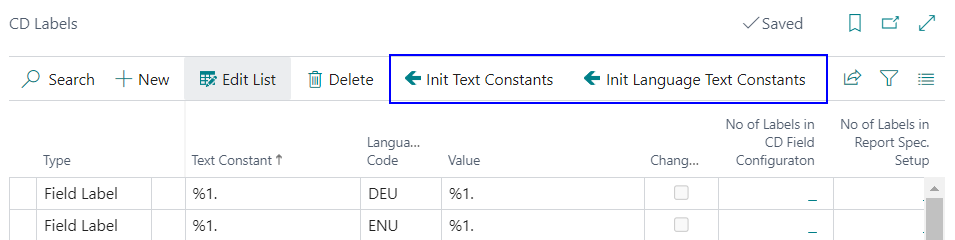
Init Text Constants
The Initialize Text Constants function creates all text constants without Language Code. If these have already been created, they can be re-initialized after a query. Initially, these text constants are also filled by the Function Initialize in the Yaveon 365 Process Base Corporate Design Documents Setup.
Init Language Text Constants
The Init Language Text Constants function can be used to initialize all Document- and Field Labels in different languages. After executing the function, a selection menu appears in which the language to be initialized can be selected. English and German are fully maintained as languages and are automatically created with the Function Initialize. Other languages such as French and Dutch are largely maintained. If a language is not maintained, the English term is automatically inserted.
Initially Created Text Constants
When the Initialize function is executed (either from the Yaveon 365 Process Base Corporate Design Documents Setup or via the Init Text Constants action), the following Text Constants are automatically created. These entries cover types that are not language-dependent (Variable, Calculation, Parameter, Condition) and serve as ready-to-use building blocks for the CD Field Configuration.
Variables
| Text Constant | Value | Description |
|---|---|---|
_CEO_Value |
Read Managing Director | Reads the managing director or CEO name from the Company Information and makes it available as a printable variable. This is used in the footer of corporate design documents to print a name below a signature line. The actual name is maintained in the CD Rec. Extensions table. |
Calculations
For details on how calculations work, see Calculation and Row Totals.
| Text Constant | Value | Description |
|---|---|---|
_GROSSWEIGHT |
Grossweight Calculation | A named calculation that totals the gross weight across all document lines. Used in the CD Field Configuration to print the total gross weight in the Row Totals or Footer section of a document. |
_NETWEIGHT |
Netweight Calculation | A named calculation that totals the net weight across all document lines. Used in the CD Field Configuration to print the total net weight in the Row Totals or Footer section of a document. |
Parameters
| Text Constant | Value | Description |
|---|---|---|
White Space |
<NBSP> |
Represents a non-breaking space character. Used in the CD Field Configuration as a separator or placeholder between fields where a standard blank space is not sufficient or where a visible gap is required. |
Conditions
| Text Constant | Value | Description |
|---|---|---|
C001 |
Contains | A condition that evaluates to true when a referenced field contains a specific value. Used in the CD Field Configuration to control whether a field is printed based on the content of another field. For details, see Conditions. |
C002 |
Empty | A condition that evaluates to true when a referenced field is empty. Used in the CD Field Configuration to suppress a field or section when no data is present. For details, see Conditions. |
Document Labels
The following Document Labels are pre-defined in the system and are initialized for the corresponding CD reports. Each label contains placeholders (%1 = document number, %2 = document date, %3 = page) that are replaced at print time.
| Label (Text Const) | Default Caption (EN) | Report | Notes |
|---|---|---|---|
Reminder |
Reminder %1 %2 %3 | Reminder | |
Sales Quote |
Sales - Quote %1 %2 %3 | Sales Quote | |
Sales Confirmation |
Order Confirmation %1 %2 %3 | Sales Order Confirmation | |
Sales Invoice |
Invoice %1 %2 %3 | Sales Invoice, Proforma Invoice | |
Sales Invoice Prepayment |
Prepayment Invoice %1 %2 %3 | Sales Invoice | Conditional: used when Prepayment Invoice = Yes on the document |
Credit Memo |
Sales - Credit Memo %1 %2 %3 | Sales Credit Memo | For non-DE companies |
Credit Memo DE |
Sales - Corrective Invoice %1 %2 %3 | Sales Credit Memo | For DE companies (Country/Region Code = DE) |
Credit Memo Prepayment |
Prepayment Credit Memo %1 %2 %3 | Sales Credit Memo | Conditional: Prepayment Credit Memo = Yes, non-DE |
Credit Memo Prepayment DE |
Sales - Prepmt. Corrective Invoice %1 %2 %3 | Sales Credit Memo | Conditional: Prepayment Credit Memo = Yes, DE |
Sales Shipment |
Sales - Shipment %1 %2 %3 | Sales Shipment | |
Return Order |
Return Order %1 %2 %3 | Sales Return Order Conf., Purchase Return Order | |
Blanket Sales Order |
Blanket Sales Order %1 %2 %3 | Blanket Sales Order | |
Sales Return Receipt |
Sales - Return Receipt %1 %2 %3 | Return Receipt | |
Sales Invoice Draft |
Draft Invoice %1 %2 %3 | Draft Invoice | |
Proforma Shipment |
Proforma Shipment %1 %2 %3 | Proforma Shipment | |
Purchase Quote |
Purchase - Quote %1 %2 %3 | Purchase Quote | |
Purchase Order |
Order %1 %2 %3 | Purchase Order | |
Purchase Invoice |
Purchase Invoice %1 %2 %3 | Purchase Invoice | |
Purchase Receipt |
Purchase Receipt %1 %2 %3 | Purchase Receipt | |
Purch. Credit Memo |
Purchase - Credit Memo %1 %2 %3 | Purchase Credit Memo | |
Blanket Purchase Order |
Blanket Purchase Order %1 %2 %3 | Blanket Purchase Order | |
Purchase Return Shipment |
Purchase - Return Shipment %1 %2 %3 | Purchase Return Shipment | |
Transfer Order |
Transfer Order %1 %2 %3 | Transfer Order | |
Transfer Shipment |
Transfer Shipment %1 %2 %3 | Transfer Shipment | |
Transfer Receipt |
Transfer Receipt %1 %2 %3 | Transfer Receipt | |
Finance Charge Memo |
Finance Charge Memo %1 %2 %3 | Finance Charge Memo | |
Certificate of Analysis |
Certificate of Analysis %1 %2 %3 | Cert. of Analysis | QA App — report PB365 QA Cert. of Analys. |
Note
Conditional Document Labels (e.g. Sales Invoice Prepayment) are stored as Section = Document Label entries in the CD Field Configuration with a Yes/No condition. The system evaluates entries top-down and uses the first one whose condition is true (or that has no condition).
Field Labels by Document
The following Field Labels are pre-initialized for each report's CD Field Configuration by the initialization function. They represent the default setup and can be freely adjusted or supplemented afterwards.
Header Section
| Field Label | Default Caption (EN) | Pre-initialized in Report |
|---|---|---|
Reminder No. |
Reminder No. | Reminder |
Finance Charge Memo No. |
Finance Charge Memo No. | Finance Charge Memo |
Customer No. |
Customer No. | Reminder, Finance Charge Memo |
Your Reference |
Your Reference | Reminder, Finance Charge Memo |
Quote No. |
Quote No. | Sales Quote |
Confirmation No. |
Order Confirmation | Sales Order Confirmation, Return Receipt |
Invoice No. |
Invoice No. | Sales Invoice, Draft Invoice |
Credit Memo No. |
Credit Memo No. | Sales Credit Memo |
Shipment No. |
Shipment No. | Sales Shipment, Transfer Order, Transfer Receipt, Purchase Return Shipment |
Bill-to Customer No. |
Bill-to Customer No. | Sales Quote, Sales Order Conf., Sales Invoice, Draft Invoice, Sales Credit Memo, Sales Shipment, Blanket Sales Order, Return Receipt |
Buy-from Vendor No. |
Buy-from Vendor No. | Purchase Return Shipment |
Document Date |
Document Date | All documents |
Posting Date |
Posting Date | Reminder, Sales Invoice, Draft Invoice, Sales Credit Memo, Transfer Order, Transfer Receipt, Finance Charge Memo |
Due Date |
Due Date | Reminder, Sales Invoice, Draft Invoice, Finance Charge Memo |
Order No. Sales |
Order No. | Sales Invoice, Sales Shipment |
VAT Registration No. |
VAT Registration No. | Reminder, Sales Quote, Sales Order Conf., Sales Invoice, Sales Credit Memo, Return Receipt, Finance Charge Memo |
Payment Terms |
Payment Terms | Sales Quote, Sales Order Conf., Sales Invoice, Draft Invoice, Sales Credit Memo, Blanket Sales Order, Purchase docs |
Shipment Method |
Shipment Method | Sales Quote, Sales Order Conf., Sales Invoice, Draft Invoice, Sales Credit Memo, Blanket Sales Order, Purchase docs, Transfer Order, Transfer Receipt |
Goods Issue Date |
Shipment Date | Sales Quote (header), Sales Order Conf. (header) |
Shipment Date |
Shipment Date | Sales Shipment, Transfer Order, Transfer Receipt |
Shipping Agent |
Shipping Agent | Transfer Order, Transfer Receipt |
Prices Including VAT |
Prices Including VAT | Sales Quote, Sales Order Conf., Sales Invoice, Draft Invoice, Sales Credit Memo, Blanket Sales Order, Return Receipt (disabled by default) |
Sales Person |
Salesperson | Sales Quote, Sales Order Conf., Sales Invoice, Draft Invoice, Sales Credit Memo, Blanket Sales Order, Return Receipt |
Purchase Person |
Purchaser | Purchase documents |
Line Section
| Field Label | Default Caption (EN) | Pre-initialized in Report (Line) |
|---|---|---|
No. |
No. | All documents with line items |
Description |
Description | All documents with line items |
Goods Issue Date |
Shipment Date | Sales Quote, Sales Order Conf. (per-line delivery date) |
Quantity |
Quantity | All documents with line items |
Unit Of Measure |
Unit of Measure | All documents with line items |
Unit Price Sales |
Unit Price | Sales documents (Quote, Order Conf., Invoice, Credit Memo, etc.) |
Line Discount % |
Line Discount % | Sales documents |
VAT Pct. |
VAT % | Sales documents |
Amount |
Amount | Sales documents (Line Amount) |
Net Weight |
Net Weight | Sales Shipment (weight calculation per line) |
Certificate of Analysis (QA App)
The following field labels are pre-initialized for the Certificate of Analysis report (PB365 QA Cert. of Analys.) by the QA App.
Header Section
| Field Label | Default Caption (EN) | Field |
|---|---|---|
PB365 QA Cert. of Analysis |
Certificate of Analysis | No. (printed in extra-large format as the document number block) |
PB365 QA Product Description |
Product Description | Item Description |
PB365 QA Product No. |
Product No. | Item No. |
PB365 QA Customer Product No. |
Customer Product No. | Extra Field (resolved at runtime from the customer's item reference) |
PB365 QA Storage Condition |
Storage Condition | Storage Condition Code |
Lot No. |
Lot No. | Lot No. |
Serial No. |
Serial No. | Serial No. |
Expiration Date |
Expiration Date | Expiration Date |
Line Section
| Field Label | Default Caption (EN) | Field / Notes |
|---|---|---|
PB365 QA Feature/Inspection Feature |
Feature / Inspection Feature | Description (caption definition for Inspection Feature lines) |
PB365 QA Target Value |
Target Value | Extra Field (computed from feature specification) |
PB365 QA Lower Tolerance |
Lower Tolerance | Extra Field (computed from feature specification) |
PB365 QA Upper Tolerance |
Upper Tolerance | Extra Field (computed from feature specification) |
PB365 QA Output Value |
Output Value | Output Value |
Unit Of Measure |
Unit of Measure | Unit of Measure Code |
Tracking Section (Lot Management App)
The Lot Management App adds the following field label to the Tracking section of the CD field configuration. It is disabled by default and can be activated when needed.
| Field Label | Default Caption (EN) | Notes |
|---|---|---|
External Lot Number |
External Lot Number | Added by the LM App to the Tracking section (disabled by default). Printed alongside Lot No. when the LM Tracking Data option is active. |
Field Labels Used by Programmed Functions
The following Field Labels are referenced directly in AL code by specific programmed functions. They are applied automatically when the corresponding function is active in the CD Field Configuration. Their label text cannot be changed through the Label column of a field configuration line — to change the caption, update the label value in the CD Labels table instead.
| Function | No. | Caption | Field Labels Used | What they print |
|---|---|---|---|---|
ExtendedTexts |
150 | PB365 Extended Texts | (none) | Appends the PB365 Extended Texts configured for the line item directly as line text. No CD Label is used — the text comes verbatim from the Extended Text setup. |
TrackingTexts |
250 | Tracking Texts | Lot No., Package No., Serial No., Quantity, Unit Of Measure, Expiration Date |
Prints item tracking information (lot, package, serial numbers with quantity and expiry date) as a line appendix. |
AddAsmComponents |
300 | Add Assembly Components | (none) | Appends the assembly components (No., Description, Variant Code, Quantity, UoM) of an assemble-to-order or posted assembly as line text. No CD Label is used — the component data is formatted directly. Controlled by the Print Assembly Components option in CD Setup. |
AddItemCrossRefNo |
450 | Add Item Cross Reference No. | Your Reference No. |
Prints the customer's item reference number (cross-reference number) per document line. |
AddBlanketOrderNo |
550 | Add Blanket Order No. | Blanket Sales Order No. |
Prints the blanket order number per sales line, if a blanket order is linked. |
AddCustomsTariffNo |
1005 | Add Customs Tariff No. | Tariff No. rs, Country of Origin rs |
Prints the item's tariff number and, if available, the country of origin in the document line area. |
AddDescription2 |
1010 | Add Description 2 | (none) | Appends the item's Description 2 field as additional line text. No CD Label is used. Controlled by the Print Description 2 option in CD Setup. |
| Add Totals (internal) | — | — | Subtotal, Inv Discount Amount, VAT Discount Amount, Discounted Amount incl. VAT, VAT Zero, Interest Amount, VAT Amount, Total excl. VAT, Total incl. VAT, Total Text |
Prints the totals block of a document: subtotal before discount, invoice discount amount, payment discount on VAT, and the final total lines. In a company that uses Sales Tax instead of VAT, the Sales Tax variants of these labels are used — see Sales Tax on Corporate Design Documents. |
| Add VAT Counter (internal) | — | — | VAT Amnt. Specific, VAT Identifier, VAT Pct., Line Amount, Inv Discount Base Amt, Inv Discount Amount, VAT Base, VAT Amount, Total |
Prints the VAT Amount Specification table (and LCY variant). All column headings and the total row label are sourced from these labels. |
| Add VAT Clauses (internal) | — | — | VAT Clause Area, VAT Identifier, VAT Clauses, VAT Amount |
Prints the VAT Clause section with its heading and column labels. |
| Add Prepayment (internal) | — | — | Prepayment Spec, GL Account No., Description, Amount |
Prints the Prepayment Specification section with its heading and column labels. |
| Add Prepayment VAT (internal) | — | — | Prepayment VAT Spec, VAT Identifier Long, VAT Pct., Line Amount, VAT Base, VAT Amount |
Prints the Prepayment VAT Amount Specification section. |
| Add Addresses (internal) | — | — | Sell to Customer No., Bill-to Customer No., Pay-to Vendor No., Ship-To Address, Bill-to Address, Payment Details, Collect From Address |
Used when printing additional address blocks (ship-to, bill-to, pay-to) alongside the main address on sales and purchase documents. |
The following functions are provided by optional process apps and follow the same rules: their label texts must be changed in the CD Labels table, not via the field configuration line.
| Function | No. | Caption | Field Labels Used | What they print |
|---|---|---|---|---|
SalesDiscounts |
5276504 | Sales Discounts | Description, Line Discount %, PB365 TR Line Discount Amount per Unit, Base Value, Discount Value, New Value |
Prints a discount detail table per sales line showing all applied line discounts with base value, discount amount per UoM, and the resulting new value. (Trade App) |
PB365 TR Pricing Unit |
5276505 | Pricing Unit | PB365 TR Price refers |
Prints a note indicating that the listed unit price refers to a specific pricing unit quantity and UoM (e.g., "The price refers to 1,000 KG."). Applies to both sales and purchase lines. (Trade App) |
| Invoice Discount Details (internal) | — | — | PB365 TR Inv. Disc. Details, Description, PB365 TR Discount Level, Discount %, PB365 TR Calc. Base, Discount Value |
Automatically appended to Sales documents (Quote, Order, Invoice, Credit Memo) as a specification section showing invoice-level discount details. The Discount Level column is only included when the Combine Lines in Levels discount mode is active. (Trade App) |
PB365 QA Inspection Method |
5518057 | Inspection Method | Inspection Method |
Prints the inspection method description as a line appendix on Certificate of Analysis lines (Inspection Feature type). Only printed when the Print Inspection Method option is enabled in CD Setup. (QA App) |
| QA Signed by (internal) | — | — | PB365 QA Prod. in Spec., PB365 QA Yes, PB365 QA No, PB365 QA Release issued, PB365 QA City Date, PB365 QA Signed by |
Prints the signature and release block at the end of a Certificate of Analysis: product-within-specification status, release indication, and a signatory line with city and date. Controlled by the Signed by option in CD Setup. (QA App) |
LotMgtTrackingData |
5517650 | Lot Management Tracking Data | Lot No., Package No., Serial No., External Lot Number, Expiration Date, Tracking Part |
Extended replacement for the base TrackingTexts function. When the Lot Management App is installed, it removes TrackingTexts (250) from the function list and registers this function instead. Additionally prints the external lot number per tracking entry. (Lot Management App) |
LoadCarrierNo |
5518300 | Load Carrier No. | Load Carrier No. |
Prints all load carrier numbers assigned to a Sales Shipment line as a line appendix. Controlled by the Print Load Carrier No. option in CD Setup. (WMS App) |
| Alternative Quote Lines (internal) | — | — | PB365 SP Alternative Quote Lines |
Automatically inserts a header text note on Sales Quotes that have the Alt. Quote Lines flag set. The full label caption is used as the note text. (Sales/Purchase App) |
BaseItem |
5517800 | Base Item | Base Item No. |
Prints the manufacturing base item number as a line extension (e.g., Base Item No. RAW-001) when the item on the line is derived from a base item. Controlled by the Print Base Item No. option in CD Setup (Additional = printed alongside the item no.; Replace = replaces the item no. column entirely). (Manufacturing App) |
HazSubstInfo |
5517950 | Hazardous Substance Information | HSM ADR, HSM IMO, HSM IATA, HSM RID |
Prints hazardous substance classification texts as line extensions on shipment lines. Each applicable transport regulation type (ADR, IMO, IATA, RID) appears as a bold heading followed by the substance descriptions. Controlled by the Print Hazardous Substance Information option in CD Setup. (HazMat Connect App) |
| Hazardous Substances Specification (internal) | — | — | HSM Hazardous Substances Spec, HSM Transport Category, HSM Net Weight KG, HSM Liter, HSM ADR Points, PB365 HSM ADR LQ Points |
Automatically appended to shipment documents (Sales Shipment, Transfer Shipment, Purchase Return Shipment) as a specification section showing totals per transport category: net weight (kg), volume (l), ADR points, and ADR limited-quantity points. (HazMat Connect App) |
| UN / Group Specification (internal) | — | — | HSM UN No., HSM Package, Quantity, HSM Net Weight KG, HSM Liter, HSM ADR Points, PB365 HSM ADR LQ Points |
Automatically appended after the Transport Category Specification on the same shipment documents. Shows one row per UN number and packaging group with quantity, net weight, volume, ADR points, and ADR LQ points. (HazMat Connect App) |