Catch Weight in Sales and Purchase
Catch Weight is a term used in the food industry to describe products that are traded in different weights per piece, rather than in a fixed unit of weight. It is commonly used for fresh or unprocessed foods such as meat, fish, fruit and vegetables. The Catch-Weight-functionality simplifies the trade of products, by allowing quantities to be specified in two different units of measure. In combination with the Sales and Purchase Tolerances it is possible to pay based on the actual weight at the time of purchase.
Example: An order of fresh chicken breast is ordered in pieces, a quantity of 100 pieces. Each chicken breast should have a weight of 200 grams. This would be a nominal weight of 20,000 grams = 20 kilograms. At a price of 10 euros per kilogram, that is 200 euros. When the shipment arrives, the actual weight of the shipment is 20.6 kilograms, but there are still only 100 pieces. Therefore, the price of the shipment is 206 euros and can be invoiced with the help of the Catch-Weight-functionality.
Catch Weight Setup
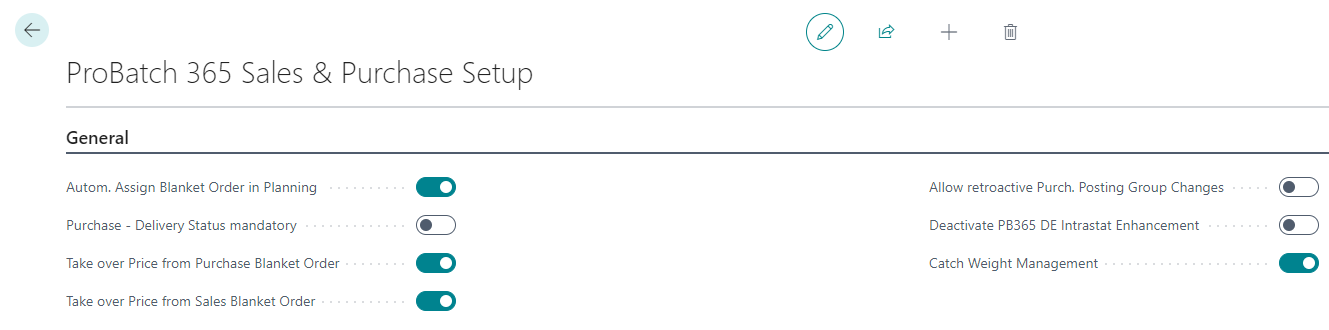
To use the Catch Weight functionality, it is necessary to activate it in the Yaveon 365 Sales and Purchase Setup.
Catch Weight Unit of Measure on the Item
Items can be marked as Catch Weight Item on the Item Card. Only if the item is marked as Catch Weight Item then the Catch Weight fields in Purchase and Sales documents can be used. The Catch Weight Unit of Measure Code is the unit that is entered in purchase, sales and associated warehouse processes and printed on documents.

Catch Weight in processes and documents
Catch weight quantity fields have been added to the lines of all purchasing and sales documents. This also applies to documents used for Warehouse Receipts and Shipments. The Catch Weight fields are Catch Weight Item, Catch Weight Qty., Catch Weight UoM Code, Catch Weight UoM, CW Qty. per Base UoM, CW Qty. to Ship/CW Qty. to Receive, CW Qty. Shipped/CW Qty. Received, CW Qty. to Invoice, CW Qty. Invoiced, CW Qty. Shipped Not Invoiced/CW Rcd. Not Invoiced and CW Qty. to Receive.
If an item marked as a Catch Weight item is entered in a document, then the Catch Weight Item and Catch Weight UoM Code fields are filled automatically. The Catch Weight quantity fields remain empty until they are either filled manually or the linked standard quantity field is filled.
If, for example, Quantity is filled, the nominal Catch Weight Quantity is calculated based on the item setup. Conversely, the value for Quantity is calculated and filled when a value is entered in the Catch Weight Quantity field for the first time.
Important
The automatic calculation of the quantities or catch weight quantity fields based on the other field only takes place if the calculated field is 0. The adjustment of a quantity field that is not 0 is not carried out automatically so that manually entered values are not overwritten. This is particularly important for partial deliveries.
Note
The catch weight quantities in the catch weight unit are currently only used in the purchasing and sales documents. There is no transfer to Ledger Entries, these are not recorded in the inventory and use in production and most logistics processes is also not possible.
Tolerances
The Purchase and Sales tolerances are applied to the standard quantity fields, not to the Catch Weight quantity fields. It is therefore recommended to keep the base unit of measure in the weight unit.