Retroactive changing posting groups after receipt
Yaveon 365 Sales and Purchase allows you to change posting groups in Purchase Orders and unposted Purchase Invoices after the warehouse receipt has been posted. This can even be done after the inventory has been consumed.
This functionality is necessary, when the origin or order address was not specified correctly when receiving the goods. This can lead to false posting groups and vat clauses.
Without this function the receipt would need to be canceled, posting groups must be corrected and the purchase order must be reposted. Additionally this would only be possible if the goods were not consumed yet.
Example Scenario: Company A is located in Germany and orders goods of company B, which is also located in Germany. When the goods arrive the receipt is posted as a national transaction. Once the Purchase Invoice is received, it is revealed that the goods were not delivered from the German main location of company B but from their Dutch warehouse. In this case the transaction becomes a European transaction which requires different posting groups, different VAT clauses and a different Partner VAT ID.
Note
It is important to understand that the posted receipt document as well as posted entries are changed. When using other non Yaveon 3rd party apps, it is necessary to fully test the integration of those apps.
Note
Posted Purchase Receipts which contain an invoiced or partially invoiced line may not be changed anymore.
Setup
The functionality can be activated/deactivated in Yaveon 365 Sales and Purchase Setup.
Retroactive Changing Posting Groups in Purchase Orders
The function Change Business Posting Group in Purchase Orders enables the user to change posting groups and vat relevant data, as long as the receipt is posted and the invoice has not been posted yet.
When running the action a new page opens. This page shows the current values for Country/Region Code, Gen. Business Posting Group, VAT Bus. Posting Group and VAT ID. Additionally, there are four editable fields for data entry
- New Receive-from Country/Region Code
- New Gen. Bus. Posting Group
- New VAT Bus. Posting Group
- New VAT Registration No.
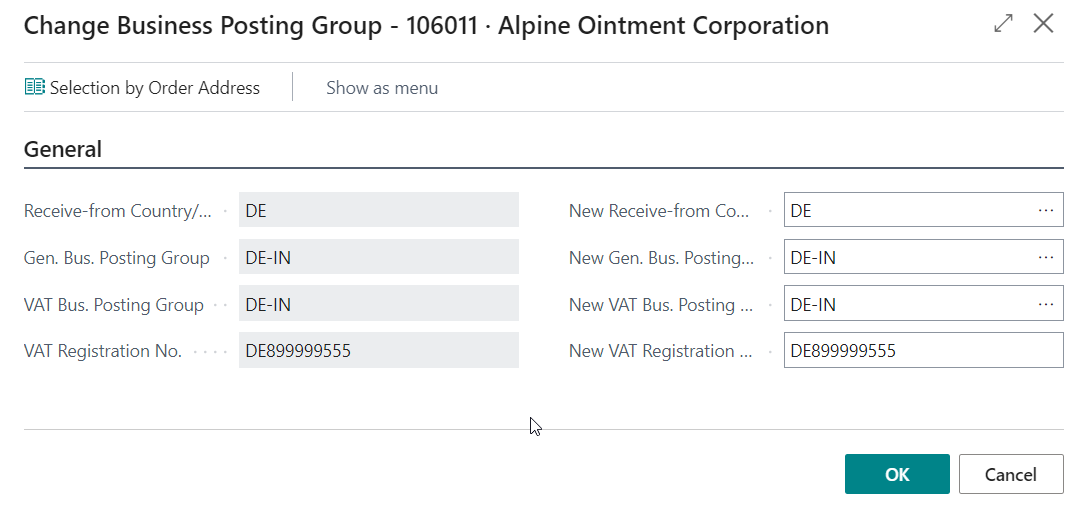
The fields New Gen. Bus. Posting Group and New VAT Bus. Posting Group are filled according to the value in New Receive-from Country/Region Code. The Country code is used to find the correct posting groups via the Country Posting Grp. Setup. If the setup table does not contain values for the given combination the fields will remain empty and must be filled manually.
Note
New VAT Bus. Posting Group is prefilled from the default VAT business posting group of the selected New Gen. Bus. Posting Group. You can overwrite the proposed value.
On the request page, the assistant Selection by Order Address helps selecting the correct posting groups. If order addresses exist, the user can select the correct order address which will result in correct entered posting groups as well as the VAT ID belonging to the vendor order address.
Note
The Selection by Order Address action is only shown if the field Posting Group and VAT ID determination on the Yaveon 365 Sales and Purchase Setup page is set to Yaveon 365 Advanced Logic, see Choosing the determination logic. With the option Business Central Standard, the fields New Gen. Bus. Posting Group and New VAT Bus. Posting Group are not proposed from the Country Posting Grp. Setup either — you have to enter both manually.
Retroactive changing posting groups on purchase invoices
The process assumes that the purchase invoice is prepared with correct postings groups, order address information as well as the correct VAT ID of the business partner. In a second step the to be invoiced receipt lines are entered into the invoice via the Get receipt lines function.
If deviation between the Posted Purchase Receipt and the prepared Purchase Invoice exist, the user will be given the option to change the data of the posted receipt and related posted entries according to the prepared invoice.