Separation of load carriers
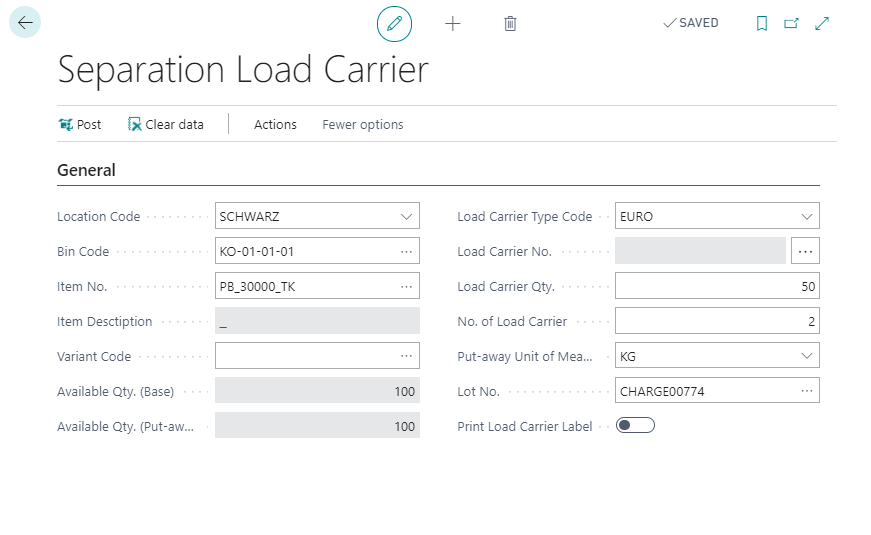
You can create load carriers for inventory that is not yet on a load carrier by using the screen Separation Load Carrier
The use of the mask is analogous to the mask separation of load carriers in goods receipt.
Note
The fields Load Carrier Type / Load Carrier Type Code referenced here keep their names, but their lookup opens the unified Package Types page (Yaveon 365 Library). See Load Carrier Types for details.
Using the field Bin Code, you can select a stock to be separated. The system then fills the item data automatically (for example, Item No.). The fields Load Carrier Type Code, Put-away Unit of Measure Code and Load Carrier Qty. can be filled automatically if the Item is maintained accordingly and can be changed here. If this is not done, the fields must be entered manually.
If several load carriers are to be created in one go, the field Load Carrier No. must remain empty. The system draws new load carrier numbers using the Number Series defined for the Load Carrier Type. You can now use the No. of Load Carrier field to define the number of load carriers to be created. If you want to create one specific load carrier you can use the field Load Carrier No. and define the specific number for that load carrier. In this case the field No. of Load Carrier is no longer editable. You can also print a label with activating the field Print Load Carrier Label here.
If the data was not entered correctly and should be removed, you can call the action Clear Data. When the entry is complete, the load carriers are created using the action Post. After creating load carriers, the system automatically creates a put-away. The put-away already contains the target bin proposed by the system and can be processed in the same way as a put-away from a warehouse receipt.
Note
This dialog can only be used for locations with directed Put-away and Pick.