Extension with variables
In Corporate Design it is possible to add data elements to each area, which do not exist directly as a data set in the system. How to create such an extension with variables is described here. As an example, the title and name of the CEO is added to the footer.
For this, entries must be created in the CD Labels and CD Rec. Extensions tables. Afterwards, this data must be set up in the CD Field Configurator so that it is printed on the report.
CD Labels
In the table CD Labels create a new row for the label with the following data:
- Type Field Label
- Text Constant _CEO_Label
- Language Code ENU
- Value CEO
To be able to print the CEO in English as well as in German documents, further lines with other Language Codes, e.g. DEU can be created.
In the CD Labels table, create another row for the value, with the following data:
- Type Variable.
- Text Constant _CEO_Value
- Value Read Managing Director.
The Text Constant can be chosen freely. The value in the Value column is not relevant and serves only as explanation.

CD Rec Extensions
In the CD Rec. Extension table, create a new row for the actual value, in the example the CEO, with the following data:
- Source Type Address Buffer.
- Variable _CEO_Value.
- Value Gregory Smith.
Via the Variable the Value is linked to the variable, which was created in the CD Labels table. This means you have to use the same Variable/Text Constant here. In the example the name of the CEO with the variable _CEO_Value.

CD Field Configuration
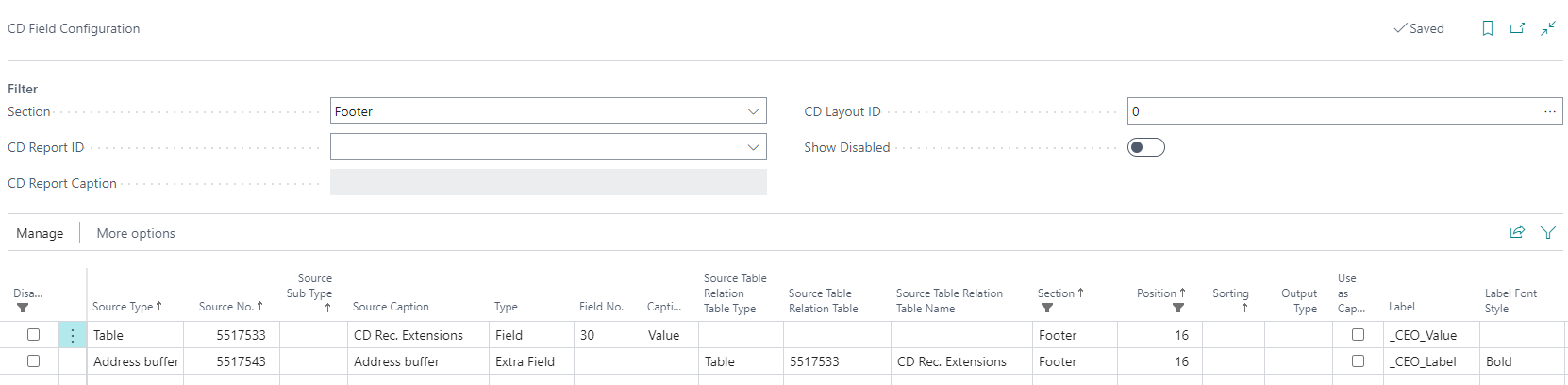
In order to print the created variable with the associated label on the document, this must be set up in CD Field Configuration. Two lines must be created for this purpose.
The following example describes the printing of the variable _CEO_Value with the label _CEO_Label in the footer of all documents.
The first line creates a link to the variable. For this purpose, the following data must be entered:
- Source Type Address buffer.
- Type Extra field
- Field No. 5517543
- Section Footer
- Position 16
- Label _CEO_Label
- Label Font Style Bold
Other fields in the line are automatically filled, for example, the fields for the source table relation. The fields Section and Position control where on the document the variable is printed. A printout can be made not only in the footer, but also, for example, in the header. The two Label fields control the printing of the label. The variable can also be printed without a label by leaving the fields empty.
The second line inserts the value of the variable. The following data must be entered:
- Source Type Table.
- Source no. 5517533
- Type *Field
- Field No. 30
- Section Footer
- Position 16
- Label _CEO_Value
Again, other fields will be filled in automatically. It is important that the values of the Section and Position fields of the two lines are the same, and that the Label field contains the name of the _CEO_Value variable. When this Label is selected, an existing filter on the Field Label value may need to be resolved before the variable can be selected.
As a result, the variable will be printed in the footer of all documents. The value of the variable, e.g. the name of the CEO, can be customized in the CD Rec. Extension table.
