Corporate Design Report-Specific Setup
The Report-Specific Setup allows you to select a different layout for each document and to set up the values and fields printed for each report separately.
The list view provides an overview of each document, the selected layout, whether the general setup is used, and the number of fields configured.

The following reports are set up through Corporate Design:
| CD Report ID | CD Report Name |
|---|---|
| 5517489 | Blanket Purchase Order |
| 5517490 | Blanket Sales Order |
| 5517492 | Purchase - Credit Memo |
| 5517493 | Purchase - Invoice |
| 5517494 | Purchase - Order |
| 5517495 | Purchase - Quote |
| 5517496 | Purchase - Receipt |
| 5517497 | Purchase - Return Shipment |
| 5517498 | Reminder |
| 5517499 | Return Order Confirmation |
| 5517500 | Return Order |
| 5517501 | Sales - Credit Memo |
| 5517502 | Sales - Draft Invoice |
| 5517503 | Sales - Invoice |
| 5517504 | Sales Order Confirmation |
| 5517505 | Sales - Proforma Invoice |
| 5517506 | Sales - Quote |
| 5517507 | Sales - Return Receipt |
| 5517508 | Sales - Shipment |
| 5517509 | Transfer Order |
| 5517510 | Transfer Receipt |
| 5517511 | Transfer Shipment |
| 5517517 | PB365 CD Finance Charge Memo |
| 5517522 | Sales - Proforma Shipment |
| 5518058 | Certificate of Analysis |
The report-specific setup is initially filled by the function Initialization in the ProBatch 365 Base Corporate Design Documents Setup.
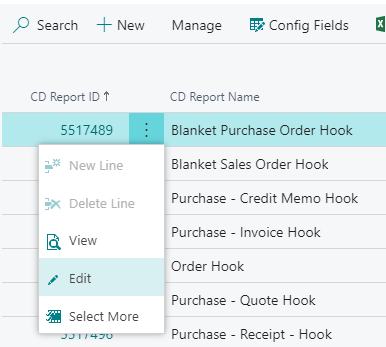
The setup of a report can be customized by selecting the menu item Edit in the column CD Report ID. This opens the card for Corporate Design Report-Specific Setup.
There are a number of tabs and options in the page view:
General tab
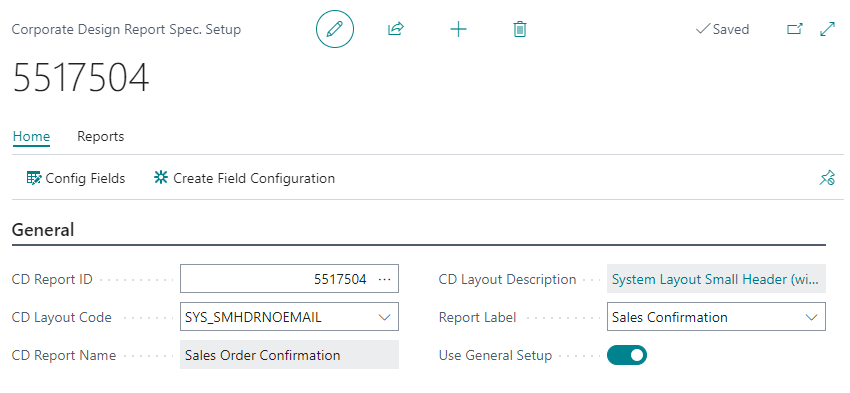
In the card view of the report-specific setup, the settings for a single report can be made. This document is identified by the CD Report ID and the corresponding CD Report Name.
In the field CD Layout Code you have to select the layout to be used for the document. CD Layout Description contains the name of the layout. Several System Layouts are contained in Corporate Design. A description of the layouts can be found in the help page Corporate Design Layouts. Additionally, new layouts can be uploaded in this page.
Use General Setup
If this option is activated, the settings for document printing details are taken over from the ProBatch 365 Base Corporate Design Documents Setup. If this option is deactivated, you can customize the document printing details for this document.
Report label
In this field you can select the Text Constant that is used as label for this document. The selection is made from the table CD Labels. There Document Labels are maintained in several languages. These can be extended there.
Report Print Details tab
If the Use General Setup option is deactivated, the Report Print Details tab is displayed. Use this tab to set up the details for this report. The individual options are described in ProBatch 365 Base Corporate Design Documents Setup, in the Report Print Details tab. The Report Print Details are extended by options from other ProBatch 365 Apps.
Functions
Config Fields
The CD Field Configuration can be called up via Config Fields in the menu bar. There you can define the fields and columns which should appear in the report. The called page will be filtered on the selected report.
Create Field Configuration
The function Create Field Configuration in the menu band creates the setup for this report in the CD Field Configuration. The setup is the same as the setup from the Function Initialize, reduced to the setup of the selected report.
Test Print
With the function Test Print a test print can be started for the selected report. The function selects the first available document by default. This simplifies the test of the current setup.