Yaveon Feature Management
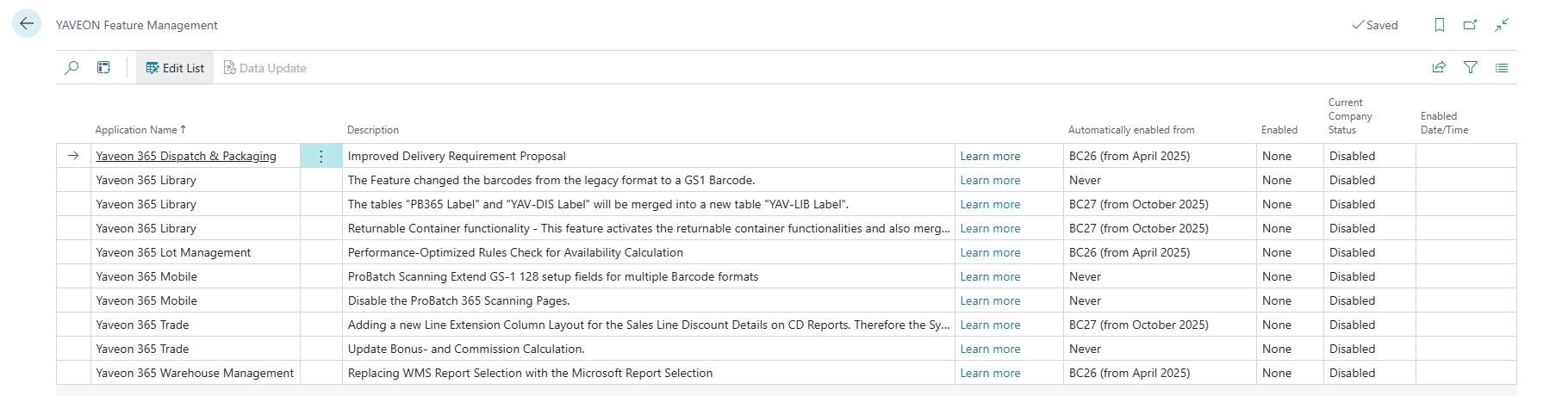
The page Yaveon Feature Management provides, similar to the Business Central Feature Management, an overview of features that can be enabled as needed. The current status of each feature can be seen in the Current Company Status field. Using the Enabled field, a feature can be activated for the current tenant by changing the option from None to All Users. Some of these features require a data upgrade, which can be performed via the Data Update action. Features that require a data upgrade cannot be deactivated afterwards. In this case, a warning message will be displayed when activating the feature, which must be confirmed.
| Field Name | Description |
|---|---|
| Application Name | Name of the affected Yaveon App |
| Description | Short description of the Feature |
| Automatically enabled from | Date from which the feature must be mandatorily enabled. After this date, the feature will no longer appear on the page and cannot be deactivated |
| Enabled | Option values are None and All Users. Setting this field to All Users will enable the Feature |
| Current Company Status | Shows the status (Enabled/Disabled) of the feature in this tenant. If a data update is required and has been performed, the field will show Completed Data Update |
| Activation date/time | Shows the date and time when the feature was activated |
Performance-Optimized Rules Check for Availability Calculation
Warning
This Feature will be automatically activated from Business Central Version 27.0 onward for existing and new systems and companies. The Feature cannot be deactivated.
When this feature is enabled, Business Central checks availability rules more efficiently. For example, when creating sales lines, if many inventory entries need to be checked, only those with different rule-checking dimensions (such as expiration dates or lot statuses) are considered individually. Entries with identical dimensions are grouped and checked just once, improving performance. If no availability rules are set up, no rule check is performed. Performance is especially improved for customers who manage many lots per item or use serial number tracking. For some transactions, item availability is cached for up to one minute to reduce the number of calculations during a single transaction.
Note
Impact: Increased performance through more sophisticated filters when calculating availability.
ProBatch Scanning Extended GS-1 128 setup fields for multiple Barcode formats
Warning
The activation of this feature is reversible but existing setup will be lost upon deactivation.
By activating this feature, the fields GS-1 128 FNC1 Character and GS-1 128 Starting Sequence on the ProBatch 365 Scanning Setup page are extended. This extension makes it possible to enter lists of separators and start sequences, enabling the identification and evaluation of various GS-1 barcode formats. Additionally, a new field Remove Start Sequences is added to the setup page. Here, a list of start sequences can be entered, separated by commas. The entered start sequences are automatically removed from the beginning of the barcode as soon as the record is transferred from the scanner.
Note
Impact: Extension of the recognizable scan parameters and qualifiers. If fully configured, this allows various GS-1 128 barcode formats to be read, including all common separators and start sequences. This increases flexibility when working with external barcodes, which may be delivered in different, supplier-specific barcode formats. Detailed information about GS1 barcodes and their setup can be found in the online help.
Disable the ProBatch 365 Scanning Pages
By activating this feature, the pages of the legacy scanning solution are deactivated and can no longer be accessed via global search. This affects the mobile dialogs of the ProBatch 365 Scanning App as well as the pages Mobile Users (Legacy) and Probatch 365 Scanning Setup.
Note
Impact: The pages are no longer accessible via global search and features are deactivated. However, existing records are not deleted and will be available again after deactivating the feature.Activation of this feature is recommended when working with the Yaveon 365 Warehouse Scanning or Yaveon 365 Manufacturing Scanning apps.
Adding a new Line Extension Column Layout for the Sales Line Discount Details in CD Reports. Therefore the System Layouts need to be updated. Individual CD layouts must be adapted manually.
Warning
This Feature will be automatically activated from Business Central Version 27.0 onward for existing and new systems and companies. The Feature cannot be deactivated.
When this feature is activated, the new field Discount Amount per Unit can be printed next to Line Discount % in a new layout for sales documents. The existing Corporate Design system layouts have 8 columns for line extensions. Because adding the new field would cause unaesthetic line breaks, a new layout with 7 columns has been implemented. All existing system layouts are updated automatically, but project-specific layouts must be updated manually.
Note
Impact: Project-specific layouts must be updated manually.
Update Bonus and Commission Calculation
Warning
The activation of this feature is not reversible, as tables are merged or split during activation.
When this feature is activated, the tables Commission Setup and Bonus Setup are moved into the ProBatch 365 Trade Setup table. The Sales Basis Data table is split into the Bonus Basis Data and Commission Basis Data tables. Additionally Bonus Basis Data Archive and Commission Basis Data Archive tables are added to be used to archive data for performance reasons. The Boolean fields Do Not Create Bonus Basis Data and Do Not Create Commission Basis Data have been added to the ProBatch 365 Trade Setup page. When these are activated, no bonus or commission basis data will be created, and the bonus or commission calculation features can no longer be used. After activating this feature, users have various configuration options for determining which invoices are included in the bonus calculation. For example, only paid invoices (i.e., with closed customer ledger entries) can be considered in the bonus calculation. Accruals for bonuses can be created, adjusted, or reversed.
Note
Impact: Increased performance through possible data archiving. Tables are merged, which means records can be deleted, changed, or newly created. Therefore, the activation of this feature is irreversible. After activating certain fields, data cannot be restored. Customer-specific adjustments in the areas of bonus or commission calculation must be checked for compatibility before activating this feature.
Replacing WMS Report Selection with the Microsoft Report Selection
Warning
The activation of this feature is not reversible!
Warning
This Feature will be automatically activated from Business Central Version 27.0 onward for existing and new systems and companies. The Feature cannot be deactivated.
When this feature is activated, the WMS Report Selections functionality is replaced by the BC standard setup Report Selection - Warehouse, allowing multiple reports to be printed for a document type at the same time. As a result, the WMS Report Selection can no longer be used, but the settings are transferred to Report Selection - Warehouse.
Note
Impact: You can now configure multiple reports per print document. The WMS Report Selection page remains accessible via global search, but the configuration on the Report Selection - Warehouse page takes precedence over any settings on the old page.
Improved Delivery Requirement Proposal
Warning
This Feature will be automatically activated from Business Central Version 27.0 onward for existing and new systems and companies. The Feature cannot be deactivated.
When this feature is activated, proposal templates with configured filters and parameters can be stored in the Automatic Delivery Requirement Fill Template field in the ProE-SCM 365 Delivery Requirement Automatic Batches page. If the feature is not activated, the filters and parameters for filling the proposal in the field Automatic Delivery Requirement Fill Parameter will be stored without templates.
Note
Impact: By activating this feature, you can specifically store templates for the delivery proposal. For more information, see here.
The Feature changed the barcodes from the legacy format to a GS1 Barcode.
The previously used label format was ItemNo.@Variant@LotNo.@SerialNo.. By activating this feature, the format is adapted to comply with GS1 guidelines. The setup can now be found elsewhere. When this feature is activated, the field Product Label Barcode Type is removed from the ProBatch 365 Lot Management Setup page and added as Label Barcode Type to the ProLibrary Setup. The option QR can be selected as a value for Label Barcode Type. The selection determines in which format the barcodes for the Product Labels and Load Carrier Label reports are to be printed.
Note
When creating labels, please note that according to the GS1 standard, only lot numbers with a maximum length of 20 characters can be recognized.
The tables "PB365 Label" and "YAV-DIS Label" will be merged into a new table "YAV-LIB Label".
Warning
The activation of this feature is not reversible, as tables are merged during activation. This may result in new records being created, and existing records may be changed or deleted.
Warning
This Feature will be automatically activated from Business Central Version 27.0 onward for new systems and companies. The Feature cannot be deactivated. For existing companies the Feature is still deactivated. The Feature will be permanently activated from Business Central Version 28.0 onward.
When this feature is activated, the tables Label (from the ProBatch 365 Base app) and ProE-SCM 365 Label (from the ProE-SCM 365 Dispatch & Packaging app) are merged into the new Label table in the ProLibrary app. The new table contains fewer fields than ProE-SCM 365 Label; the data previously stored there is now retrieved directly from the referenced source record instead of being stored locally in a label record.
Note
Impact: The original tables and associated pages are no longer accessible via global search. Existing records are imported in the new table when the data upgrade is executed, new records are not added to the original tables. Many fields are no longer stored in a label record but are retrieved directly from the source record. This avoids unnecessary duplication of information, which can improve performance. Existing adjustments to the Label or ProE-SCM 365 Label tables, as well as custom reports, must be adapted to the new table.
Returnable Container functionality - This feature activates the returnable container functionalities and also merges the tables load carrier typ, container type and ESCM Package into one new table Package type.
Warning
The activation of this feature is not reversible, as tables are merged during activation. This may result in new records being created, and existing records may be changed or deleted.
Warning
This Feature will be automatically activated from Business Central Version 27.0 onward for new systems and companies. The Feature cannot be deactivated. For existing companies the Feature is still deactivated. The Feature will be permanently activated from Business Central Version 28.0 onward.
When this feature is activated, the Returnable Container Management functionalities are enabled. In addition, the Packaging Account table is introduced, allowing vendor-, customer-, and shipping agent-specific packaging accounts to be set up for clear and detailed tracking of packages. The tables Load Carrier Type, Container Type, and ProE-SCM 365 Package are also merged into the new Package table in the ProLibrary app to centralize data storage and unify functionalities. Furthermore, this feature enables the transfer of load carrier lines from warehouse shipment to the corresponding shipment order.
Note
Impact: The original tables are no longer accessible via global search. Although the functionalities are now unified in a central table, Load Carriers, Containers, and Packages are still distinct entities with different functions and applications. Load Carriers for Warehouse Management can be created from the new Package Types page. Customer-specific adjustments affecting packaging materials, containers, or load carrier types must be checked for compatibility.