Rules for electronic signatures
To open or create existing rules for electronic signatures, open the list of Electronic Signature Rules. The list displays the existing rules. You can edit them using the Edit action or create a new rule using +NEW.
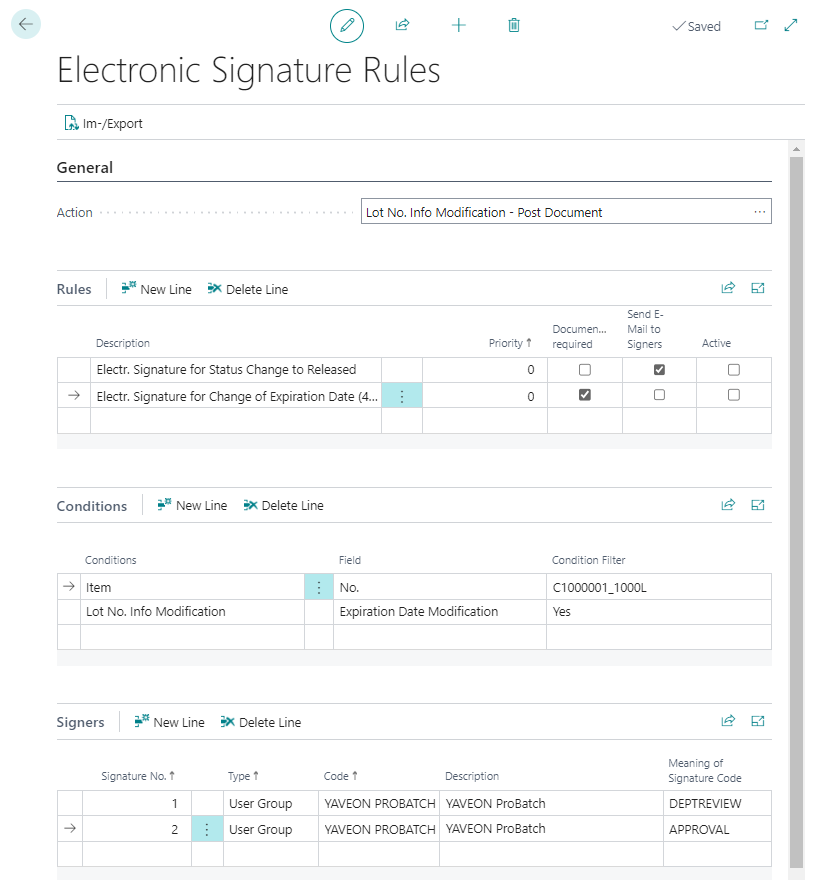
Each Electronic Signature Rule refers to a unique action. Certain actions are only available if the corresponding app is installed and licensed.
The following actions are available:
| Area | Action |
|---|---|
| Audit Trail | Changes |
| Item tracking data | Lot No. Information Modification - post document Lot No. Modification - post document |
| Sales | Post sales order / invoice |
| Purchase | post purchase order / invoice |
| Warehouse | post item journal post inventory journal post assembly order post inventory reclassification journal post inventory movement |
| Inventory | Post Warehouse Receipt Register Put-Away Post Warehouse Shipment Register Pick Register Whse. Movement Register Whse. Item Journal Register Whse. Reclassification Journal Register Whse. Phys. Inventory Journal Register Inventory Movement |
| Phys. Inventory Order | Phys. Inventory Order - post document |
| Manufacturing | Certify Production BOM Reset Status of Production BOM Certify Routing Reset Status of Routing Certify Manufacturing Specification Reset Status of Manufacturing Specification Change PO Routing Change PO Component Release Production Order Finish Production Order Post Consumption journal Post Output Journal Post Decanting Order |
| Quality Assurance | Certify of Inspection Equipment Certify Inspection Methods Certify Inspection Groups Certify Qualifications Certify Interval Rules Certify Objects Certify Inspection Plans Reset Inspection Plan Status Certify Inspection Features/Inspection Methods Setup Certify Certificate of Analysis Release Inspection Order Finish Inspection Order Cancel Inspection Order Release Stability Test Finish Stability Test Edit Stability Test Cancel Stability Test Certify Specification Reset Status Specification |
| Research & Development | Convert R+D items Convert Development Recipe Certify Development Recipe Reset Status Development Recipe |
| Jobs | post Job journal |
| Master data | Certify features |
To create a rule:
Add a meaningful description and the priority.
In the Conditions section, you define the exact data for which a signature is required. The options displayed depend on the selected action.
In the Signer section, you can enter the users who should be authorized to execute the electronic signature and which Meaning of Signature is valid for the signer (Review, Approval, etc.). You can select Users or User groups. Use Signatures no. to specify whether
- several signatures are required (different numbers in the field Signatures no., dual control principle)
- or whether a signature can be executed by different users (same Signatures no. in two or more lines, OR link).
The setting Documentation required means that documentation must be entered in addition to the password.
Activate the rule so that it can be used.
Note
From version BC22 upwards, user groups are replaced by Yaveon User Groups.