Feature Inspection Method Setup
Many inspections must be carried out according to a standardized procedure. To simplify data maintenance in the inspection plan, it is possible to define recurring physical-sample data in a setup table and then assign this data to an inspection plan line. In this institution table, you can define the parameters that are important, for example, for the provision of samples or a cost assignment.
First, you must define the combination of Feature No. and Inspection Method No. for which you want to define a sample drawing and/or inspection cost calculation. You can then start to maintain the data.
Sample Drawing
For each inspection feature, different inspection methods often require a variable or constant number of samples.
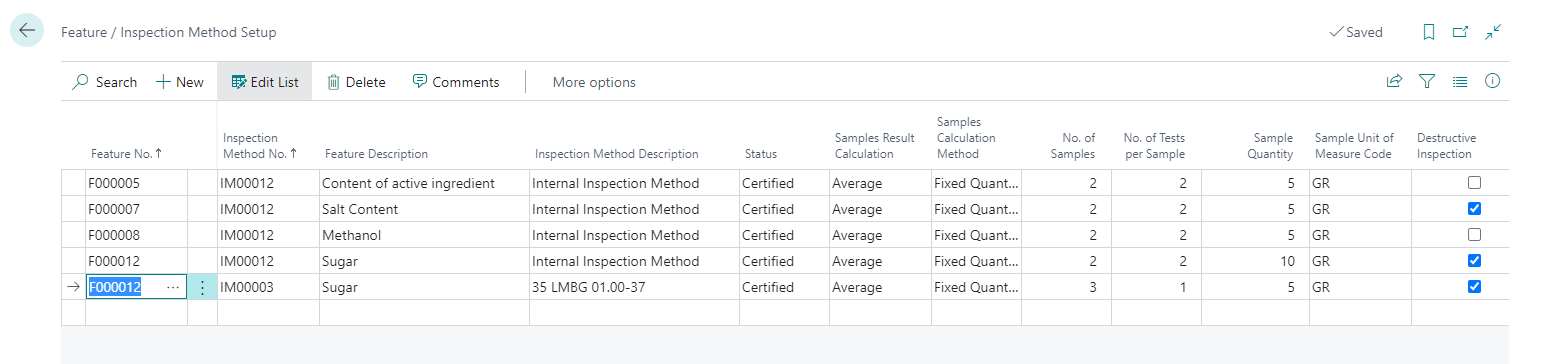
Since the actual value can be composed of inspections of several samples, you can specify the type of results calculation in the Samples Result Calculation field. The following options are available:
- blank: No calculation, you must enter the value for the inspection feature manually.
- Additive: All values are added together
- Mean value: The sum of the individual results is divided by the number of tests
- Minimum: The lowest of the measured values is output as actual value
- Maximum: The highest of the measured values is output as actual value
- Last Value: Any time when entering an actual value to a sample line the result for the feature line is updated with this value.
Depending on the data type, the following calculation types are available:
| Data type | Selection options |
|---|---|
| Decimal | Additive / Average / Minimum / Maximum |
| Boolean | Minimum / Maximum (Minimum: If at least one of the options is set to NO, NO is inherited. Maximum: If at least one of the options is set to YES, YES is inherited) |
| date | minimum / maximum |
| text and option | - |
You can also choose between three different Sample Calculation Methods, two of which you can only use in the goods receipt department:
- Fixed quantity: default value. The number of samples is defined in the Number of samples field and is identical for each inspection order.
- Per Package: Can only be used in goods receipt. Based on the number of containers recorded at goods receipt, a sample is created for each container recorded.
- SQRT(No. of Packages)+1: Can only be used in goods receipt. Based on the number of containers entered in the goods receipt, the number of samples is determined and samples are created using the formula SQRT(No. of Packages)+1 (No. of Packages = number of containers).
In the No. of samples field, you can define the number of samples to be drawn in combination with the Fixed quantity sample calculation method. The field can only be maintained for this calculation method, since the number of samples is determined by the goods receipt quantity for the other two calculation methods. You can assign a No. of Tests per Sample, a Sample Quantity and a Sample Unit of Measure Code to the sample.
Note
The sample quantity is given as an indication and has no influence on stock levels. Therefore, if a sample with a defined Sample Quantity is taken from a container for the inspection, the stock level does not change.
In addition, the field Destructive inspection is available. You use this field to define whether the sample is destroyed during the inspection or can be reused for subsequent inspections of other inspection features and samples. It therefore has a direct influence on the number of samples to be taken for a inspection order.
Assignment of Inspection Costs
In addition to the sample drawing, you can also define the inspection costs that occur in the feature/inspection method setup. You can use the Fixed Costs field to define fixed costs which are always accruing. You can define a value for changing costs in the Variable Costs per Unit field. In combination with the Run Time and the Run Time Unit of Measure Code the variable costs are calculated.
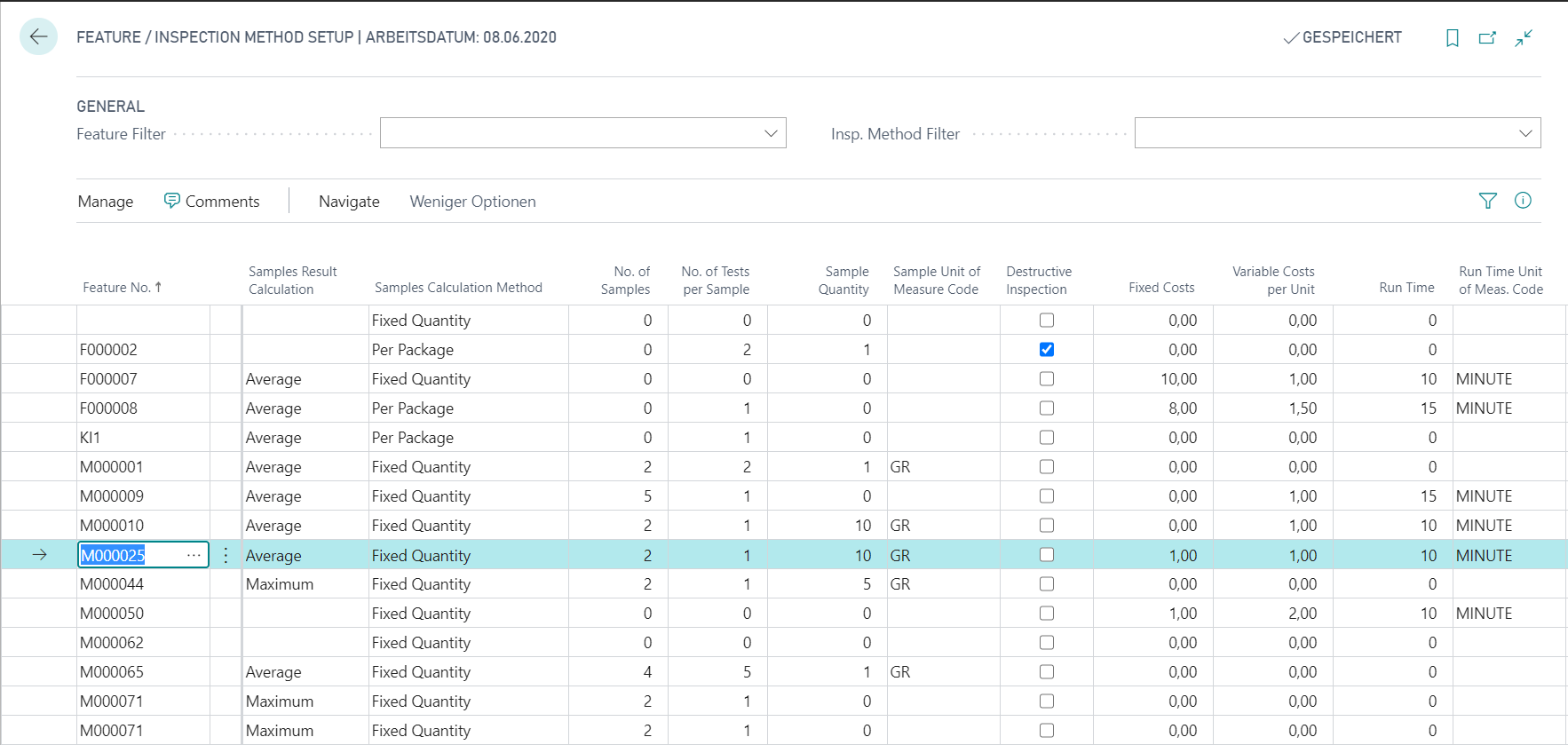
If the inspection costs are maintained, they are displayed in the Inspection Order for each inspection feature in the inspection order line and cumulated in the inspection order header in the field Total Costs. In production, the total costs are posted to the production order as capacity ledger entries when the inspection order is completed. For more information, refer to the chapter Production Inspection Costs.
You can also define Comments. If comments are available, the field Comment is set in the feature/inspection method line.
If the setup is done for the combination of Inspection Feature and Inspection Method, the Status must be changed to Certified. Only certified lines are applied. At the same time, certifying can be secured with an electronic signature (see Electronic signature).