HazMat Material
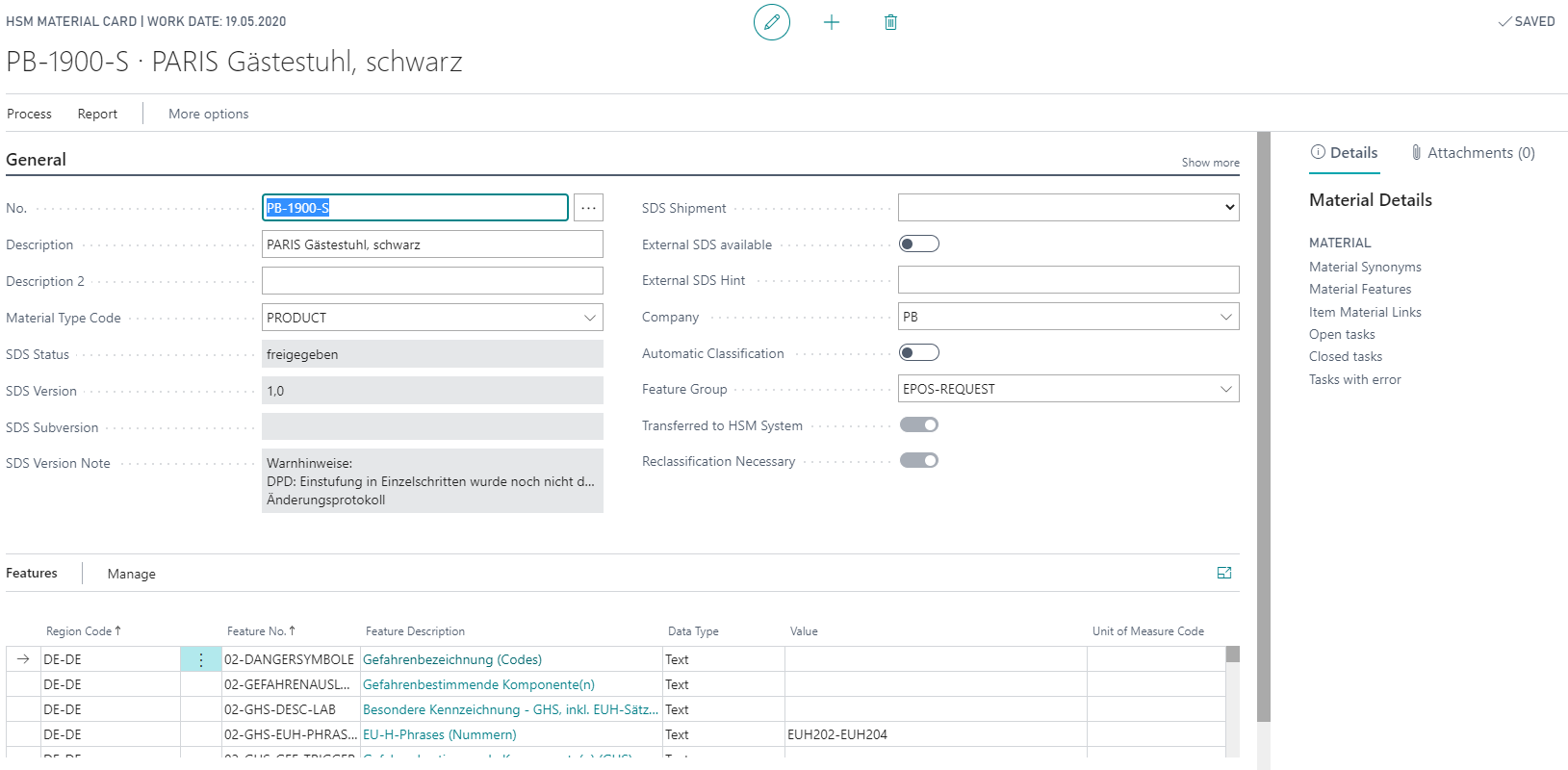
The representation of properties of an HazMat Material is done via the HazMat Features. Features that describe hazardous material properties can only be maintained through a HazMat Material. If there are changes in a Recipe that affect hazardous substance relevant data, a new HazMat Material needs to be created and linked to the Item. When you change HazMat Features, or values of a HazMat Feature, archivation using the Time Stamp of the last HazMat Feature Version ensures that this data is correctly linked to an Item in a lot. If a HazMat Feature that is already assigned to a HazMat Material is changed in the HSM system, the data has to be updated in BC (see also Retrieving the Feature Values from the Hazardous Substance Management System).
SDS Shipping
Important
If the field SDS (Main) Version of the HazMat Material is updated by the command Request SDS Status/Revision, it triggers a new SDS sending.
You can use the SDS Shipment field to control whether a safety data sheet should be send at all for this HazMat Material. The following options are available:
- <empty>
- SDS Distribution Duty (default)
- Demand for SDS
- No SDS Distribution Duty
- Print SDS blocked
- Blocked
Tip
No SDS Distribution Duty is important if a HazMat Material is created for all Items (e.g. packaging, container and so on). Print SDS blocked prevents the output of an SDS. Blocked prevents both.
The fields for the Safety Data Sheet are filled via the report SDS Request Status/Version. For more information, see SDS Shipping.
Reclassification of a HazMat Material
The indicator Automatic Classification controls whether a HazMat Material should be automatically classified after transmission to the HSM system. For HazMat Materials that are automatically classified, it is possible to set a reclassification marker as soon as a HazMat Material linked via a HazMat Recipe has been revised.
| Field | Fill in | Instruction |
|---|---|---|
| No. | Req | The number up to 20 digits for the HazMat Material must be assigned manually. |
| Description | Opt | Here you can enter a material description that defines the HazMat Material in more detail. |
| Description 2 | Opt | You can describe the HazMat Material in more detail here. |
| Material Type Code | Opt | Assign the HazMat Material to a HazMat Material Type. |
| SDS Status | Aut | Display of the SDS status of the HazMat Material (the SDS is transmitted by requesting data from the HSM system). |
| SDS Status blocked | Aut | Display whether the SDS status for HazMat material is a blocked status or not (This is transmitted by requesting the HSM system). |
| SDS Version | Aut | SDS (main) version of the HazMat Material ( This is transmitted by querying the HSM system). A change will result in a new SDS being sent within the SDS shipment request. |
| SDS Subversion | Aut | SDS sub-version of the HazMat Material ( This is transmitted by querying the HSM system). A change has no effect within the SDS shipment request. |
| SDS Version Date | Aut | Date of the SDS version or subversion of the HazMat Material (this is transmitted by querying the HSM system). |
| SDS Version Note | Aut | Note to the SDS version or sub-version of the HazMat Material (this is transmitted by querying the HSM system). A change has no effect in the context of the SDS shipment request. |
| SDS Shipment | Opt | Here you can define whether a safety data sheet is retrieved and/or sent. The following options are available for selection * empty * SDS Distribution Duty (Default) * Demand for SDS * No SDS Distribution Duty * Print SDS blocked * Blocked |
| External SDS avilable | Opt | Indicates if an external SDS is available. |
| External SDS Hint | Opt | Text note on a possibly existing external SDS (e.g. from the supplier). |
| Company | Opt | Assignment of the HazMat Companies in which the HazMat Material was created for an Item (see also Creation of a Material for an Item) |
| Automatic Classification | Opt | Here you can define whether a HazMat Material is classified directly after transmission to the HSM system. |
| Feature Group | Opt | By entering a HazMat Feature Group, the HazMat Features stored there are assigned to the HazMat Material (see also HazMat Feature Group). |
| Transferred to HSM system | Aut | Shows whether the HazMat Material has already been transferred to the HSM system. |
| Reclassification Necessary | Aut | Indicates whether the HazMat Material should be reclassified by the HSM system. |
| Reclassification by Mat. No. | Aut | Identifies which HazMat Material has triggered the reclassification. |
| Reclassification at Date | Aut | The date that triggered the necessity for reclassification. |
| Reclassification at Time | Aut | Labelling of the time at which the reclassification was triggered. |
| Open Feature Update | Aut | Indication that the HazMat Features need to be updated (e.g. after a reclassification) |
Info Tab Features
The info tab Features of HazMat Material displays data on the material features.