(Re-)Initialize Corporate Design Setup
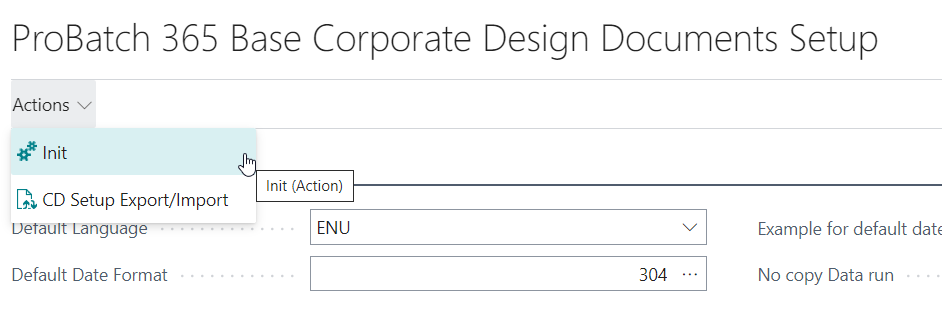
The report (Re-)Initialize Corporate Design Setup (ID 5517518) creates or resets the initial setup of the Corporate Design (CD) module. It is started from the Yaveon 365 Process Base Corporate Design Documents Setup page with the action Init in the menu ribbon.
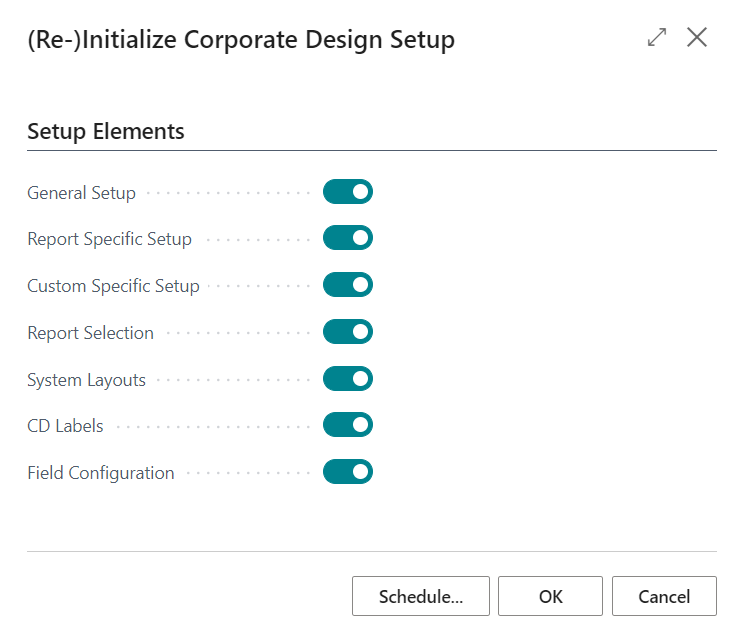
On the request page, the setup elements to be initialized can be selected individually. All elements are enabled by default.
Note
If a setup already exists for a selected element, the system shows a confirmation dialog before it is overwritten. Clicking No skips that element and continues with the next one.
The elements are processed in the following order: General Setup, System Layouts, Custom Specific Setup, Report Specific Setup, Report Selection, CD Labels, Field Configuration. After completion the message (Re-) Initialization finished is displayed.
General Setup
Initializes the Yaveon 365 Process Base Corporate Design Documents Setup. table with the default values.
If a CD Setup record already exists, the confirmation dialog A Corporate Design Setup already exists. Should this be replaced? is shown. When confirmed, the existing record is updated in place; otherwise the current setup is kept unchanged.
Report Specific Setup
Opens the page CD Initialize Report Setup in which the reports that should be (re-)initialized in the CD Report Specific Layout table can be selected individually.
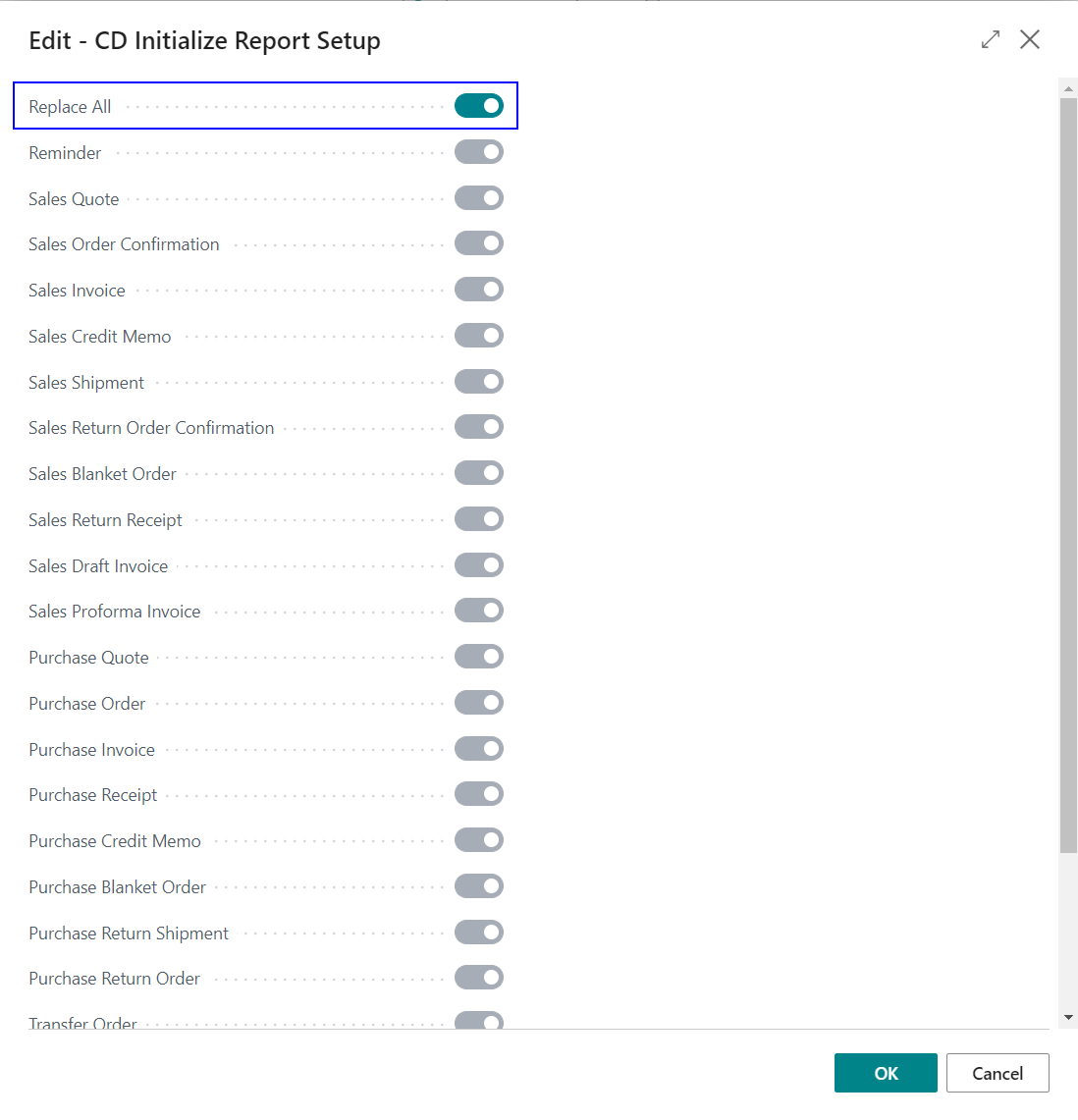
The available reports are:
- Reminder
- Sales Quote, Sales Order Confirmation, Sales Invoice, Sales Credit Memo, Sales Shipment, Sales Return Order Confirmation, Sales Blanket Order, Sales Return Receipt, Sales Draft Invoice, Sales Proforma Invoice, Sales Proforma Shipment
- Purchase Quote, Purchase Order, Purchase Invoice, Purchase Receipt, Purchase Credit Memo, Purchase Blanket Order, Purchase Return Shipment, Purchase Return Order
- Transfer Order, Transfer Shipment, Transfer Receipt
- Finance Charge Memo
Setting Replace All activates every report in the dialog and triggers a full reset:
- When Replace All is used, the confirmation dialog A Corporate Design Report Specific Layout already exists. Should this be replaced? is shown, together with the note Locked field configurations will also be deleted. When confirmed, all existing records in Corporate Design Report Specific Setup are deleted and the complete set of default report-specific setups is re-created.
- When individual reports are selected, only the chosen report entries are overwritten in the Corporate Design Report Specific Setup table, together with their related CD Field Configurations. Entries for reports that are not selected are left unchanged.
See also Corporate Design Report-Specific Setup.
Custom Specific Setup
Clears the customer-specific Corporate Design setup.
When the Corporate Design Custom Specific Setup table is not empty, the dialog The complete Corporate Design Custom Specific Layout will be deleted. Are you sure? is shown, together with the note Locked field configurations will also be deleted. When confirmed:
- All records in Corporate Design Custom Specific Setup are deleted, including entries flagged as locked are deleted.
- All records in CD Field Configuration with a Layout ID other than 0 are deleted as well. This removes every customer-specific field configuration, including entries flagged as locked.
No new records are created by this option; it is a pure cleanup step. New customer-specific setups can afterwards be created on the page Corporate Design Custom Specific Setup.
Report Selection
Updates the standard Report Selections table so that the Corporate Design reports are used as the default printing reports for the supported usages.
For every supported usage the following happens without further confirmation:
- All existing Report Selection entries for that usage are deleted.
- A new entry with Sequence 1 is inserted pointing at the corresponding CD report.
The usages and the CD reports that are assigned are:
| Report Selection Page | Usage | Report ID | Report Name |
|---|---|---|---|
| Report Selection - Reminder | Reminder | 5517504 | Reminder |
| Report Selection - Sales | Quote | 5517505 | Sales - Quote |
| Report Selection - Sales | Order | 5517506 | Sales Order Confirmation |
| Report Selection - Sales | Invoice | 5517507 | Sales - Invoice |
| Report Selection - Sales | Credit Memo | 5517508 | Sales - Credit Memo |
| Report Selection - Sales | Shipment | 5517509 | Sales - Shipment |
| Report Selection - Sales | Draft Invoice | 5517510 | Sales - Draft Invoice |
| Report Selection - Sales | Return Order Confirmation | 5517511 | Return Order Confirmation |
| Report Selection - Sales | Return Receipt | 5517512 | Sales - Return Receipt |
| Report Selection - Sales | Blanket Order | 5517513 | Blanket Sales Order |
| Report Selection - Sales | Pro Forma Invoice | 5517514 | Sales - Proforma Invoice |
| Report Selection - Sales | Pro Forma Shipment | 5517515 | Sales Proforma Shipment |
| Report Selection - Purchases | Quote | 5517516 | Purchase - Quote |
| Report Selection - Purchases | Order | 5517517 | Purchase - Order |
| Report Selection - Purchases | Invoice | 5517518 | Purchase - Invoice |
| Report Selection - Purchases | Receipt | 5517519 | Purchase - Receipt |
| Report Selection - Purchases | Credit Memo | 5517520 | Purchase - Credit Memo |
| Report Selection - Purchases | Blanket Order | 5517521 | Blanket Purchase Order |
| Report Selection - Purchases | Return Shipment | 5517522 | Purchase - Return Shipment |
| Report Selection - Purchases | Return Order | 5517523 | Return Order |
| Report Selection - Inventory | Transfer Order | 5517524 | Transfer Order |
| Report Selection - Inventory | Transfer Shipment | 5517525 | Transfer Shipment |
| Report Selection - Inventory | Transfer Receipt | 5517526 | Transfer Receipt |
| Report Selection - Finance Charge | Finance Charge Memo | 5517527 | Yaveon 365 CD Finance Charge Memo |
Note
This option removes any custom report selections that have been configured for the listed usages. Select it only if the default Corporate Design reports should be restored.
System Layouts
Initializes the CD Layout table with the seven delivered system layouts. For each layout the corresponding system RDL report is copied and registered as a standard layout.
| Layout Code | Description | Source Report |
|---|---|---|
| SYS_BIGHDR | System Layout Big Header | PB365 CD Big Hdr. Layout |
| SYS_SMALLHDR | System Layout Small Header | PB365 CD Small Hdr. Layout |
| SYS_FOURCOLFOOTER | System Layout Four Columns Footer | PB365 CD S.Hdr./4 Col F. L. |
| SYS_RIGHTADDRHDR | System Layout Right Address Header | PB365 CD S. H./Ad. right L. |
| SYS_SMHDRNoEMAIL | System Layout Small Header (without Electr. Mail Section) | PB365 CD Sm. H. L. (No E.Mail) |
| SYS_BH_NOEMAIL | System Layout Big Header (without Electr. Mail Section) | PB365 CD Big H. L.(No E. Mail) |
| SYS_FOURCFNOEMAIL | System Layout Four Columns Footer (without Electr. Mail Section) | PB365 CD S.H./4 C F. N. E. L. |
If at least one CD Layout record already exists, the confirmation dialog A Corporate Design Layout already exists. Should this be replaced? is shown. When confirmed, every system layout listed above is deleted and re-created. User-created CD Layouts are not touched by this option.
See also Corporate Design Layouts.
CD Labels
Populates the CD Label table with the standard translations for the document and field labels.
When the table is not empty, the confirmation dialog A Corporate Design Label already exists. Should this be replaced? is shown. When confirmed, the following actions are performed:
- All CD Label records of type Document Label or Field Label in English (1033) or German (1031) that are not flagged as Changed are deleted. Labels flagged as Changed are kept so that manual translations are preserved.
- All CD Label records with Language ID 0 that are not flagged as Changed are deleted.
- The standard labels are re-inserted for English (1033) and German (1031).
- The standard entries for Variable, Calculation, Parameter and Condition labels are re-inserted, e.g. the variable _CEO_Value and the calculation labels _GROSSWEIGHT and _NETWEIGHT.
If the language DEU (1031) or ENU (1033) is not yet registered in the Language table of Business Central, it is created automatically.
See also CD Labels.
Field Configuration
Initializes the CD Field Configuration table with the default mappings that define which fields are printed in which section of a Corporate Design document.
When field configurations already exist, the confirmation dialog A Corporate Design Field Configuration already exists. Should this be replaced? is shown, together with the note Locked field configurations will also be deleted. When confirmed, the following actions are performed:
- All general field configurations (records with CD Report ID = 0 and Layout ID = 0, and Section different from Condition) are deleted, including locked entries.
- The default Header and Footer field configurations are re-created.
- The standard CD Labels are (re-)inserted (see CD Labels).
- The default extension definition, the CD functions and the base definition are re-created.
- The default field definitions for the CD Address Buffer (e.g. Name, Address, Post Code, City, County) are re-created in the footer.
- The default entry for the CD Record Extension variable _CEO_Value is re-created, including the corresponding field definition.
- The default field definitions for Tracking Specification are re-created in the tracking section of the document lines.
Report-specific and customer-specific field configurations (records with CD Report ID or Layout ID different from 0) are not affected by this option.
See also CD Field Configuration.
See also
Corporate Design Initial Setup
Yaveon 365 Process Base Corporate Design Documents Setup
Corporate Design Report-Specific Setup
Corporate Design Custom Specific Setup
CD Field Configuration
CD Labels
Corporate Design Layouts