CD Layout Sections and Document Elements
The Corporate Design Layouts consist of different Sections and contain different Document Elements.
The content of these Sections can be configured using the CD Field Configuration. There, fields and variables can be shown and hidden, which are printed within the Section. The arrangement and formatting of this data can also be controlled there.
Sections
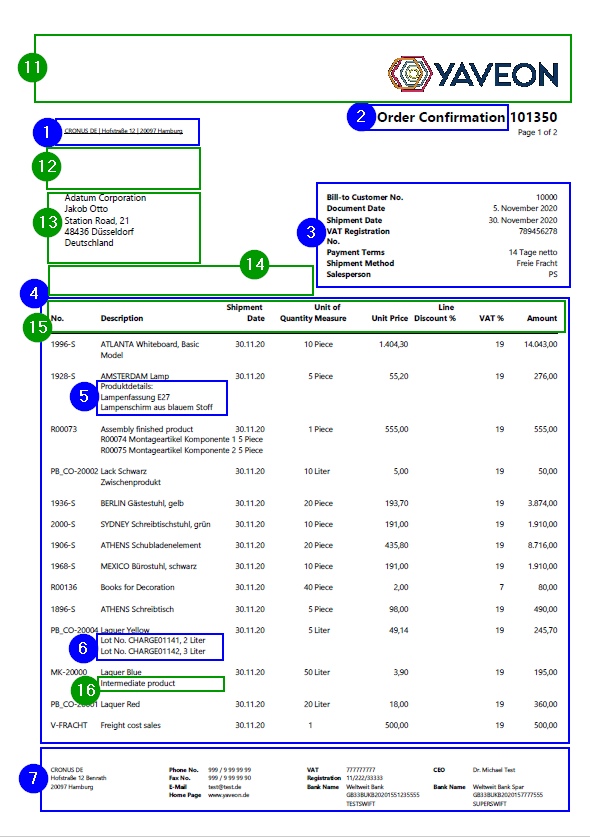
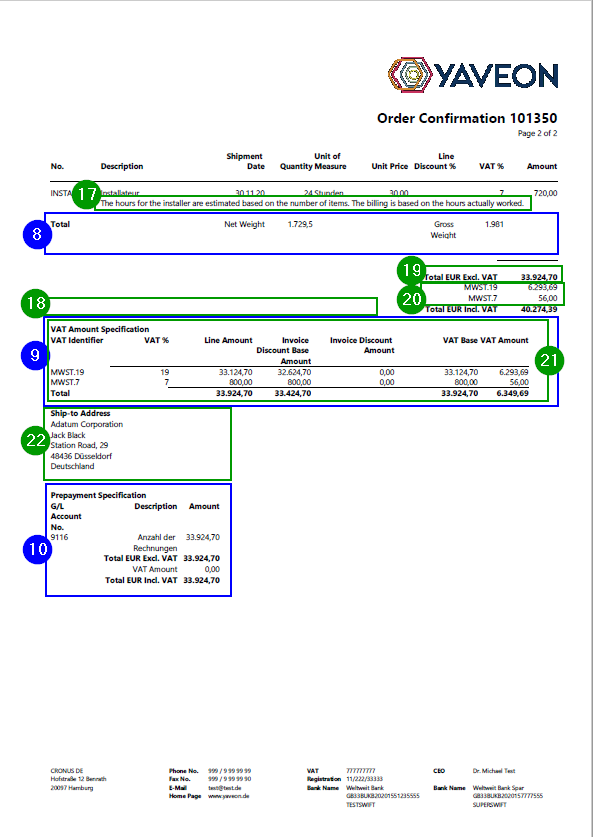
The following Sections exist on the standard documents. The example images below show each section labeled on an order confirmation.
Return Address
The Return Address (No. 1) is a single line printed above the recipient address, visible through a window envelope. It contains a short form of the company's address so the sender is identifiable on the outside of the envelope.
The return address can be shown or hidden via the Print Return Address option in the Header Section of the general setup. Its content and fields are configured in the CD Field Configuration.
Document Label
The Document Label (No. 2) is the title area of the document, showing the document type name and optionally the document number, for example Order Confirmation 4711. The label text (e.g., Order Confirmation) is maintained per document in the Report-Specific Setup.
The Doc. No. to Document Label option in the Header Section of the general setup controls whether the document number is appended directly to the label or displayed below it.
Header
The Header (No. 3) section contains document-level information such as the document number, document date, customer or vendor address, salesperson, payment terms, and delivery information. The fields and their order are configured in the CD Field Configuration.
Options for the header area — such as removing empty lines and showing labels without values — are available in the Header Section of the general setup.
Line
The Line section (No. 4) is the main table of document lines. It contains columns for item number, description, quantity, unit of measure, price, and amounts. The columns and their order are configured in the CD Field Configuration using the Output Type to define the number of columns (valid values: 1, 7, 9, or 15).
Options for the line section, such as showing lines with zero quantity and printing row totals, are available in the Line Section of the general setup.
Line Extension
Line Extensions (No. 5) are additional rows printed directly below each document line. Typical examples are:
- Description 2 of the item
- Assembly components
- Yaveon 365 Document Texts at line level
- Item cross reference numbers or blanket order numbers
Each type of line extension is enabled individually via options in the Line Section of the general setup. The setup in the CD Field Configuration is described on the page Set up line extensions.
Tracking
The Tracking (No. 6) section contains item tracking data printed below each document line: serial number, lot number, quantity, unit of measure, and expiration date. It is enabled via the Print Tracking Information option in the Line Section of the general setup. The content is configured in the CD Field Configuration.
For extended item tracking data from the Yaveon 365 Lot Management app, see Item tracking setup on documents.
Footer
The Footer (No. 7) is printed at the bottom of every page and typically contains company information such as bank account details, contact information, and company registration data. Its content and column layout are configured in the CD Field Configuration.
Options for showing or hiding the footer and controlling its height are available in the Footer Section of the general setup. For specific footer layout options such as centered columns, see Footer Elements.
Row Totals
The Row Totals (No. 8) section is a totals row printed after all document lines. It is used, for example, to display the total net or gross weight across all shipment lines. It is enabled via the Row Total option in the Line Section of the general setup.
The content of the row totals row is configured in the CD Field Configuration. A setup example is described on the page Calculation and Row Total.
Specification
The Specification area appears below the document lines. It consists of two sub-areas:
- Specification - area 1 (No. 9): Contains page transfer subtotals, which carry the running line sum from one page to the next.
- Specification - area 2 (No. 10): Contains the document total, VAT details, and optionally cash discount amounts.
The options for these areas — including VAT display format, document total printing, and page transfer subtotals — are configured in the Specification Section of the general setup.
Document Elements
In addition to the Sections, there are other document elements that can be shown and hidden or displayed differently via setup options. These elements are controlled in the setup tables in the Report Print Details section.
These document elements include, but are not limited to, the following:
| Element | No. | Description | Setup |
|---|---|---|---|
| Logo | 11 | Company logo printed at the top of the document. The logo image is uploaded on the Company Information page. | Logo Section |
| EPost Barcode Placeholder | 12 | Reserved space for an EPost barcode (Deutsche Post). Only available with EPost-compliant layouts: SYS_SMALLHDR, SYS_BIGHDR, and SYS_FOURCOLFOOTER. | Corporate Design Layouts |
| Recipient address | 13 | The recipient's address shown in the address window area of the document. | – |
| Yaveon 365 Header Texts | 14 | Document Texts printed in the document header area. | Line Section (Yaveon 365 Document Texts) |
| Label Line area | 15 | Column headers for the line section table. Defined via Use as Caption in the field configuration. | CD Field Configuration |
| Description 2 | 16 | Second item description printed below description 1. | Line Section (Print Description 2) |
| Yaveon 365 Line Texts | 17 | Document Texts printed in the line area, below the document lines. | Line Section (Yaveon 365 Document Texts) |
| Yaveon 365 Footer Texts | 18 | Document Texts printed in the footer area. | Line Section (Yaveon 365 Document Texts) |
| Document total | 19 | Total sum of all document lines. | Specification Section (Print Document Total) |
| VAT (shown as Sums for VAT Rates) | 20 | VAT amounts broken down per VAT rate. | Specification Section (Print VAT Details) |
| Detailed VAT block | 21 | Extended VAT calculation details including base amounts and invoice discounts. | Specification Section (Print VAT Details) |
| Ship-to-Address (deviating from customer address) | 22 | Delivery address printed when it differs from the customer's standard address. | – |
App-Specific Elements
Depending on the installed Yaveon 365 Apps, the selection of printable elements is extended, for example by:
| Element | App | Setup |
|---|---|---|
| Hazardous Material Information | Yaveon 365 HazMat Connect | Yaveon 365 HazMat Connect |
| Additional Item Tracking Data | Yaveon 365 Lot Management | Item tracking setup on documents |
| Base Item Numbers | Yaveon 365 Manufacturing | Yaveon 365 Manufacturing |
| Load Carrier Information | Yaveon 365 Warehouse Management | Yaveon 365 Warehouse Management |
| Line and Invoice Discount Details | Yaveon 365 Trade | Yaveon 365 Trade |
| Company VAT-IDs | Yaveon 365 Sales and Purchase | Yaveon 365 Sales and Purchase |
| Signature Block and Inspection Method | Yaveon 365 Quality Assurance | CD Setup Certificate of Analysis |