Inventory Summary
Yaveon 365 Process provides you with a clear overview of all stock, combining Item Ledger Entries, Warehouse Entries, and Item Tracking information in a single list. Each line represents the stock of one item (or lot / serial number) at one location and bin.
The data in the Inventory Summary is stored and updated by postings — it is not read live from the underlying ledger entries on every page open.
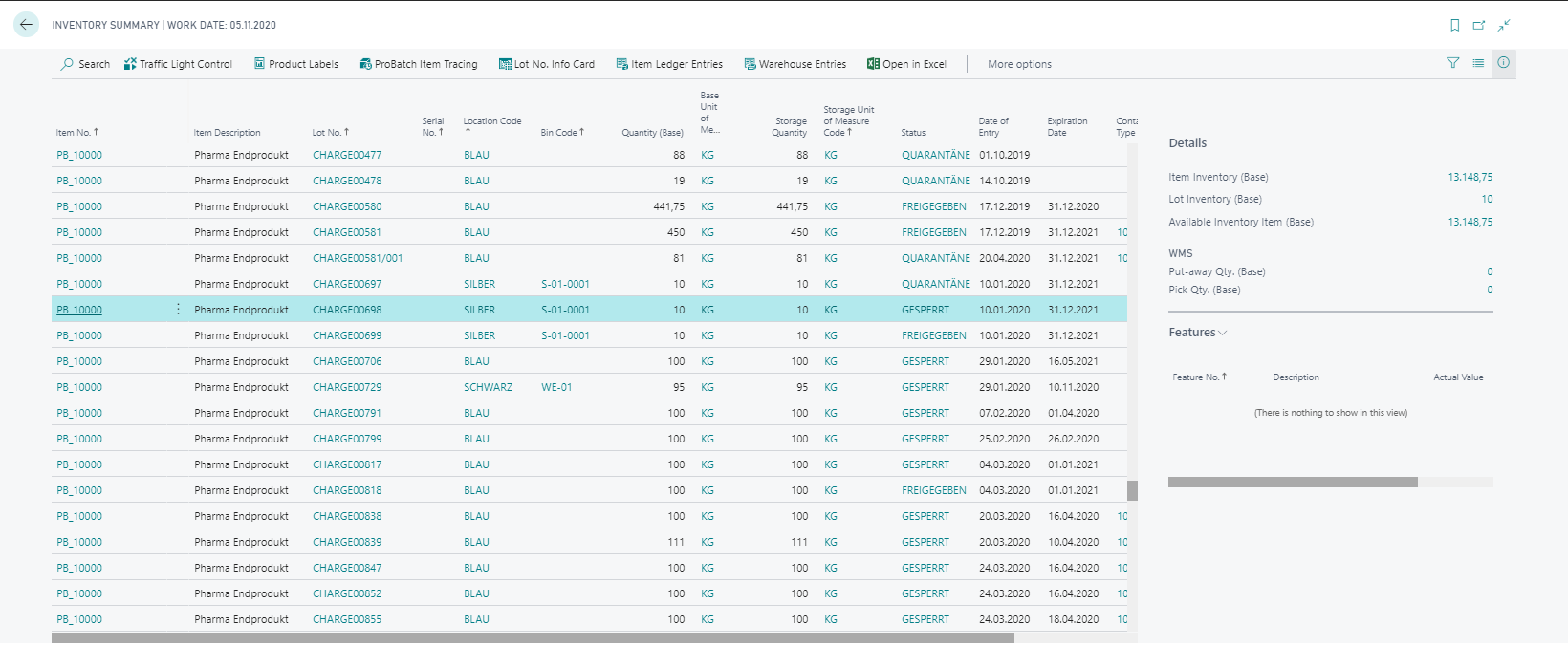
Columns
The following columns are available on the Inventory Summary. Some columns are only visible when additional apps are installed.
| Column | Description | Required app |
|---|---|---|
| Traffic Light | Symbol of the active traffic light rule that applies to this line. | – |
| Item No. | The item number. | – |
| Base Item No. | The base item number used in filling item scenarios. | Yaveon 365 Manufacturing |
| Variant Code | The variant assigned to the item. | – |
| Item Description | Item description from the item card. | – |
| Item Description 2 | Second item description line from the item card. | – |
| Lot No. | Lot number of the inventory line. | – |
| Serial No. | Serial number of the inventory line. | – |
| Package No. | Package number of the inventory line. | – |
| Item Category Code | Item category assigned to the item. | – |
| Location Code | Location where the stock is stored. | – |
| Zone Code | Warehouse zone within the location. | – |
| Bin Code | Bin where the stock is currently located. | – |
| Quantity (Base) | Physical quantity on stock in base unit of measure. | – |
| Base Unit of Measure Code | Base unit of measure defined on the item card. | – |
| Storage Quantity | Quantity expressed in the storage unit of measure. | – |
| Storage Unit of Measure Code | Unit of measure used for the storage quantity. | – |
| Load Carrier No. | Load carrier the stock is assigned to. | Yaveon 365 Warehouse Management |
| Load Carrier Type | Type of the load carrier. | Yaveon 365 Warehouse Management |
| Block Movement | Indicates whether the stock is blocked for inbound, outbound, or all movements. See Field Block Movement below. | – |
| Avail. Qty. (Base) | Document-independent available quantity in base unit. See Field Avail. Qty. (Base) below. | Yaveon 365 Lot Management |
Info Boxes
Details
The Details info box shows aggregated inventory figures for the item and variant of the currently selected line, respecting any active location and bin filters on the page:
- Item Inventory (Base) — total physical stock across all lots and bins for this item and variant.
- Lot Inventory (Base) — total physical stock for the specific lot of the selected line.
- Available Inventory Item (Base) — sum of Avail. Qty. (Base) across all lines for this item and variant. This value aggregates the entire item, while the column Avail. Qty. (Base) shows only the single selected line. Both values therefore usually differ. The availability is affected by Posting Rules with Action Item Availability.
Features
The Features info box displays the features and their actual values assigned to the lot or serial number of the selected line. This info box requires the Yaveon 365 Lot Management app.
Field Block Movement
The field Block Movement is not maintained manually on the Inventory Summary — it is derived from its sources. A field of the same name exists on three levels, and the blocking can be set on each of them:
| Source | Field | Effect |
|---|---|---|
| Load Carrier | Block Movement | Applies to all stock on this load carrier. Requires the Yaveon 365 Warehouse Management app. |
| Bin Content | Block Movement | Applies to the item, variant, and unit of measure in this one bin. |
| Bin | Block Movement | Applies to the entire bin. |
The sources differ in specificity — from the most specific to the least specific: Load Carrier, Bin Content, Bin. On the bin side, the blocking of the Bin Content therefore applies if a matching one exists for the inventory line — otherwise the blocking of the Bin. This blocking is then combined with the blocking of the Load Carrier.
The values mean: Inbound — no stock can be posted to it; Outbound — no stock can be taken from it; All — both are blocked; blank — there is no restriction.
Combined means that both blockings apply at the same time: if one of them is blank, the other applies. If both block different directions, the stock is blocked for All movements. The "stronger" of the two blockings is therefore not adopted — the two restrictions are added up.
| Bin or Bin Content | Load Carrier | Inventory Summary |
|---|---|---|
| blank | blank | blank |
| Inbound | blank | Inbound |
| blank | Outbound | Outbound |
| Inbound | Inbound | Inbound |
| Inbound | Outbound | All |
| Outbound | All | All |
Note
A newly created Bin Content inherits the blocking of its bin, and BC propagates a change on the Bin to all existing bin contents of that bin.
Important
The value is evaluated by downstream checks, for example by the availability calculation for picking and by picking. If stock is blocked on the Inventory Summary, movements in the blocked direction result in an error message.
Field Avail. Qty. (Base)
The field Avail. Qty. (Base) shows the document-independent availability of the inventory summary line. The value is either the full Quantity (Base) of the line or 0 — there are no values in between. Reservations, open demand, or picks are not taken into account.
Whether a line counts as available is controlled by posting rules with the action Item Availability, provided by the Yaveon 365 Lot Management app. If no blocking rule applies, the line is available. Without this app, every line is always shown as available.
Important
The value is stored and not recalculated each time the page is opened. It is updated by postings and by changes to the lot or serial no. information. Time-dependent rules — such as Expired Goods or Rem. Shelf Time — additionally require the daily run of the task Inventory Summary - Update availability. Newly created or changed rules also only affect existing inventory after this task has been run.
Actions
Navigation
| Action | Description | Required app |
|---|---|---|
| Item Ledger Entries | Opens the item ledger entries for the item, variant, lot, and serial number of the selected line. | – |
| Warehouse Entries | Opens the warehouse entries for the selected line. | – |
| Lot No. Info Card | Opens the lot number information card for the selected line. | Yaveon 365 Lot Management |
| Serial No. Info Card | Opens the serial number information card for the selected line. | Yaveon 365 Lot Management |
| Yaveon 365 Item Tracing | Opens the item tracing for the selected line. Only supported for items with full item tracking set up. | Yaveon 365 Lot Management |
| Inspection Orders | Shows existing inspection orders for the selected line. | Yaveon 365 Quality Assurance |
Functions
| Action | Description | Required app |
|---|---|---|
| Traffic Light Control | Selects or changes the active traffic light rule group for the page. | – |
| Update Availability | Recalculates and writes the Avail. Qty. (Base) for all lines. Required after creating or changing Item Availability posting rules and for time-dependent rules (expiry, shelf time). | – |
| Post Inventory Correction | Posts a quantity correction for the selected line. See Inventory Correction. | Yaveon 365 Lot Management |
| Create Internal Movement | Creates a warehouse movement or internal movement for the selected lines. See Creating an Internal Movement. | Yaveon 365 Warehouse Management |
| Pick Availability | Opens the pick availability overview for the item and location of the selected line, showing the detailed calculation of what is available for picking. | Yaveon 365 Warehouse Management |
| Create Inspection Orders | Creates inspection orders for the selected lines based on the applicable inspection plan. | Yaveon 365 Quality Assurance |
| Product Labels | Prints product labels for the selected lines. | Yaveon 365 Lot Management |
Display of Item Tracking Data
Whether item tracking data are displayed in the Inventory Summary depends on the settings of the Item Tracking Code of the Item. The settings on the Item Tracking Card define in which company areas item tracking information will be handled. If Lot Warehouse Tracking or SN Warehouse Tracking is not activated, the item tracking information (Lot No., Serial No., Expiration Date, Status,...) will not be displayed in the Inventory Summary. Locations without logistic make an exception.