Sales Approval for items
Yaveon 365 Sales and Purchase allows you to restrict the number of customers, an item can be sold to, through Sales Approval for items. This can be used in situations where licenses or permissions for the sale of goods are necessary, e.g. pharmaceutical drug trade. It can also be used to stop accidental sales, e.g. of production items that should not be sold.
The Sales Approval for items has to be activated for every item separately. On the item card the field Require Sales Approval has to be activated. If this field is active, the item cannot be sold to a customer without an entry in the Sales Approval Setup table.

To allow the sale of an item to a specific customer, this customer has to be listed in the Sales Approval Setup table. This table can be accessed from the Item Page and the Customer Page.
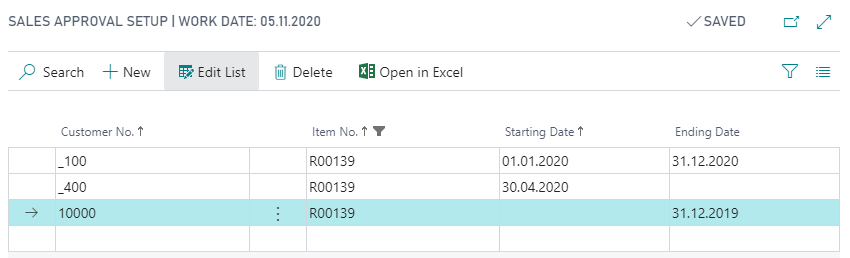
With the combination of customer and item number in this table, the item can be sold to the customer indefinitely. By adding a Starting Date an Ending Date or both, the approval can be limited to a time frame.
To check whether the approval period is valid, the following dates on the sales document are evaluated:
- For Sales Orders, Sales Quotes, and Sales Invoices: the Promised Delivery Date is used if it is filled; otherwise the Requested Delivery Date is used. When an item is first entered on a line, the Header's dates are evaluated; once the line exists, subsequent checks (date changes, line modifications, change of Sell-to Customer No., release, posting, copy, and converting a Sales Quote into an Invoice) evaluate the Line's dates.
- For Blanket Sales Orders: the Starting Date and Ending Date of the Blanket Sales Order are used (see section Starting and Ending Date in Blanket Sales Orders below).
If the evaluated date (or date range) is not covered by the Starting Date and Ending Date of a matching entry in the Sales Approval Setup, the item cannot be added to the sales lines and an error message will appear.
Provided, the system can't find a valid combination of an item and a customer, an error message occurs when trying to enter an Item No. into a sales line.
The above described functionality applies to the following documents:
- Sales Order
- Blanket Sales Order
- Sales Quote
- Sales Invoice
The approval is checked in several situations, in particular:
- when the Sell-to Customer No. on the document header is validated,
- when an Item No. is entered on a sales line or items are added via the Select Items dialog,
- when the Requested Delivery Date or Promised Delivery Date on the sales line is changed,
- when the sales document is Released, Posted (for orders: only when shipping), Copied, or when a Sales Quote is converted into an Invoice.
Extended Sales Approval through Item Groups, Customer Groups and Hierarchies
The functionality described above can be extended with the Extended Sales and Purchase Approval feature, which you enable on the Yaveon Feature Management page (see Yaveon Feature Management). Enabling the feature replaces the original approval setup tables with extended tables and copies the existing approval entries into them.
Important
The Extended Sales and Purchase Approval feature requires a data update and cannot be deactivated after activation.
After the feature is enabled, an entry in the Sales Approval Setup is no longer limited to a single item and a single customer. Instead, each entry defines an item side and a customer side, so you can approve entire item groups for entire customer groups, company groups, or customer hierarchies with a single entry.
The item side is defined through the following fields:
| Field | Description |
|---|---|
| Type | Determines whether the entry applies to a single Item or to an entire Item Group. |
| Code | Depending on Type, the Item No. or the SP Item Group. |
| Description | The item or item group description, depending on Type. |
To use item groups, create the required groups on the SP Item Groups page and assign an item to a group with the SP Item Group field on the item card (register Price & Sales).
The customer side is defined through the following fields:
| Field | Description |
|---|---|
| Customer Type | Determines the scope of the approval: Customer No., Customer Group (SP Customer Group), Company Group Code, or Customer Hierarchy (Trade App). |
| Customer Code | Depending on Customer Type, the Customer No., SP Customer Group, Company Group Code, or Customer Hierarchy. |
| Name | The name of the selected customer. |
For more information about the groups and hierarchies you can reference, see Yaveon 365 SP Customer Groups, Company Group, and Customer Hierarchies.
Note
The Customer Hierarchy (Trade App) option for Customer Type is only available if the Yaveon 365 Trade App is installed.
You can open the Sales Approval Setup directly from the Item List and the Customer List through Related > Sales. Opened this way, the page is filtered on the marked item or customer; opened via the search function, it shows all entries. The Sales Approval Setup table supports Edit in Excel.
How overlapping entries are evaluated
If an entry exists for an item and another entry exists for an item group that contains the same item, both entries are evaluated. The approval is valid as long as the date checked on the sales document falls within the Starting Date and Ending Date of at least one matching entry.
Example:
Item A is part of item group TEST, and the following entries exist in the Sales Approval Setup for customer X:
- Item, Item A, customer X, Starting Date 01.01.2025, Ending Date 30.06.2025
- Item Group, item group TEST, customer X, Starting Date 01.01.2025, Ending Date 31.12.2025
In this case item A can be sold to customer X from 01.01.2025 to 31.12.2025: until 30.06.2025 because of the item-specific entry, and from 01.07.2025 to 31.12.2025 because of the item group entry. Before 01.01.2025 and after 31.12.2025 no approval exists.
Starting and Ending Date in Blanket Sales Orders
Sales Approvals of Items can be limited in time, which affects the functionality of Blanket Sales Orders, as these can also be set up with a Starting Date and an Ending Date (see Sales and Purchase Enhanced Blanket Order).
To ensure that a Customer has the Approval to sell the Item for the full period of a Blanket Sales Order, it is not possible for the Starting Date and / or Ending Date of the Blanket Sales Order to be outside the Sales Approval Period. The check is performed at two levels:
- When an item is added to a Blanket Sales Order line, the Starting Date and Ending Date of the Blanket Sales Order Header must lie completely within the Sales Approval Period. If they do not, the item is rejected and an error message is shown.
- When the line-level Starting Date or Ending Date is changed, those line-level dates must also lie completely within the Sales Approval Period. If they do not, the change is rejected and an error message is shown.
This means that a matching entry in the Sales Approval Setup must exist whose Starting Date is on or before the Blanket Order's Starting Date and whose Ending Date is on or after the Blanket Order's Ending Date (empty dates in the Sales Approval Setup are treated as "no limit" on that side).
Other dates such as the Due Date or the Shipment Date of the Blanket Sales Order are not evaluated by the Sales Approval check and can lie outside the Sales Approval Period.
Disable Sales Approval for Quotes
By default, the Sales Approval described above is also enforced in Sales Quotes, so an approval-requiring item cannot be added to a quote line if no valid Sales Approval exists for the customer. Since quotes are often created before a formal approval is in place, this behavior can optionally be deactivated.
If the field Disable Sales Approval for Quotes is activated in the Yaveon 365 Sales and Purchase Setup, approval-requiring items can be entered on Sales Quote lines even if no valid Sales Approval exists for the customer. Instead of a blocking error message, an informative notification appears in the notification area (My Notifications) to indicate that an approval would normally be required.
Important
The Sales Approval check remains mandatory when the quote is converted into another document. Even if the check is disabled for quotes, the functions Create Blanket Order, Create Order, and Create Invoice remain blocked as long as no valid Sales Approval exists for the customer and the item.
Disabling the check applies exclusively to Sales Quotes. In Sales Orders, Blanket Sales Orders, and Sales Invoices, the Sales Approval is still enforced as soon as items are entered on the document lines.