Certificate of Analysis
The certificate of analysis is used as proof that certain properties of lots comply with the general or specifically required standards. Certificates of analysis essentially show the inspection methods carried out or their results and therefore documents the perfect inspection result of a batch.
The certificate of analysis is created - analog to a inspection order - as a document with header-line logic. Depending on the ProBatch 365 Quality Assurance Setup it can be defined, from which inspection order status the creation of a certificate of analysis is possible.
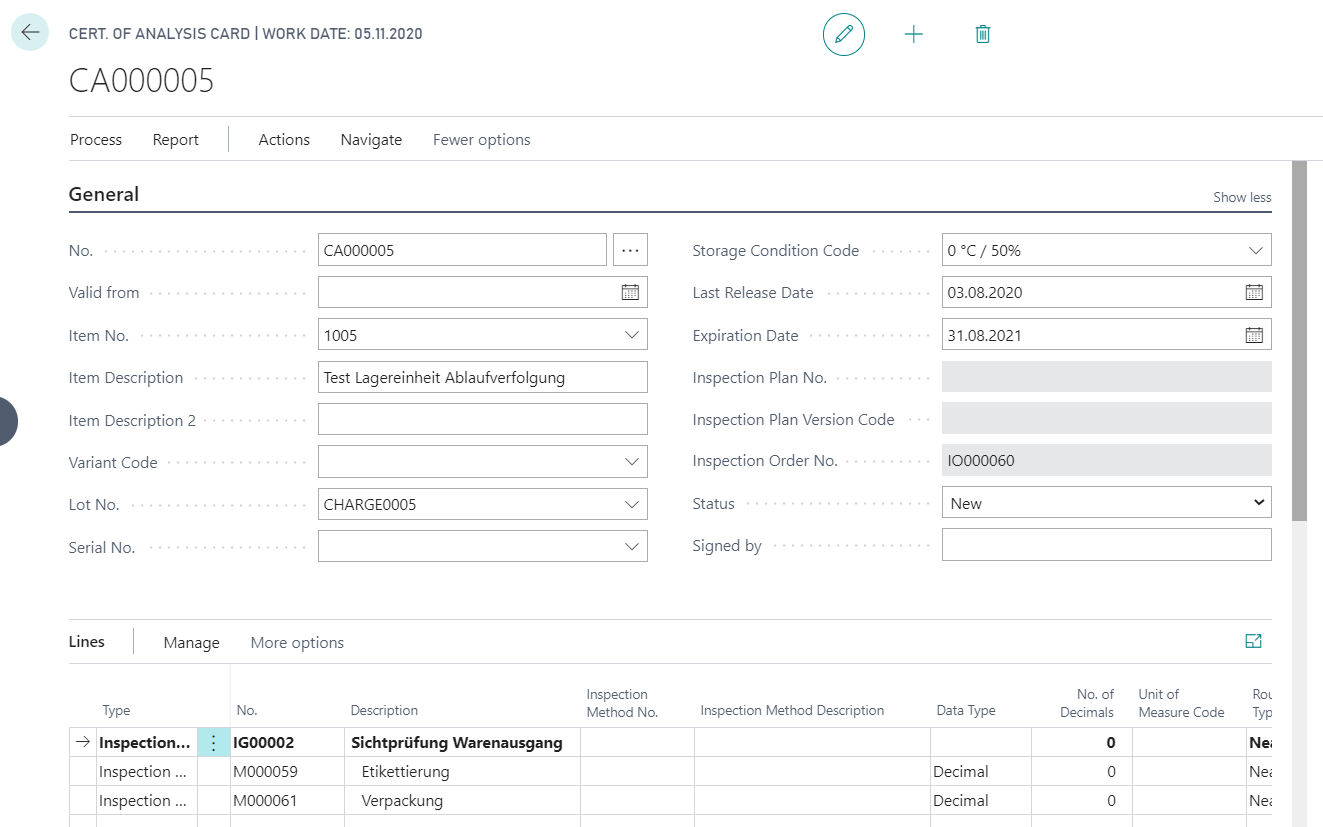
The analysis certificate header contains general information about the item and item tracking data. Furthermore, the Status of the certificate of analysis can be edited, Storage Condition Code can be defined and a period of validity can be defined in the fields Last Release Date and Expiration Date. The analysis certificate lines contain the inspection groups and inspection features. There are different possibilities to transfer inspection groups and inspection features into a certificate of analysis or to create a certificate of analysis. The data of the CoA-line is not subject to any logical check in order to keep the design of the certificate flexible. This means that no logical check is performed when filling and changing the fields such as the values or the Within Limit indicators.
Create the Certificate of Analysis as follows:
- A new certificate of analysis can be created manually on the Certificates of Analysis page via the action New. You can then select the information on the item and lot or serial number. It is possible to manually add inspection groups and inspection features.
- Using the action Copy Inspection Order it is also possible to copy an inspection order into the certificate of analysis. Only inspection orders are displayed that correspond to the data of the item or tracking information selected in the certificate of analysis header.
- A certificate of analysis can be created from a inspection order via the action Create Certificate of Analysis depending on the ProBatch 365 Quality assurance setup. The newly created certificate automatically contains the data of the inspection order. Also Translations and correspondingly marked Extended Texts are inserted language dependent. The Customer Informations tab is also filled automatically if the fields Business Relation No. and Business Relation Type were filled in the inspection order.
Here you can use the Text Module and define PB365 Header Texts, PB365 Footer Texts and PB365 Line Texts. Furthermore, you can define necessary Translations and Comments. When entering an item number manually its Translations are inserted and when copying an inspection order the translations will overwrite existing ones.
After completing the processing, the status of the certificate of analysis can be set to Certified. Once you have done this, you can no longer make any changes to the certificate of analysis. If you want to make a new correction, you must first reset the certificate of analysis to status Under Development or New. If a certificate of analysis is no longer valid, you can set the status to Closed.
At the end the printing can be started with the action Certificate of Analysis and the certificate of analysis can be sent to your customer.
Note
Since ProBatch 365 Version 2.2 the layout of the document Certificate of Analysis can be set up and customized via Corporate Design. A description of the setup can be found in the Corporate Design section of the ProBatch 365 Base Help, here.