Quality assurance setup
To be able to work with quality control, it is important to start with some basic settings.
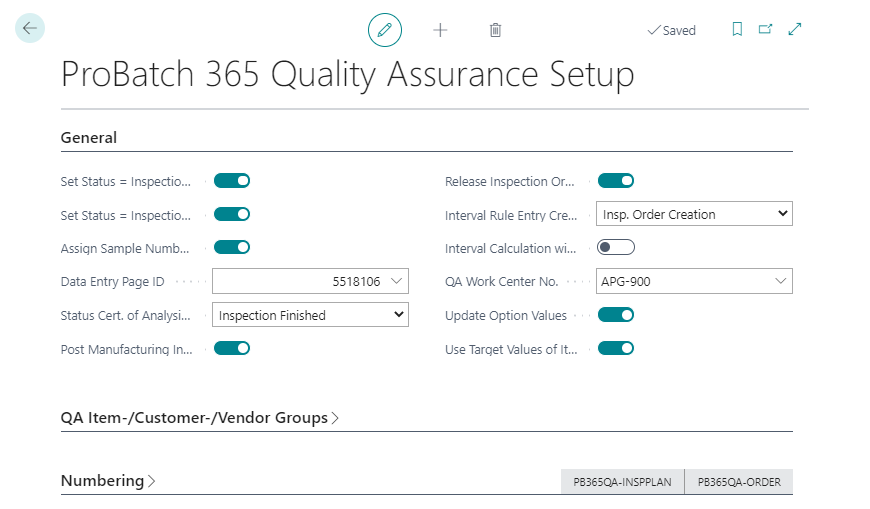
On the tab General, you can activate the fields Status = Inspection whit value recording and Status = Inspection Finished with completing value recording to specify that the status of the inspection order is automatically set to Inspection when the first actual value is entered and to Inspection completed when the last actual value is entered. If the fields are not activated, the actions for changing the status in the inspection order can be used.
To enter the actual values, the field Data Entry Page ID can be used to determine which actual value entry mask should be used. Two entry page ID's are available: ID 5518106 and ID 5518107.
Important
When neither the quality control setup nor the inspection group has a Data Entry Page ID defined, the actual value can only be entered directly in the inspection order.
Depending on the activation of the field Release Inspection Order in the ProBatch 365 Quality assurance setup, you can create the inspection order with either the status Created or Released when creating them manually in the processes via Function -> Create Inspection Order.
Other fields are not discussed here, as these are to be understood in connection with the master data process. The function and effect of these fields can be explained more easily elsewhere.
Using the tab QA Item-/Vendor-/Customer Groups, you can define whether certain values are to be used as the basis for the QA Item Group Code, QA Vendor Group Code and/or QA Customer Group Code. For more information, see the corresponding chapters:
In the info tab Numbering you can define the number series for the following documents:
- Inspection Equipment Nos.
- Inspection Method Nos.
- Inspection Group Nos.
- Object Nos.
- Interval Rule Nos.
- Inspection Plan Nos.
- Inspection Order Nos.
- Stability Test Nos.
- Certificate of Analysis Nos.
- Sample Shipping Nos.
- Specification Nos.