Interval Rules
You can use interval rules to define intervals at which inspections should take place. In the Inspection Plan, these can then be assigned to the individual inspections so that the number of inspections can be reduced while maintaining a constant quality.
You can use the action New to create a new interval rule and then assign a number manually using the No. field or have it assigned automatically using the number series. You can define the interval rule more precisely in the fields Description and Description 2. You can also define in the Interval 100% Inspection field when a full check must be carried out, regardless of the interval level.
Creating Interval Steps
You can define interval lines or interval steps to reduce the scope of the inspection and/or the inspection frequency. Enter the number (1,2,3,etc.) in the Step field. In the Next step (in Tolerance) field, you define the step to which the system should move if the inspection is successful. If the inspection is negative, you can use the fields Next step (out of Tolerance) and Next step (out of Ctrl. Limits) to define the step to which you want to go back or whether you want to go back.
Important
The Next Step (out of Tolerance) and Next Step (out of Ctrl. Limits) fields are only available if the Finish Inspection Order option has been selected in the Interval Rule Entry Creation field in the ProBatch 365 Quality Assurance Setup. If the option Insp. Order Creation is selected, the inspection result is not yet known when the interval rule entry is created.
You can also define a Dateformula Next Inspection to determine the intervals at which an inspection must be performed. Example: After 4x (level 1 - 4) "OK" inspections have been carried out, you only need to carry out inspections every 3 months. You can define the Inspection Scope required for the stage in the corresponding field and the following options are available to you:
- Inspection: Initial value - the Inspection takes place "normally".
- Reduced inspection: The inspection is accepted into the inspection order, but is displayed as "reduced" and the actual value = target value is already entered automatically.
- Skip inspection: The inspection does not take place. The inspection plan line is not accepted into the inspection order.
Extension to the field Interval 100% Inspection
For the field Interval 100% Inspection there is an extension of the date calculation. In the Quality assurance setup the field Interval Calculation only for full Inspection is available. If the field is activated, the date of the last full inspection is used instead of the date of the last inspection. This means that only full inspections should be taken into account when determining theInterval 100% Inspection. Any inspections that have been reduced or suspended in the meantime are ignored.
Example of a created Interval Rule
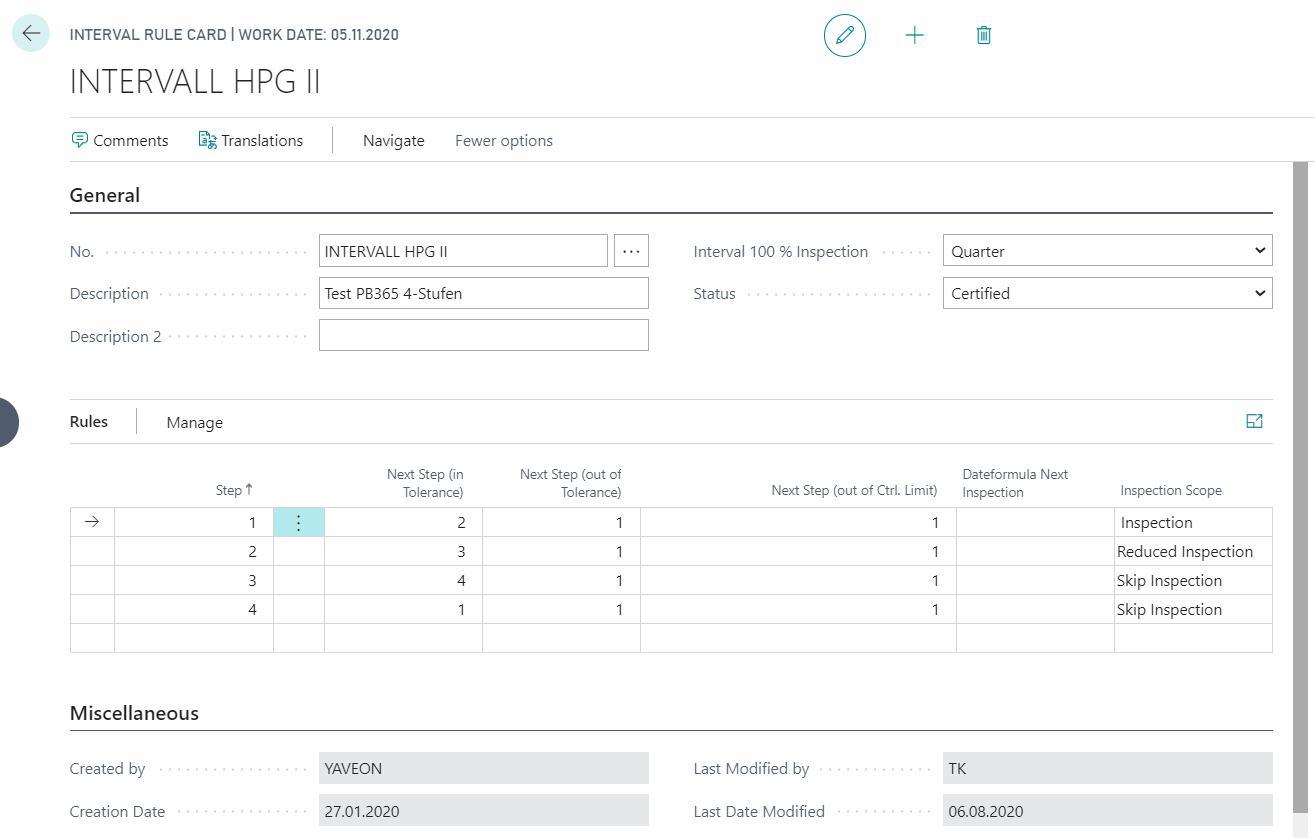
Below is a brief explanation of the interval rule set up in the image:
The inspection starts in stage 1 with a complete inspection. If the inspection result is within the specified tolerance limits, the inspection moves up to stage 2. If the inspection result is outside the tolerance and action limits, the inspection remains in stage 1. Since stage 1 always means a complete inspection, stage 1 is defined in each of the 4 stages if the inspection result is outside the tolerance and action limits. Only a reduced inspection is carried out in stage 2. This means that inspection plan lines are transferred to the inspection order, but lines defined as requiring inspection are deactivated. In addition, actual values automatically correspond to the target values. If the reduced inspection is positive, the next inspection will correspond to stage 3. No inspection is performed in stages 3 and 4. Skip inspection means that no inspection order is created, but the inspection stage is increased anyway. Therefore, after two inspection cycles are suspended, the inspection starts again at level 1.
Example of a created Interval Rule with date formula next Inspection
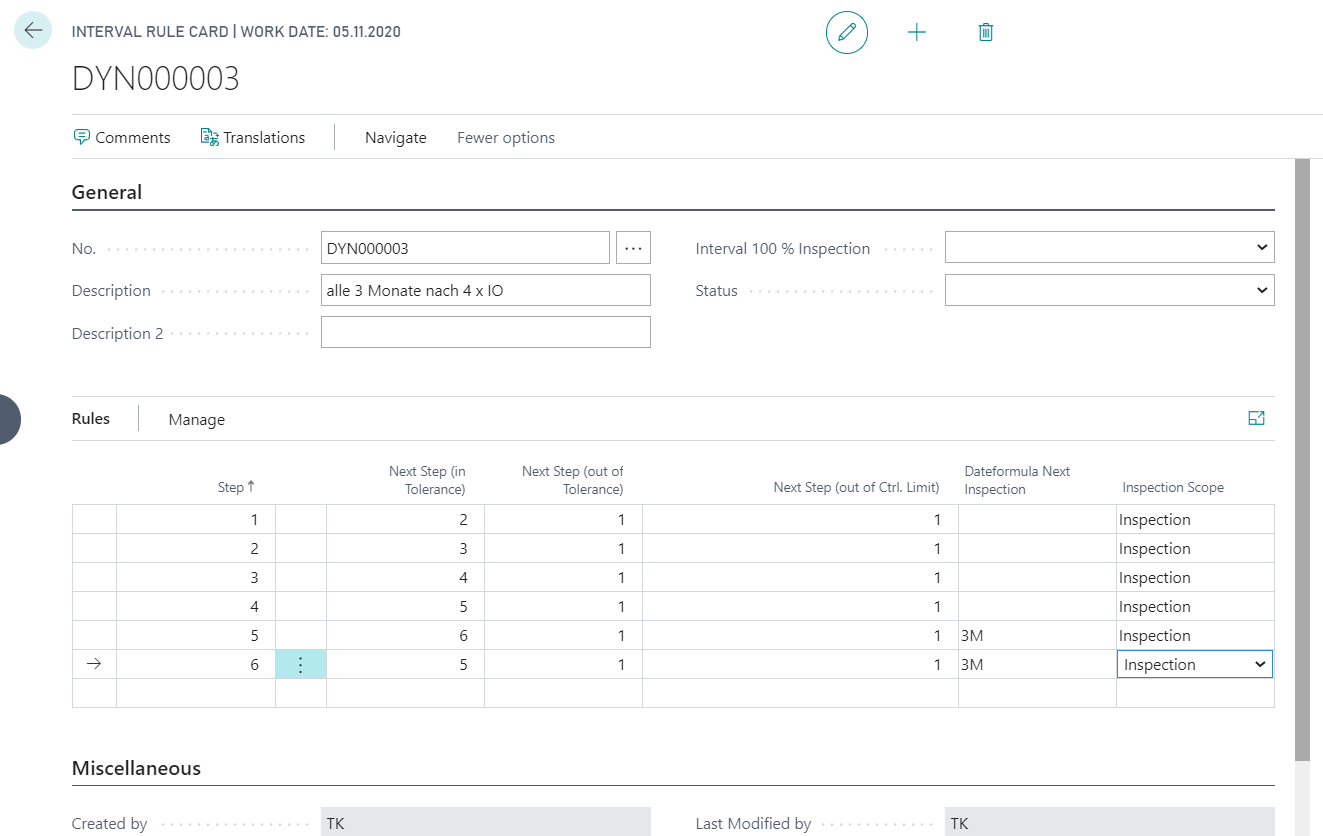
You can also define a Dateformula Next inspection to determine the intervals at which a inspection must be performed. Example: After 4x (level 1 - 4) "OK" inspections have been carried out, only every 3 months a check must be carried out. If no negative check result is determined, the inspection only takes place every 3 months. If the test result in step 5 or 6 is negative, there is a return to step 1 and the test must be repeated 4 times before the test only has to be repeated every 3 months.
Interval Rule Maintenance
You can also define Comments and Translations for interval rules.
The system also creates Interval Rule Entries for each level change. For more information, click on the link provided.