Locations
At the storage location you can set which documents are used in logistics. The following table provides an overview of which settings are useful for using the extended functions of the ProBatch 365 Warehouse:
| Function | Settings |
|---|---|
| Load carrier management | Require Receive , Require Shipment, Require Pick, Bin Mandatory |
| Put-away / Pick | Require Put-away , Require Pick, Directed Put-away and Pick |
The info register WMS Warehouse Receipt/Put-away and WMS Warehouse Shipment/Pick contains the configuration of the extension using ProBatch 365 Warehouse.
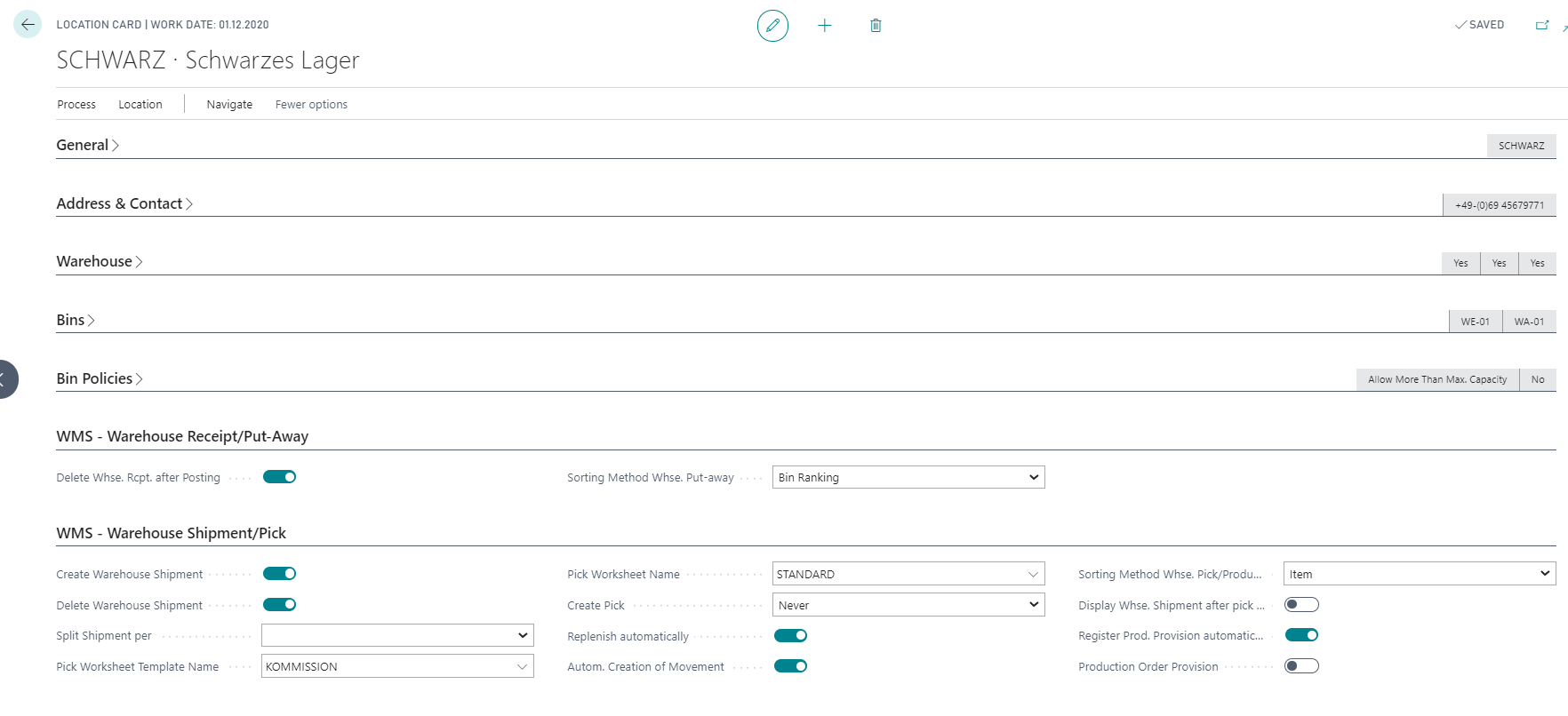
Using the field Split Shipment Per, you can optionally create a separate warehouse shipment for each delivery date and/or shipping agent. The following options are available:
- empty
- Delivery Date
- Shipping Agent
- Delivery Date + Shipping Agent
This means that different line specifications of the source document are taken into account when creating a warehouse shipment. For example, for each different date specification in the order lines with the option Delivery Date, you receive one shipment for each deviating date specification. If combine shipment is activated for a specific Shipping Agent (see chapter extension shipping agent) and the goods are split by delivery date, any defined time span for combine shipment is ignored and a separate shipment is created for each delivery date. If combine shipment is carried out according to Shipping Agent, the Shipping Agent Service is generally also taken into account during grouping.
Enclosed you will find a list of further fields:
| Field | Description |
|---|---|
| Delete Whse. Rcpt. after Posting | If the field Delete Whse. Rcpt. after Posting is activated, the warehouse receipt document is automatically deleted by the system after successful posting. If this field is not activated, the system only deletes the document if the remaining quantities of all warehouse receipt lines are zero. |
| Create Warehouse Shipment | If the field Create Warehouse Shipment is activated, a warehouse shipment is automatically created when a corresponding document (e.g. sales order) is released. |
| Delete Warehouse Shipment | The field can only be activated if Create Warehouse Shipment has been activated. If the field Delete Warehouse Shipment is activated, the corresponding warehouse shipment is deleted when the status of the origin document is reset. |
| Pick Worksheet Template Name | This field is described in the chapter plan pick. |
| Pick Worksheet Name | This field is described in the chapter plan pick. |
| Create Pick | This field is described in the chapter plan pick. |
| Replenish automatically | This field is described in the chapter replenishment |
| Autom. Creation of Movement | This field is described in chapter replenishment. |
| Register Prod. Provision automatically | If stock is stored in the production area and the from bin is the same as the target bin, activating the field will directly assign the stock and register the production provision in the background. |
| Production Order Provision | This field is used as a default value for the field Production Order Provision of the same name in the manufacturing specification. If the field is activated at the Location and the location is entered in the Manufacturing Specification, the corresponding field in the Manufacturing Specification Line is also activated. |