Replenishment
Replenishment is the automatic replenishment or supplementation of the stock of certain storage areas from other storage areas. A frequently used application is the management of dedicated "pick areas" and "replenishment areas". Requirements that are smaller than a full load carrier are to be picked directly from the pick area. If this stock is not sufficient to cover the requirement, full load carriers are first replenished from the replenishment area to the pick area.
Replenishment in general
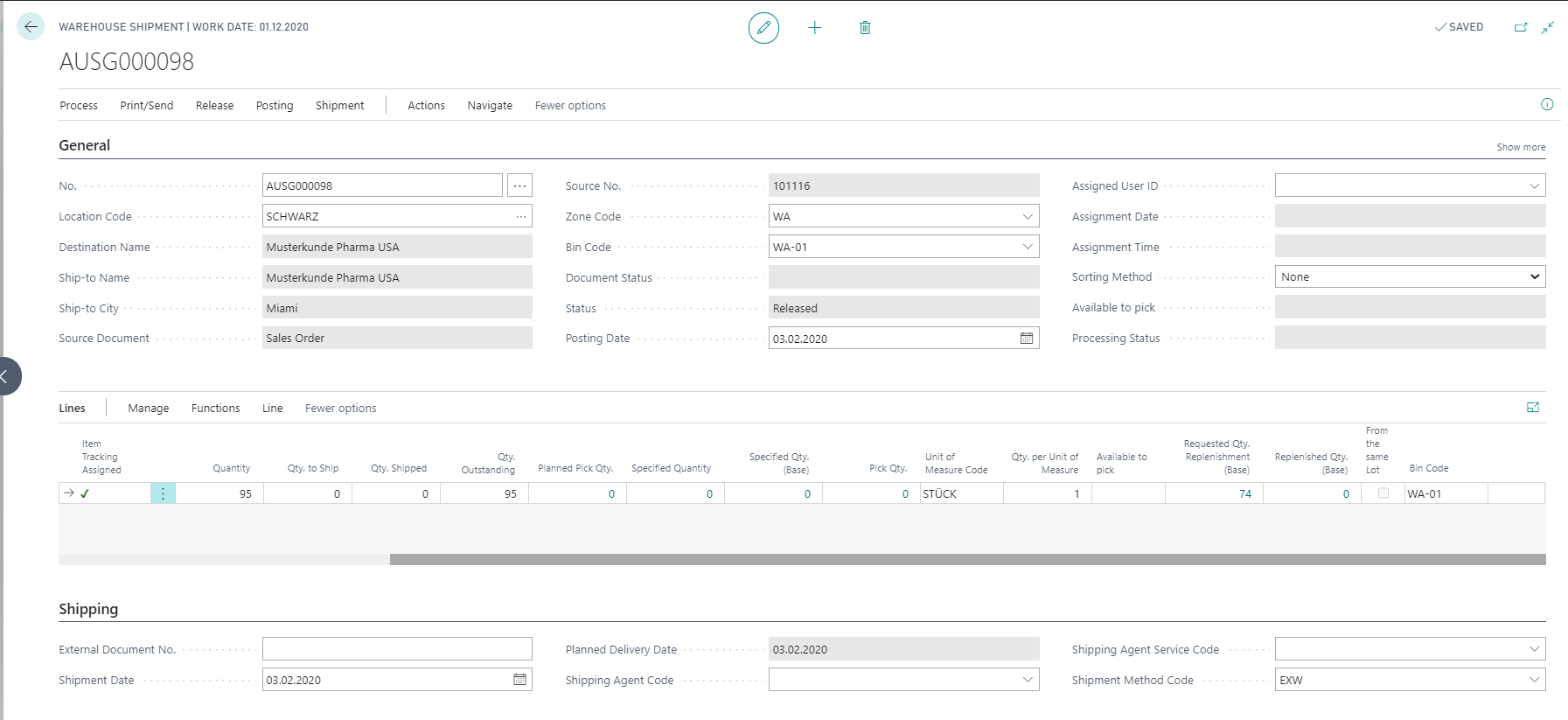
The fields Replenishment required and Replenishment processed in the warehouse shipment control center indicate whether replenishment is available for a warehouse shipment. If the field Replenishment required is activated, the stock to be picked at warehouse shipment is in a replenishment document. The field Replenishment processed indicates whether this document has already been processed. The following options are available:
| Options | Description |
|---|---|
| No | The replenishment haven't been processed yet. |
| Partial | Part of the replenishment was processed. |
| Complete | The replenishment was completed. |
In addition, the fields Requested Qty. Replenishment (Base) and Replenished Qty. (Base) in the warehouse shipment line provide information on the processing status of replenishment per warehouse shipment line and pick order line. The requested quantity shows the quantity that still needs to be replenished. The replenished quantity has already been replenished and can be picked.
With the ProBatch 365 Warehouse you have the possibility to define for each zone whether a container may be opened from this zone in the course of an inventory movement. The control takes place via the fields Inventory Rounding Whse. Movement and Zone Code Pick (see also the chapter zone). In addition, you can override this setting individually using the item zone data. If, for example, you define a inventory rounding for a replenishment zone in your warehouse with container/load carrier and the pick zone in the zone code pick, complete containers or load carriers are pushed into the pick zone as long as no complete containers or load carriers are required. If you also use a bin type without pick in the replenishment zone, the system does not access the replenishment zone directly but always replenishes it.
When determining replenishment, the system generally only considers zones that have a lower Priority than the zone to which the replenishment is to be made. In addition, when determining the target bin within the "target zone" (zone in the field Zone Code Pick), the system runs through the put-away zone order. In this way, it is possible to exclude a zone from normal put-away, but to search for a bin in the zone during replenishment, taking a ABC Class into account.
In principle, the following installation aids can still be named:
- Replenishment areas should generally be defined with Inventory Rounding Whse. Movement not equal to the required quantity
- Use a Bin Type without pick if you do not want to pick directly from the replenishment zone
- Give preferred bins a high Bin Ranking for pick
- If you do not want to pick partial quantities, use sales tolerances and a Inventory Rounding Pick not equal to the required quantity
- If the whse. movement for a replenishment is to be created directly by the system, the field Autom. Creation of Movement can be activated at the location.
When using replenishment, a distinction is made between the following two variants:
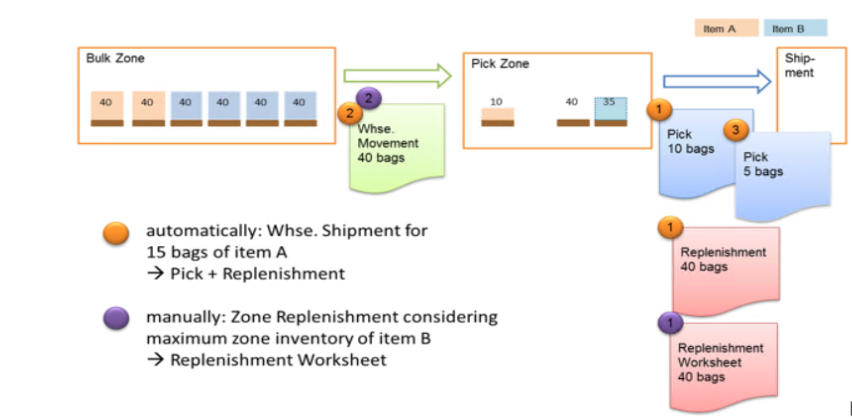
- Replenishment is triggered automatically due to a requirement in the pick zone that cannot be met there
- Replenishment is triggered manually on the basis of a minimum stock level in the pick area that has not been reached
Automatic replenishment
This function is only active if the Replenish automatically field at the Location is not equal to No. The options of the Replenish automatically field can be used to define the time at which replenishment should be created:
- Plan pick: If the **Plan Pick* function is used in the Warehouse Shipment Control Center and the need for a replenishment is detected, the replenishment is created.
- Create Pick: The required replenishment is not created until a pick document is also created.
Note
When selecting the option for the Replenish automatically field, note the effect on the Create Pick field: The effects of the various field options are as follows when the Plan Pick action is invoked in the warehouse shipment control Center:
| Options | Behavior |
|---|---|
| Create Pick = Never and Replenish automatically = No | The marked warehouse shipments are planned, no further action. |
| Create Pick = Never and Replenish automatically = Plan Pick | The selected warehouse shipments are planned, replenishment is created directly, no picks are created. |
| Create Pick = Never and Replenish automatically = Create Pick | The marked warehouse shipments are planned, no further action. |
| Create Pick = Completely Available and Replenish automatically = No | The selected warehouse shipments are planned and only for items that are completely available a Pick is created. |
| Create Pick = Completely Available and Replenish automatically = Plan Pick | The marked warehouse shipments are planned, required replenishment is created and picks are created for the stock that can already be picked, if the item is completely available. |
| Create Pick = Completely Available and Replenish automatically = Create Pick | The selected warehouse shipments are planned, the required replenishment is created if a Pick is also created for the warehouse shipment and picks are created for the stock that can already be picked if the item is completely available. |
| Create Pick = Always and Replenish automatically = No | The marked warehouse shipments are planned and picks are created for all items for which available stock exists. No replenishments are created. |
| Create Pick = Always and Replenish automatically = Plan Pick | The marked warehouse shipments are planned, required replenishments are created. Picks are created for all required stock that is available. |
| Create Pick = Always and Replenish automatically = Create Pick | The marked warehouse shipments are planned,picks are created for all needed and available stocks. If a pick is created for a warehouse shipment that requires replenishment, the required replenishment will also be created. |
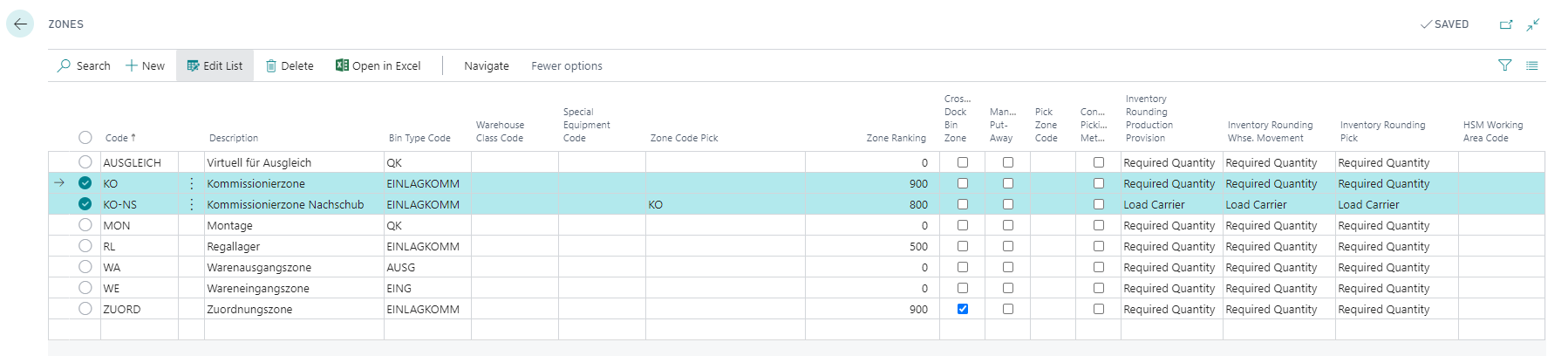
For example, for zone KO, a Inventory Rounding Pick with Required Quantity is defined. If the required quantity cannot be covered there, the system tries to generate replenishment from other zones. If there is available stock in zone KO-NS, it is replenished to the zone defined in the field Zone Code Pick, in this case KO. How much stock is replenished depends on the Inventory Rounding Whse. Movement in the replenishment zone.
A Replenishment is generated for all requirements generated in this way. The system first checks whether there is already a data record in the Replenishment table for this data record. If so, the quantity of this data record is increased by the determined replenishment quantity. If not, a new data record is created with the determined replenishment quantity. A whse. movement can be created using the action Create Replenishment Movement. The created whse. movement can then be edited and registered.

The requested quantities of the whse. movement can be higher than the required quantities, depending on the field Inventory Rounding Whse. Movement. After the whse. movement is registered, a Pick can be created again for the warehouse shipment for the quantity still outstanding.
Manual replenishment
You can use the Replenishment Worksheet mask to replenish inventory on the basis of minimum and maximum stock levels. You can define minimum and maximum quantities using item zone data and also for individual bins using the appropriate setup in table Bin Contents (field Fixed must be selected).
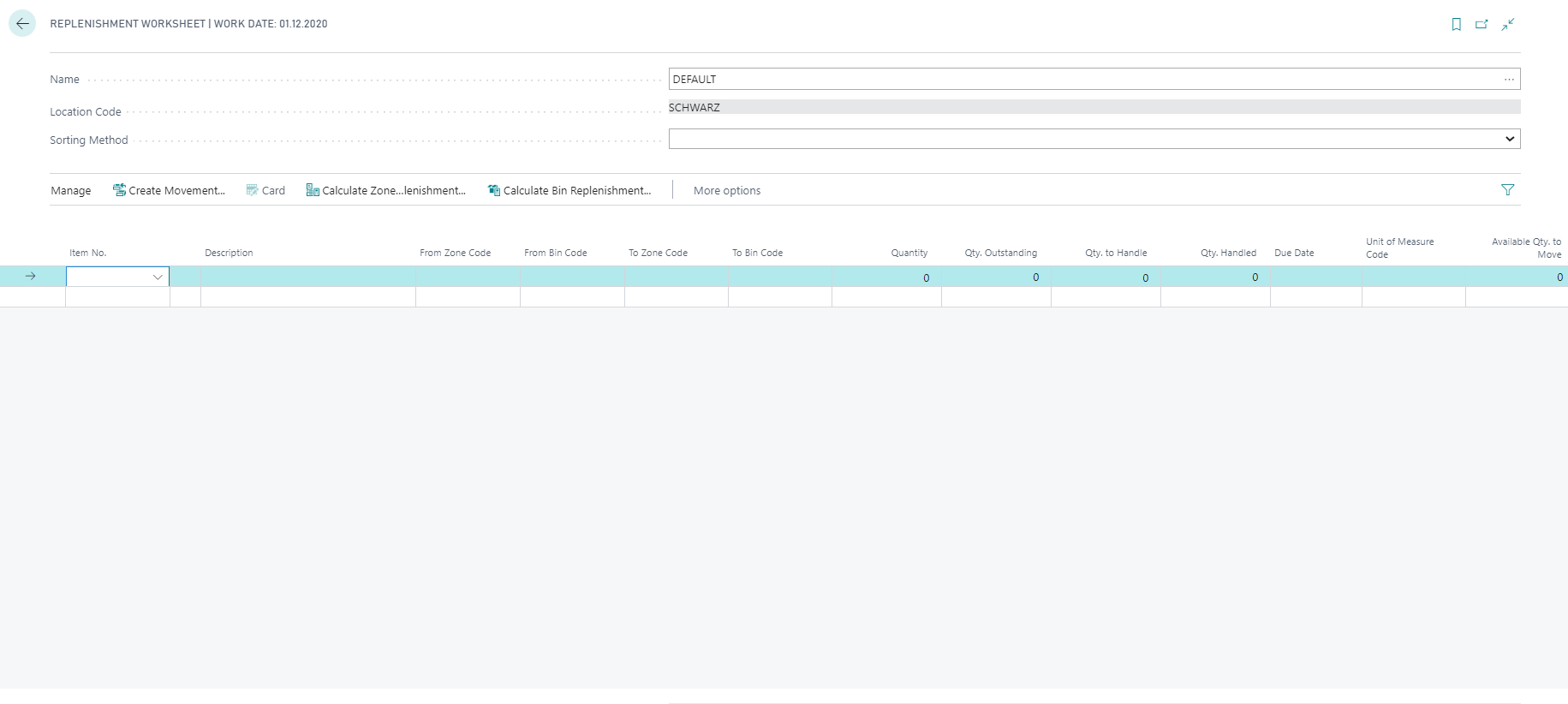
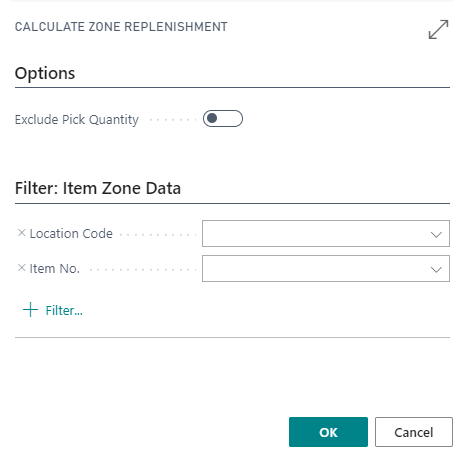
The report calculate zone replenishment can be called up via actions Calculate Zone Replenishment. In the request window, filters can be set on the zone or items for which a replenishment is to be created. In addition, if the field Exclude Pick Quantity on the Options tab is activated, the pickings already created from the bin to be replenished are not included in the calculation.
For replenishment, only stock in bins with a storage bin ranking lower than the zone priority of the zone to which the replenishment is being made is taken into account. These bins must also be set up with a bin type that has Pick = Yes resp. Put-away = Yes. Depending on the setting for the Inventory Rounding Whse. Movement in the Zone or the Item Zone Data, a complete storage unit (container), a complete container with activated container management, a complete load carrier or only the quantity required for replenishment to the maximum quantity level may be moved.
With the action Calculate Bin Replenishment, a proposal can be calculated for replenishing the stock in individual bins. Both the options and the criteria for determining the stock to be replenished correspond to the function Calculate zone replenishment. The bins to be replenished can be limited using filters. Only stock in bins that have a lower bin ranking than the bin to be replenished is taken into account.
You can create a whse. movement for the lines created in the replenishment proposal using the action Create Movement. The processing of the whse. movement is the same in both variants.
Note
To use replenishment worksheet, you must first create a new template. To do this, use the Type movement and the Page ID 5518330 for the replenishment worksheet. The basic procedure has already been described in the chapter Plan pick. A Worksheet is also used here.